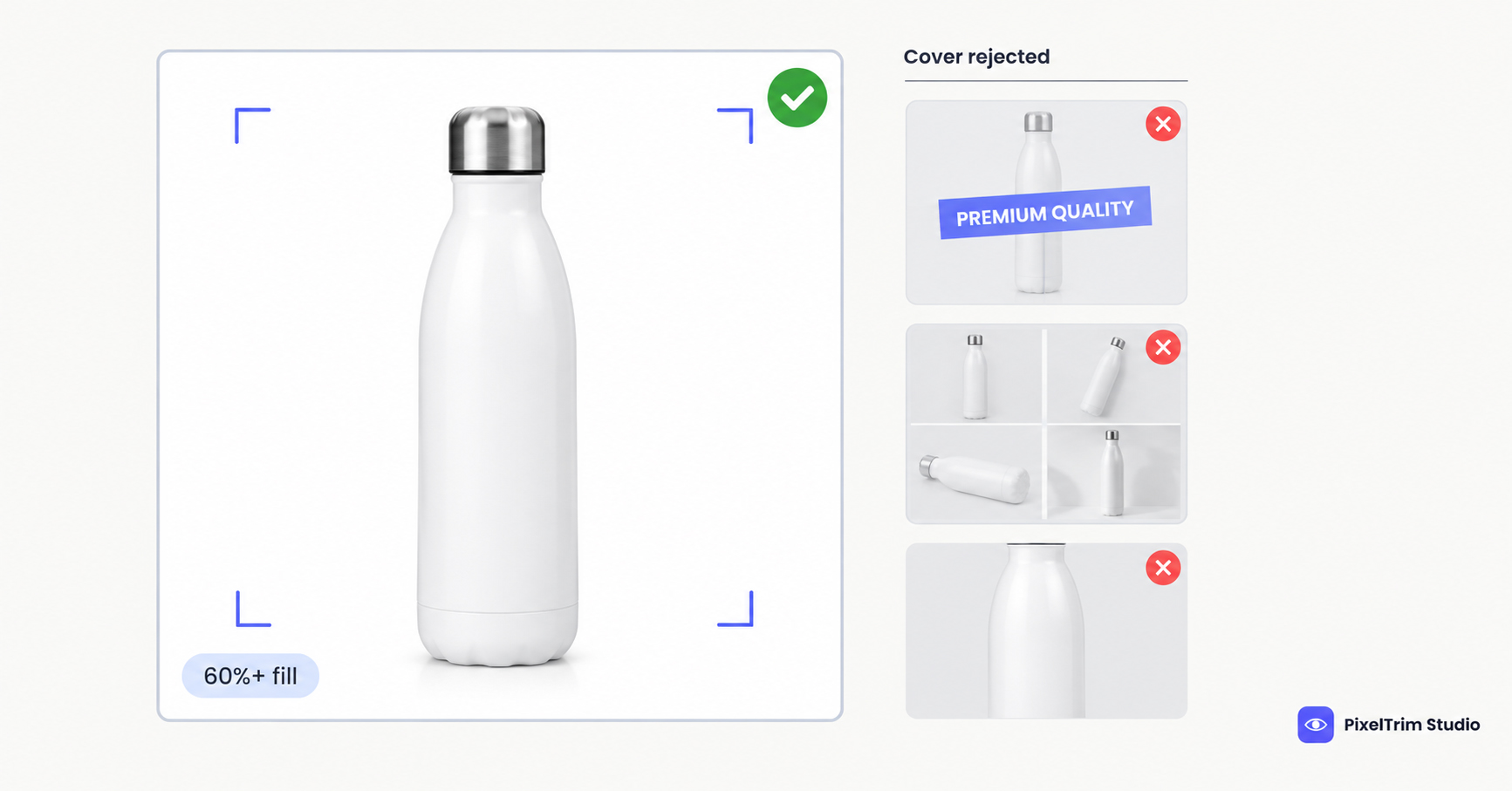
Search "Shopee image size" and you will find three different minimums, two different file caps and a cover-image rule that changes from blog to blog. Some of it is real Shopee policy. Some of it is copied from older posts. This guide separates the two: every rule below is labelled as coming from a Shopee document or as a third-party number you should double-check in Seller Centre.
Shopee Image Requirements at a Glance
| Requirement | What to follow | Where it comes from |
|---|---|---|
| Images per listing | Up to 9 per product SKU, cover included | Shopee Seller Education Hub |
| Display ratio | 1:1 square is mandatory; a 3:4 display option exists as an extra | Shopee Seller Education Hub (older Singapore article, check the upload screen) |
| File type and size | JPEG, JPG or PNG, up to 2 MB per image | Shopee Image Space guide (Malaysia) |
| Cover background | Solid colour, white preferred | Shopee Mall listing guidelines |
| Product fill on cover | At least 60% of the frame | Shopee Mall listing guidelines |
| Cover extras | No collage, border, text or graphics; full product in frame | Shopee Mall listing guidelines |
| Minimum pixel size | 500 x 500 px widely quoted, 1,024 x 1,024 px recommended | Third-party guides only, not confirmed in the Shopee documents we could open |
Shopee runs separate country sites, and its documents are not dated consistently, so treat this table as the starting point and let the live upload screen in Seller Centre have the final say.
Shopee Cover Image Rules
Shopee's strictest photo checklist sits in its Mall listing guidelines. Mall sellers have to follow it. Regular sellers are not formally held to it, but it shows exactly what Shopee considers a good cover image, so shooting to it is the safe default.
- Solid background, white preferred. Up to two solid colours or a quiet pattern is acceptable. Live backgrounds, bright distracting backgrounds and low-contrast backgrounds are not.
- Product fills at least 60% of the frame and sits fully inside it. A cropped product is not allowed on the cover.
- No montage, borders, text or graphics. Showing several variations in one image with visible gridlines is also out.
- No human model except in Fashion (apparel only), Health and Beauty, and Sports and Outdoor (apparel only). Hands or feet showing the product in use are fine.
- Logo or watermark in the top-left corner, no larger than 10% of the frame, and never overlapping the product.
- Product unwrapped, with exceptions for consumables such as food and diapers.
The other images in the listing get more freedom. Backgrounds and props are allowed, the product plus props should fill at least 50% of the frame, and each image should show a different angle. Mall listings also need at least three non-duplicate, professionally taken images.
Why Every Blog Gives Different Numbers
Third-party guides list minimum sizes anywhere from 500 px to 900 px, file caps of 2 MB or 5 MB, and product fill from 40% to 70%. The gaps come from three places: Shopee's country sites do not always match, Mall rules are stricter than regular-seller rules, and older numbers keep getting copied forward after policies change.
You do not have to settle the argument. Shoot to the strictest version of every number and all of them are covered.
One Master Spec That Clears Every Version
- Shoot and edit square (1:1) at 2,000 x 2,000 px. That is far above every quoted minimum, and you can export smaller if a file runs heavy.
- Put the cover on pure white, RGB 255,255,255. It meets the white-preferred rule and matches Amazon, Walmart and TikTok Shop expectations, so one cover works across platforms.
- Fill about 70% of the frame. That clears Shopee's 60% Mall rule and the 70% figure most guides repeat.
- Keep the cover clean: no text, border, badge or collage. If you add a logo, top-left corner, under 10% of the frame.
- Export JPEG or PNG under 2 MB. A 2,000 px JPEG usually lands well below that, but check the file size, not just the pixels.
- Use the other eight slots for context: different angles, scale, the product in use, and variations.
What Shopee's Guidelines Call Non-Compliant
The Mall guidelines illustrate the failures directly: excessive text on the cover, a product that fills less than 60% of the frame, a cropped product, full-frame borders, a multi-image collage with gridlines, a live or distracting background, and a model on the cover outside the allowed categories. Most of these are editing problems, not shooting problems, which is why they are cheap to fix after the shoot.
Fixing Non-Compliant Photos Without a Reshoot
Most failed Shopee covers come down to two jobs: a clean cutout and a correct export.
- Busy or off-white background: a clipping path cuts the product out and places it on true white. Pricing is $0.39 per image for simple products, $0.69 for medium and $0.99 for complex shapes. For fine edges such as mesh or fur, image masking is the better method.
- Wrong format, oversized file or wrong dimensions: image conversion resizes and reformats a batch to spec from $0.19 per image, or $0.39 when a colour mode or DPI change is also needed.
As a worked example, a cover plus two supporting white-background shots on a simple product is three images at $0.39, so $1.17 per listing.
To check that a background is truly white rather than just looking white, use the colour-picker method in our pure white background guide. It is written for Amazon, but the pixel check is the same on any marketplace. Selling on more than one platform? Our four-marketplace comparison and TikTok Shop image guide show how to build one master shot that clears several platforms at once.
Not sure your current Shopee photos would pass? Send 1-2 sample images and we will edit them to spec, free.
FAQ
What size should Shopee product images be?
Shopee requires 1:1 square product images. 500 x 500 px is the minimum most guides quote and 1,024 x 1,024 px is the usual recommendation, but we could not confirm a pixel minimum in Shopee's own documents. Shoot at 2,000 x 2,000 px, export under the file cap, and check the Seller Centre upload screen before a big batch.
How many images can I upload to a Shopee listing?
Up to nine images per product SKU, with the cover image counted in that nine. Shopee also allows extra images for product variations such as colour or size.
Does Shopee require a white background?
Not strictly. Shopee Mall guidelines ask for a solid background on the cover image, with white preferred, and accept up to two solid colours or a non-distracting pattern. Live and distracting backgrounds are not accepted. Pure white is still the safest choice.
What file format and file size does Shopee accept?
Shopee's Image Space guide lists JPEG, JPG and PNG files up to 2 MB per image. A few third-party guides mention 5 MB for some categories, so keep every file under 2 MB to be safe.
Can I show a model on my Shopee cover image?
Under Shopee Mall guidelines, a human model on the cover is allowed only for Fashion (apparel only), Health and Beauty, and Sports and Outdoor (apparel only). Hands or feet that show the product in use are acceptable in any category.
Tags
Ready to get your images edited?
Upload 2 photos for a free trial edit — returned in under 24 hours.
Start free trial →

