Watch Photo Retouching Service: What It Includes and How to Choose a Provider
A watch is mostly reflective surfaces — crystal, steel, sometimes gold — photographed under studio lights built to bounce off exactly those surfaces. Straight-out-of-camera watch shots almost always carry light glare, dust on the dial, or fingerprints on the case. Retouching isn't optional polish here; it's the step that makes the photo usable.
What Watch Photo Retouching Actually Fixes
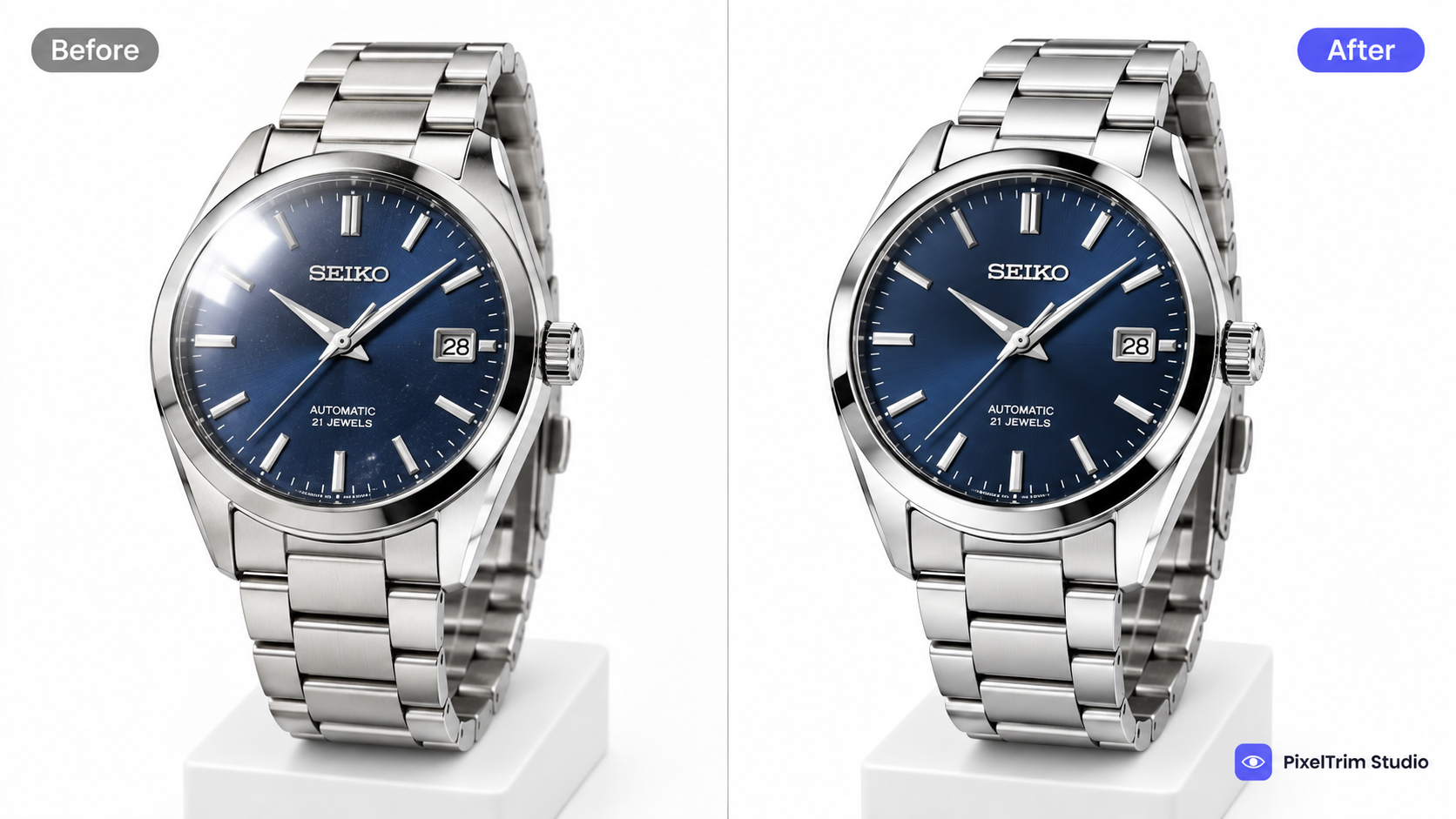
- Crystal reflection removal — softbox and ceiling reflections in the glass, cleaned up without killing the natural shine.
- Dial cleanup — dust specks, smudges, and fingerprints removed from the dial face and hands.
- Metal polish — brushed and polished steel/gold surfaces evened out without looking artificial or over-sharpened.
- Strap and clasp detail — leather grain, link seams, and clasp hardware kept sharp through masking, not blurred by background tools.
- Background and shadow — clean white or transparent background with a natural contact shadow so the watch doesn't look like it's floating.
Why This Isn't a Job for AI Background Removers
Automated cutout tools handle flat, low-detail products fine. A watch has three problems they consistently get wrong: metal reflections (the tool either keeps the glare or flattens the shine entirely), dial detail (fine hands and numerals get smudged), and crystal edges (the dome catches light in a way that confuses edge-detection). Manual retouching by someone trained on jewelry and metal work avoids all three.
What It Costs
Pricing depends on how much correction the image needs, not a flat per-watch rate. At PixelTrim Studio, current per-image rates are:
| Tier | Price | Covers |
|---|---|---|
| Standard | $0.99/image | Masking, shadow creation, color correction — dial cleanup and basic reflection work |
| Complex | $1.99/image | Heavy retouching — crystal reflection removal, metal polish, strap detail masking |
Most watch catalog shots land in the Complex tier because of the crystal and metal work involved. Get an exact quote through a jewelry retouching service page — watch images are quoted the same way as ring or necklace work, based on detail level, not product category.
How to Choose a Provider
- Ask for a watch-specific before/after, not just rings or necklaces — metal and crystal work behaves differently than stone work.
- Confirm manual editing, not just "AI-enhanced." Reflection removal on a domed crystal is one of the harder manual-masking tasks in product photography.
- Check turnaround for batches. A single hero shot and a 200-image catalog batch should have different, clearly stated turnaround times.
- Free trial first. Send one of your toughest images — heavy glare, dark dial — before committing to a batch.
Getting Your Watch Photos Retouched
Send a couple of sample images through a free trial before committing to a full batch. That's the fastest way to see how a provider actually handles crystal glare and dial detail on your specific photos, not a portfolio sample.
Tags
Ready to get your images edited?
Upload 2 photos for a free trial edit — returned in under 24 hours.
Start free trial →