OnBuy is a UK marketplace, and its seller-side image rules are harder to find than most. We could not open an image-spec page on OnBuy's own seller site. The figures below come from partner documentation, mainly ChannelEngine's OnBuy guide, which lists the image fields used when products are sent to OnBuy. This guide keeps each number next to its source, so you can see which figure to trust and which one to check in your own account.
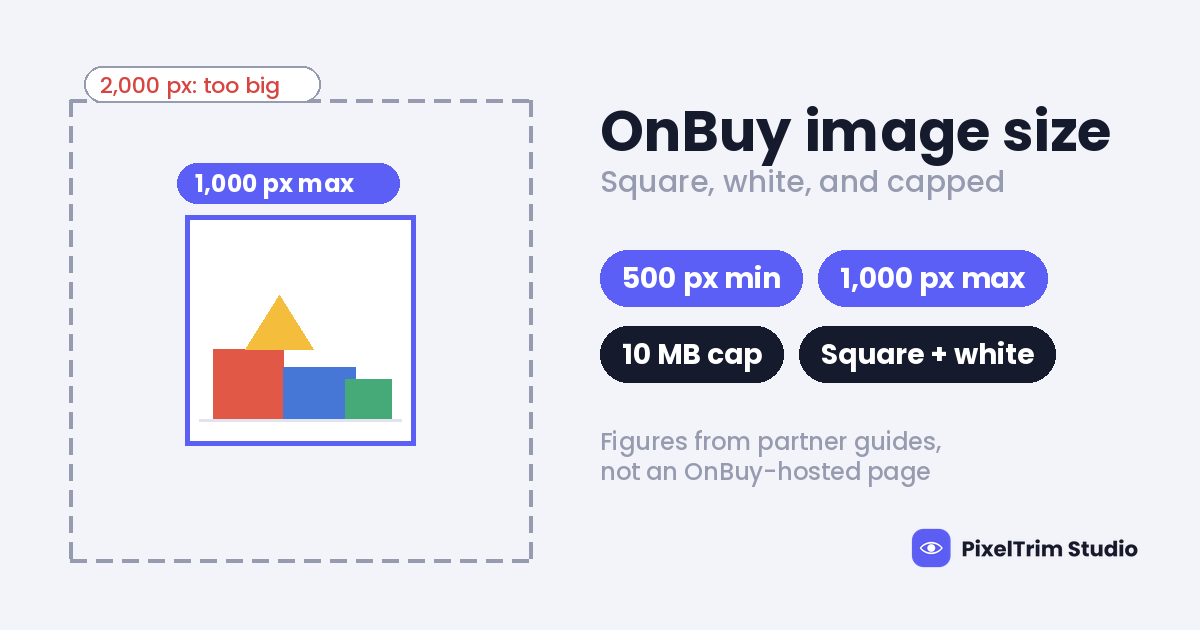
One number matters more than the rest. ChannelEngine gives OnBuy a maximum of 1,000 x 1,000 px as well as a minimum of 500 x 500 px. Most marketplace guides only give a floor, so a large master file that passes everywhere else can be too big here.
OnBuy Image Specs at a Glance
| Item | What it says | Source and confidence |
|---|---|---|
| Main image shape | Square | ChannelEngine OnBuy guide (partner). Medium. |
| Main image background | White | ChannelEngine. Medium. |
| Pixel size, every image | 500 x 500 px minimum, 1,000 x 1,000 px maximum | ChannelEngine only. Medium to low. |
| File size | 10 MB at most | ChannelEngine. Medium. |
| File format | JPEG, JPG, PNG or GIF | ChannelEngine. Medium. |
| Content on every image | No promotional text, watermarks or placeholder images | ChannelEngine. Medium. |
| Extra images | Up to 10 (ChannelEngine) or up to 8 (M2E) | Two partner guides. Sources disagree. Low. |
| OnBuy-hosted spec page | Not found | We could not locate one. |
Where the Sources Disagree
- Extra image count: ChannelEngine lists ten additional image fields. M2E, which also builds an OnBuy connector, says up to 8 additional images per listing. Each limit may reflect its own tool, so plan 5 to 8 images and check your upload screen before building a longer set.
- Pixel ceiling: Only ChannelEngine gives a maximum. M2E's page gives no pixel figures. A monitoring-vendor example in a search result used 1,000 px as a floor instead, but we could not open that page again, so we do not count it. Treat 1,000 px as a ceiling for feed uploads until your seller account says otherwise.
- Feed or upload screen: ChannelEngine describes sending images through its connector. We could not confirm that OnBuy's own upload screen applies the same limits.
- Background: ChannelEngine says white on the main image. A GS1 UK seller guide says OnBuy's most successful products have clear white backgrounds. That is advice about sales, not a stated rule.
Why a Large Master File Can Fail Here
Many sellers keep one big master and upload it everywhere. Our marketplace image size cheat sheet suggests a 2,000 x 2,000 px square for most platforms. If ChannelEngine's ceiling holds, OnBuy is a case where that master is too big, so export a smaller copy and keep the large original in your archive.
The opposite problem shows up on other marketplaces. The bol.com image requirements guide covers a platform that states a 6000 px maximum and asks for 1200 px or more for zoom. One file cannot serve both, so plan on two exports from the same original.
White Background and Content Rules
The main image must be a square on white. The ban on promotional text, watermarks and placeholder images is listed for every image, not only the first one, so sale badges and logo stamps do not belong on extra images either.
If your background only looks white, check the exact value instead of trusting your screen. Our pure white background guide shows how to read a background with a color picker. It was written for Amazon, but the check works for any marketplace that asks for white.
Who Can Change a Product's Images
ChannelEngine notes that content on OnBuy can only be updated by the seller who created the product. If another seller created it, the feed returns an error saying the product belongs to another seller or is listed by another seller. Before you plan a reshoot, check whether you own the listing you want to improve.
A Master File That Clears Every Figure
This is our suggestion, not an OnBuy number. Export one 1,000 x 1,000 px square JPEG in sRGB, well under 10 MB, on a pure white background with no text, badges or watermarks. That stays inside the 500 to 1,000 px range and far below the file cap. For platforms that want more pixels, export a second, larger file from the same original. Selling in Japan too? Rakuten's rules differ again, as our Rakuten image requirements guide explains.
Pre-Upload Checklist
- Every image at least 500 x 500 px and no larger than 1,000 x 1,000 px
- Each file under 10 MB, saved as JPEG, JPG, PNG or GIF
- Main image square, on a background that reads exactly white
- No promotional text, watermarks or placeholder images on any image
- 5 to 8 images planned, with the upload screen checked for the real limit
- You created the product, or you have confirmed you can change its content
- One test listing uploaded before the full catalog
What OnBuy-Ready Edits Cost
Most images that miss these rules need two jobs: a clean cutout onto white, and a resize and export to spec. PixelTrim Studio prices both per image:
| Service | Simple or basic | Medium or standard | Complex |
|---|---|---|---|
| Clipping path (cutout onto white) | $0.39 per image | $0.69 per image | $0.99 per image |
| Image conversion (resize, format, rename) | $0.19 per image | $0.39 per image (adds color mode, DPI and profile) | Volume rate on request for 500+ images |
As an illustration, not a quote: 30 products with simple shapes need 30 cutouts at $0.39 and 30 resize jobs at $0.19. That is $11.70 plus $5.70, or $17.40 for the set. Medium and complex shapes cost more per image. Turnaround is 24 to 48 hours with one free revision, and you can send 2 images for a free trial edit before you commit to a batch.
FAQ
What size should OnBuy product images be?
ChannelEngine's OnBuy guide says every image should be at least 500 x 500 px and no larger than 1,000 x 1,000 px, with a square white main image. We could not find a matching page on OnBuy's own seller site, so confirm the limits in your seller account before a large upload.
What is the maximum file size for OnBuy images?
ChannelEngine lists 10 MB at most, in JPEG, JPG, PNG or GIF format. A 1,000 px product JPEG is normally far below that.
Does OnBuy require a white background?
For the main image, ChannelEngine says yes: square and white. The extra images have content rules but no background rule in that guide. A GS1 UK seller guide adds that OnBuy's most successful products use clear white backgrounds, which is advice about sales, not a rule.
How many images can I add to an OnBuy listing?
Sources disagree. ChannelEngine lists a main image plus 10 additional images, and M2E says up to 8 additional images. Plan for the lower number and check your upload screen before building a longer set.
Can I use my 2,000 px master from other marketplaces on OnBuy?
Possibly not. ChannelEngine gives OnBuy a 1,000 x 1,000 px maximum, so export a smaller copy for OnBuy and keep the large original for platforms that ask for more.
Why can't I change the images on an existing OnBuy product?
ChannelEngine notes that product content can only be updated by the seller who created the product. Other sellers get an error saying the product belongs to another seller, so check who owns a listing before you plan new photos.
Tags
Ready to get your images edited?
Upload 2 photos for a free trial edit — returned in under 24 hours.
Start free trial →