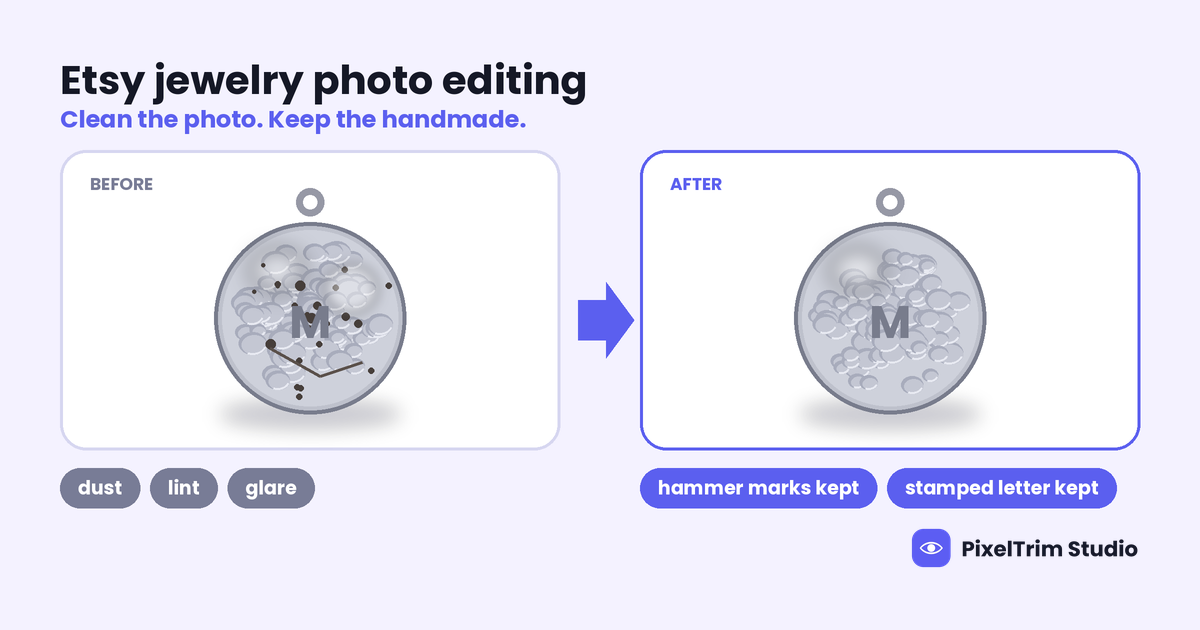
Etsy buyers search for handmade jewelry because they want something a person made. So the photo has a different job than a catalog shot: it should look clean, and it should still look handmade. Over-retouching is the common mistake. A hammered pendant smoothed into a flat disc, or a patina ring brightened until it looks new, shows the buyer something they will not receive.
This guide covers what to remove and what to keep, where handmade pieces go wrong in editing, how to brief an editor, and what it costs. For the general techniques, see our jewelry product photo editing guide. This one is about the handmade, Etsy-specific side.
The Rule: Edit the Photo, Not the Piece
Ask one question about every mark you see: will the buyer see it on the piece they receive? If yes, it stays. If it is dust, a fingerprint, a stray fiber or a reflection of your hand, it goes. That single test keeps the photo honest and avoids "not as described" problems.
What to Remove and What to Keep
| On the photo | Decision | Why |
|---|---|---|
| Dust, lint and fibers on metal or resin | Remove | Not part of the piece |
| Fingerprints and smudges on polished surfaces | Remove | Left over from handling |
| Reflections of your hands, phone or room | Remove or soften | Not part of the piece; keep the natural shine |
| Props, holders, thread or tape that held the piece | Remove | Distracts from the product |
| Hammer marks, brushed grain and hand-stamped letters | Keep | This is the handmade look buyers search for |
| Patina and oxidized darkness in recesses | Keep | It gives silver depth; brightening it changes the piece |
| Natural variation in beads, pearls and raw stones | Keep | Buyers expect each one to differ |
| Color cast from your lamp or window | Correct | The photo should match the true metal and stone color |
| Solder blobs, glue marks or a bent jump ring | Fix the piece, then reshoot | Editing it out hides what the buyer will receive |
Where Handmade Pieces Go Wrong in Editing
Texture Gets Smoothed Away
A filter or a heavy polish pass flattens hammered and brushed metal until it looks cast instead of made. Ask the editor to polish only the parts of the piece that are meant to be polished.
Color Drifts
Gold-fill, brass, copper, sterling and rose-tone pieces shift easily under warm light. Send a daylight photo of the real piece, or a swatch, so the editor can match the true color instead of guessing.
Fine Wire and Chain Cutouts Come Out Rough
Thin wire wraps, jump rings and chain links need careful hand paths. Automated tools tend to leave halos or fill the gaps between links. Our Etsy background removal guide covers the cutout side in more detail.
Resin and Glass Lose Their Edges
Clear resin, glass beads and sea glass blend into a white background. A manual cutout keeps the edge and the see-through look, so the piece does not appear to dissolve.
One-of-a-Kind Pieces Make an Uneven Shop
Every piece is shot a little differently, so the shop grid looks patchy. Fix the consistency in the background, crop, centering and shadow. Do not force identical retouching on pieces that are not identical.
Etsy Photo Basics That Affect Your Edit
Etsy recommends listing photos with a width and height of at least 2,000 pixels, and says the first photo should be at least 635 pixels on each side to avoid showing lower in searches. The first photo is the one buyers meet in search results, so it gets your most careful edit: the piece centered with an even margin, a clean background and true color. Etsy does not require a white background, so a consistent plain or softly tinted backdrop is a style choice. Our Etsy image size guide covers dimensions, crop and format.
A Short Brief to Send Your Editor
- Name the finish of each piece: hammered, brushed, high-polish, oxidized or matte.
- List the marks that are intentional, such as stamped letters, tool marks or patina, so they are not "fixed".
- Send a color reference: a daylight photo of the real piece or a swatch.
- Say what background you need: pure white, a transparent PNG or a soft tone. Mention thin chains or wire, because they need manual cutout work.
- Start with 2 images as a trial before you send a full batch.
What Etsy Jewelry Photo Editing Costs
Our jewelry retouching service is priced per image by how much work the piece needs:
| Tier | Price | What is included |
|---|---|---|
| Basic | $1.99 per image | Dust and lint removal, basic background cleanup, color correction, JPG or PNG delivery |
| Standard | $3.99 per image | Full surface polish, sparkle enhancement, gemstone color boost, 1 revision round |
| Premium | $7.99 per image | High-end metal retouching, micro-scratch removal, setting and prong cleanup, layered PSD and revision |
A practical way to choose: Basic fits simple pieces on a clean source photo, where the job is dust, background and color. Standard suits pieces with polished surfaces or stones, and you should ask for polish only where the piece is meant to be polished. Premium is for high-value pieces where metal detail matters most. Turnaround is 24 to 48 hours with one free revision round.
As a worked example, say you are refreshing 30 listing photos: 20 simple pieces on Basic and 10 pieces with polished stones on Standard. That is 20 x $1.99 = $39.80 plus 10 x $3.99 = $39.90, or $79.70 in total, about $2.66 per photo. This is our own illustration, not a quote. For the wider market range of $2 to $15 per image and what drives it, see our jewelry retouching cost guide.
Shoot It Clean First
The cheapest edit is the one you do not need. Wipe the piece before you shoot, use diffused light and keep one light temperature per session, so there is less to remove and color is easier to match. Our jewelry photography tips guide covers the setup.
Not sure how much editing your pieces need? Send 2 sample images and we will edit them free, so you can check that the handmade texture survives.
FAQ
Should I retouch handmade jewelry photos for Etsy?
Yes, lightly. Remove dust, fingerprints, stray fibers and reflections of your hands or room, and correct the color. Leave the texture, marks and variation that make the piece handmade.
Will retouching hide the handmade look of my jewelry?
Not if you brief the editor. Name the finish of each piece and list the intentional marks, such as hammer marks, stamped letters and patina, so they are kept and only the dust and glare are removed.
Can I edit out solder marks or glue spots in the photo?
It is better not to. If a mark is on the piece, the buyer will see it when the order arrives, and a photo that hides it creates a mismatch. Fix the piece and reshoot instead.
What size should Etsy jewelry photos be?
Etsy recommends a width and height of at least 2,000 pixels, and a first photo of at least 635 pixels on each side to avoid showing lower in searches. Etsy does not require a white background.
How much does Etsy jewelry photo editing cost per piece?
At PixelTrim Studio, jewelry retouching is $1.99 per image for Basic, $3.99 for Standard and $7.99 for Premium. Most simple handmade pieces on a clean photo fit Basic or Standard.
Tags
Ready to get your images edited?
Upload 2 photos for a free trial edit — returned in under 24 hours.
Start free trial →