Rakuten sellers usually run into two kinds of numbers. Rakuten's own seller-service site gives a short, clear rule set: a square image of 700 x 700 px or larger, a cap on text, no borders and a plain background. Everything else you find, such as file caps and maximum pixels, comes from third-party guides, and those guides do not always agree. This guide keeps the two apart, so you can see which figure is a rule and which one needs checking in your own account.
Rakuten also runs more than one marketplace. A file that suits one store can break the rules of another, so the first job is to know which Rakuten you are uploading to.
Which Rakuten Are You Selling On?
| Marketplace | What we found | Where it comes from |
|---|---|---|
| Rakuten Ichiba (Japan) | Square image, 700 x 700 px or larger recommended, plus four content rules for the first image and SKU images | Rakuten's own RMS Service Square seller-service site |
| Rakuten France | 500 x 500 px minimum, 1,001 to 2,000 px per side recommended, 1:1, 20 MB per image in bulk uploads | An integration vendor's handbook (third party), not Rakuten's own help pages |
The France figures are a starting point, not a rulebook. Check your seller account before a large upload.
Rakuten Image Requirements at a Glance
| Item | What it says | Source and confidence |
|---|---|---|
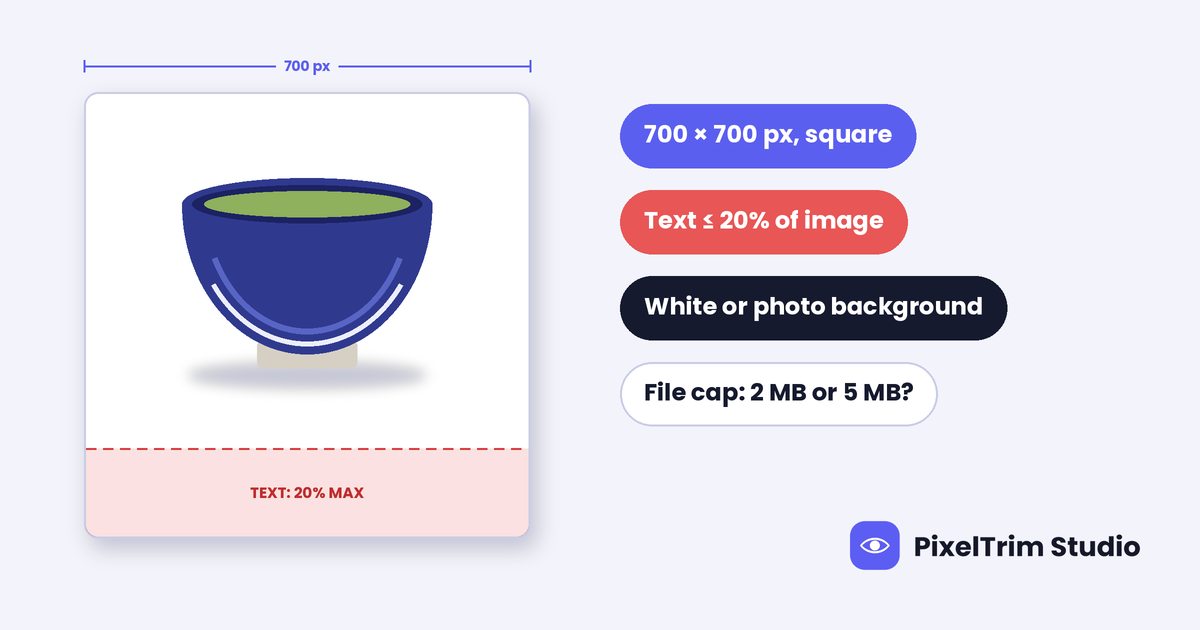
| Shape and size | Square, 700 x 700 px or larger | Rakuten's own seller-service page. High. |
| Text on the image | Text elements take up no more than 20% of the image | Rakuten's own page. High. |
| Borders | No border or frame | Rakuten's own page. High. |
| Background | Solid white or a photo background | Rakuten's own page. High. |
| Animated GIF | Do not use it in the images the guideline covers | Rakuten's own page. High. |
| Which images are covered | The first product image and SKU images. Other images on the page are not covered | Rakuten's own page. High. |
| Minimum and maximum size | 500 x 500 px minimum, 3,840 x 3,840 px maximum | Third-party Japanese guides. Not on the Rakuten page we read. Medium. |
| File size | 2 MB per image in most guides, 5 MB in one | Third-party guides. Sources disagree. Low. |
| File format | JPEG or PNG named as examples; some guides also list GIF | Rakuten's page and third-party guides. Medium. |
The 20% Text Rule in Numbers
The rule is about area, not word count. Text elements, such as sale lines and banners, may cover at most one fifth of the image. Here is what that means at common sizes:
| Image size | Total area | Most area text may use |
|---|---|---|
| 700 x 700 px | 490,000 px² | 98,000 px² |
| 1,000 x 1,000 px | 1,000,000 px² | 200,000 px² |
| 1,200 x 1,200 px | 1,440,000 px² | 288,000 px² |
As a quick picture, a full-width strip across the bottom of a 1,200 x 1,200 px image that is 240 px tall equals exactly 20% of the area. Rakuten's page does not say how it measures text area, so leave a safety margin instead of working to the last pixel.
One of the most common violations Rakuten lists is the thing most sellers do first: big sale or free-shipping text, and banners, placed on the main image. Put that copy in the product description or in the second and later images, where the rule does not apply.
White or Photo Background: What Fails
The first image must show the product clearly, on either a solid white background or a natural photo background. These are the cases Rakuten's page calls out as problems:
- A solid background in any color other than white
- A band-shaped or L-shaped border drawn around the image
- A background that misleads the buyer about the size of the product
- Generated images with awkward cuts or parts fused together
If you go for a white background, confirm it is truly white and not a light gray. Our pure white background guide shows how to check the exact value with a color picker. A cutout that looks fine on white can also show a thin bright rim later, which our white halo guide explains how to fix.
If you plan to use generated scenes, note that Rakuten's concern on its page is image quality. Our AI image disclosure guide covers the labeling rules other marketplaces ask for.
First Image, SKU Images and the Rest
- First product image: the main picture on the product page. It must follow all four content rules.
- SKU images: the pictures for each variant, such as a color or size. Rakuten gives an example of a drink where the first image shows every size together and each SKU image shows one size. They follow the same rules as the first image.
- Everything else: description images and later gallery images are not covered by the guideline, so size charts, use shots and detail close-ups can carry more text.
Where the Sources Disagree
- File cap: most Japanese guides say 2 MB per image. One says 5 MB. The Rakuten page we read gives no file cap, so treat 2 MB as the safe number.
- Maximum size: 3,840 x 3,840 px appears only in third-party guides.
- Floor or target: Rakuten recommends 700 x 700 px or larger. Third-party guides give 500 px as the minimum, and one says zoom works smoothly from about 1,000 px. Treat that last figure as unconfirmed.
- Ichiba versus France: the France numbers above differ from the Japan numbers, so do not reuse one platform's spec sheet for the other.
A Master File That Clears Every Figure
This is our suggestion, not a Rakuten number. Export one 1,200 x 1,200 px square JPEG in sRGB, under 2 MB, on a plain white background with text well under 20%. That sits above Rakuten's 700 px recommendation, above both 500 px minimums, inside the 1,001 to 2,000 px range given for France, and under the strictest file cap in this guide. If a larger original exists, keep it for platforms that ask for more. Our marketplace image size cheat sheet shows how this master compares with the limits on 35+ other platforms.
Pre-Upload Checklist
- Confirm whether the listing is for Rakuten Ichiba or Rakuten France
- Square canvas, 700 x 700 px or larger
- Text and banners cover no more than 20% of the first image and each SKU image
- No border, band or L-shaped frame
- Background is solid white, or a natural photo background
- No animated GIF in the first image or SKU images
- File under 2 MB, to be safe
- Sale and shipping text moved to later images or the description
What Rakuten-Ready Edits Cost
Most rejected images need two jobs: a clean cutout onto white, and a resize and export to spec. PixelTrim Studio prices both per image:
| Service | Simple or basic | Medium or standard | Complex |
|---|---|---|---|
| Clipping path (cutout onto white) | $0.39 per image | $0.69 per image | $0.99 per image |
| Image conversion (resize, format, rename) | $0.19 per image | $0.39 per image (adds color mode, DPI and profile) | Volume rate on request for 500+ images |
As an illustration, not a quote: 40 products with simple shapes need 40 cutouts at $0.39 and 40 resize jobs at $0.19. That is $15.60 plus $7.60, or $23.20 for the set. Medium and complex shapes cost more per image. Turnaround is 24 to 48 hours with one free revision, and you can send 2 images for a free trial edit before you commit to a batch.
FAQ
What size should Rakuten product images be?
For Rakuten Ichiba, Rakuten's seller-service site recommends a square image of 700 x 700 px or larger. Third-party guides give 500 x 500 px as the minimum and 3,840 x 3,840 px as the maximum, but those figures are not on the Rakuten page we read.
What is Rakuten's 20% text rule?
Text elements on the image may take up no more than 20% of its area. On a 700 x 700 px image that is at most 98,000 px². The rule applies to the first product image and SKU images.
Does Rakuten require a white background?
The first image needs either a solid white background or a natural photo background. A solid background in another color is listed as a problem, as are band-shaped or L-shaped borders.
What is the maximum file size for Rakuten images?
Sources disagree. Most Japanese guides say 2 MB per image and one says 5 MB. The Rakuten page we read gives no cap, so keep files under 2 MB and confirm the limit in your seller account.
Do the rules apply to every image in the listing?
No. The guideline covers the first product image and SKU images. Description images and later gallery images are not covered, so they can carry size charts, feature text and use shots.
Can I use the same image on Rakuten France?
Often, but check first. A third-party integration guide gives Rakuten France a 500 x 500 px minimum, a 1,001 to 2,000 px recommended range and a 20 MB bulk-upload cap, which differ from the Japan figures. A 1,200 x 1,200 px square under 2 MB fits both sets of numbers.
Tags
Ready to get your images edited?
Upload 2 photos for a free trial edit — returned in under 24 hours.
Start free trial →