A moving box sits in the corner of the living room. The seller swears it will be gone by the first viewing, the shoot is today, so the box goes on the editor's list. Nobody asks what is behind it.
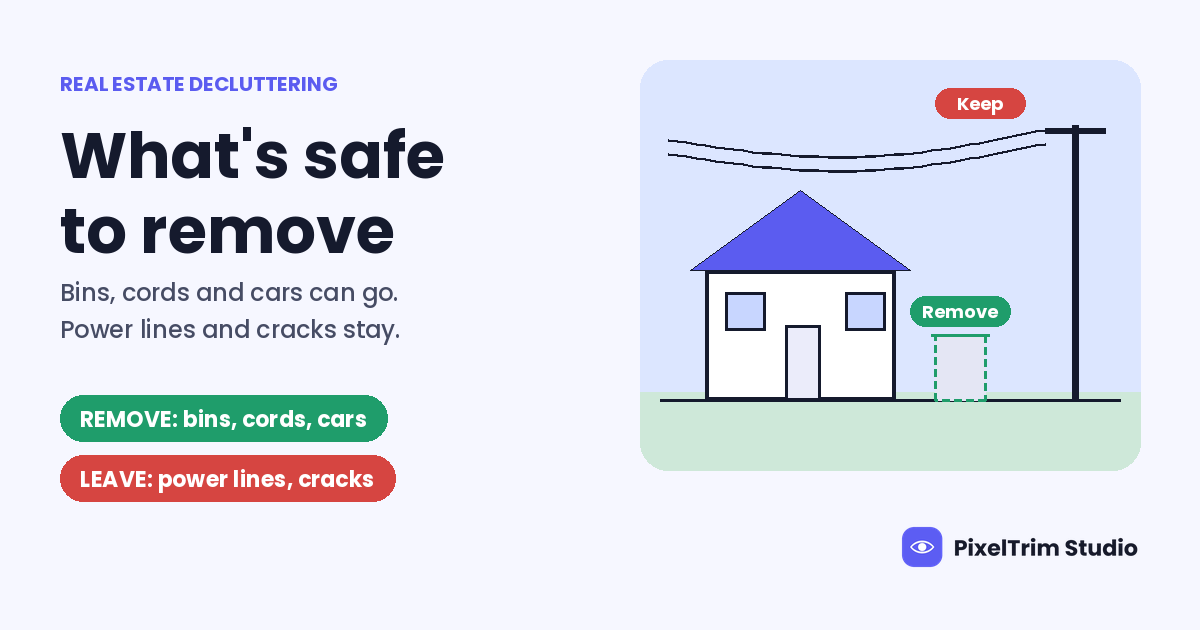
That small decision is the whole topic here. Removing clutter from a listing photo is one of the most useful edits there is, and one of the easiest to get wrong. Cords, bins and parked cars are fair game. A power line, a stain or a crack is not. Below, the common items are sorted into what is safe to remove, what needs care or a label, and what stays exactly where it is, followed by the rules and what the edit costs at PixelTrim Studio.
Quick Answer
- Safe to remove: things that will not be there when a buyer visits, such as bins, hoses, cords, pet bowls and parked cars.
- Remove with care or a label: personal items, moving boxes and furniture, because they change what the room holds or can hide what sits behind them.
- Leave alone: anything permanent, including power lines, neighboring buildings, stains, cracks and worn flooring.
- Price: basic decluttering and object removal is available with the Enhanced ($2.49 per image) and Virtual Twilight ($4.99 per image) packages, or as an add-on to Basic HDR ($1.49 per image).
The One Test: Will It Still Be There on Viewing Day?
Every item below comes back to one question. Would a buyer walking in next week find it? If not, because the bin goes back in the garage and the car drives away, then removing it shows the house the way it normally looks. If yes, removing it shows a house that does not exist.
It is the same idea behind the NAR Code of Ethics. Article 2 asks Realtors to avoid exaggeration, misrepresentation and concealment of pertinent facts, and Article 12 asks for a true picture in advertising. Both apply to listing photos like any other marketing.
| Item | Decision | Why |
|---|---|---|
| Trash and recycling bins, hoses, cords, pet bowls | Remove | They belong to the day of the shoot, not to the house |
| Cars on the driveway or street | Remove | Temporary, and a car pulls the eye away from the facade |
| Personal photos, fridge magnets, toiletries | Remove | Buyers picture their own things, and the owner's privacy stays protected |
| Moving boxes and piles | Care | Nobody can see what is behind them without a clean frame |
| Furniture that is leaving with the seller | Label | It changes what the room holds and how big it feels |
| Power lines, poles, utility boxes | Leave | Permanent, and a buyer sees them the moment they arrive |
| Neighboring buildings, construction, roads | Leave | Part of the setting the buyer is paying for |
| Stains, cracks, water marks, damaged flooring | Leave | These are facts about the house, not clutter |
| Walls, doors, fences, pools | Leave | Structure. Moving it on screen changes the layout |
Why Moving Boxes Are the Hard One
A real estate photographer quoted by NAR described being asked to remove moving boxes from a photo. The trouble starts with what happens next. Whoever erases the box, person or software, has to invent the wall or floor behind it. That patch could hide anything, including water damage or a hole in the wall.
There is a simple fix on the shoot. If you can move the box, move it. If you cannot, take one extra frame of the same angle with the box set aside and the tripod untouched. An editor can then fill the gap with what is really there instead of a guess. It costs thirty seconds and saves an argument later.
Fix It on Site or in the Edit?
Not everything needs an editor. A rough split that saves money:
- Move it on site if it takes under a minute: cords, bowls, toiletries, the hose reel.
- Leave it for the edit if you cannot move it: a neighbor's car, a bin on collection day, a competing brokerage sign at the edge of the frame.
- Never fix it in the edit if it is structure or permanent. That is a conversation with the agent, not a job for the editor.
Object removal sits on top of the exposure blend, so shoot your usual 3 to 5 brackets per angle first. If you want to know what the blend itself does to a room, our guide to HDR blending, sky replacement and virtual twilight covers it. And a white rectangle where a window should be is a different problem again. That one is a window pull, not decluttering.
What the Rules Say About Disclosure
This is not legal advice, and the rules change from board to board and state to state, so check yours before you publish. The general picture looks like this:
- Most boards accept removing temporary items and expect a label when the edit changes what is actually in the space. Our MLS photo requirements guide covers the general test boards apply.
- California's AB 723, now in force, requires a disclosure when an altered image adds, removes or changes elements of a property, plus access to the original image. Routine fixes such as exposure, sharpening, white balance and color correction generally fall outside it when they do not change what the photo shows.
- One analysis from Coraly, reported by NAR, looked at about 40,000 primary listing photos on US portals. Sky replacement showed up in 69% of the altered photos and object removal in nearly 2%. More than 90% of the altered photos carried no visible disclosure.
Whether a removed bin needs a label under any one rule is not always clear, and the California wording is broad. When in doubt, label it. A short note costs nothing, and it works best when it says what changed, such as "Objects digitally removed," placed on or beside the image, with the original kept on file. As the Coraly founder put it in the NAR piece, the rule of thumb is to improve the photograph, not the property.
What Clean Object Removal Looks Like
Removing an object is easy. Removing it so nobody can tell is the hard part. These are the five things worth checking on any delivered batch, ours or anyone else's.
| Check | Clean result | Red flag |
|---|---|---|
| Texture | Carpet, grass and wood grain run on unbroken | A smudged or repeating patch where the object stood |
| Shadows and reflections | The shadow is gone, and so is its mirror or glass reflection | A ghost shadow with nothing casting it |
| Lines | Baseboards, tile joints and siding run straight through | A bent or broken line across the repair |
| Neighbors | Nearby items untouched | A chair leg or plant leaf clipped |
| Proportions | The room is the same size it was | A wall or floor that looks shifted |
What Decluttering Costs
PixelTrim Studio prices real estate photo editing per image. These are the live rates, with manual editing, 24 to 48 hour turnaround and one revision round:
| Package | Price per image | Decluttering and object removal |
|---|---|---|
| Basic HDR | $1.49 | Not in the package, available as an add-on |
| Enhanced | $2.49 | Basic decluttering and object removal available as part of the package |
| Virtual Twilight | $4.99 | Basic decluttering and object removal available as part of the package |
Here is the math on a 25-photo listing where only 5 photos need an object removed. All 25 at Basic HDR is $37.25. Twenty at Basic plus the 5 problem photos at Enhanced is 20 x $1.49 = $29.80, plus 5 x $2.49 = $12.45, for $42.25. That is our own illustration, not a quote. Bigger removals, or an add-on on Basic HDR, are priced per photo, so send the image and ask before you order. If you shoot several listings a week, send your typical volume and ask for a standing rate.
Still choosing between providers? Our real estate photo editing service guide lists what to check before you send a full shoot.
How to Brief the Editor
- Write a remove note and a keep note for each photo. For example: "03-kitchen: remove bin and magnets, keep the scuffed floor."
- Send the clean frame for any box or object you moved aside.
- List what is permanent and must stay, such as power lines, neighboring roofs and visible wear.
- Name your board and say whether you will add a label.
- Start with a trial. Send 2 photos and judge the textures, shadows and straight lines yourself.
Hosting a rental rather than selling a house? The same test applies, with a stricter reason, because guests compare the photos to the room when they arrive. Our vacation rental photo editing guide covers it.
Not sure which of your photos need an object removed? Send 2 images for a free trial edit and get them back in under 24 hours: start your free trial.
Frequently Asked Questions
What is virtual decluttering in real estate photos?
It is the digital removal of unwanted items from a listing photo, such as bins, cords, parked cars, personal belongings and loose clutter, so the room or exterior reads cleanly.
Is it okay to remove clutter from listing photos?
Removing temporary items is widely accepted. Removing anything permanent, such as power lines, a neighboring building, a stain or a crack, is where it becomes misrepresentation, and edits that change what is in the space generally call for a disclosure.
Do I have to disclose that objects were removed?
It depends on your board and state. California's AB 723 requires disclosure when an altered image removes elements of a property and requires access to the original. When in doubt, add a short label such as "Objects digitally removed" beside the photo.
How much does object removal cost per image?
At PixelTrim Studio, basic decluttering and object removal is available with the Enhanced package at $2.49 per image and the Virtual Twilight package at $4.99 per image, or as an add-on to Basic HDR at $1.49 per image.
Can an editor remove a power line from a listing photo?
An editor can paint one out, but it is the edit most often called misrepresentation, because a buyer sees the line on arrival. Leave permanent features in unless your board allows the change and you disclose it.
Tags
Ready to get your images edited?
Upload 2 photos for a free trial edit — returned in under 24 hours.
Start free trial →