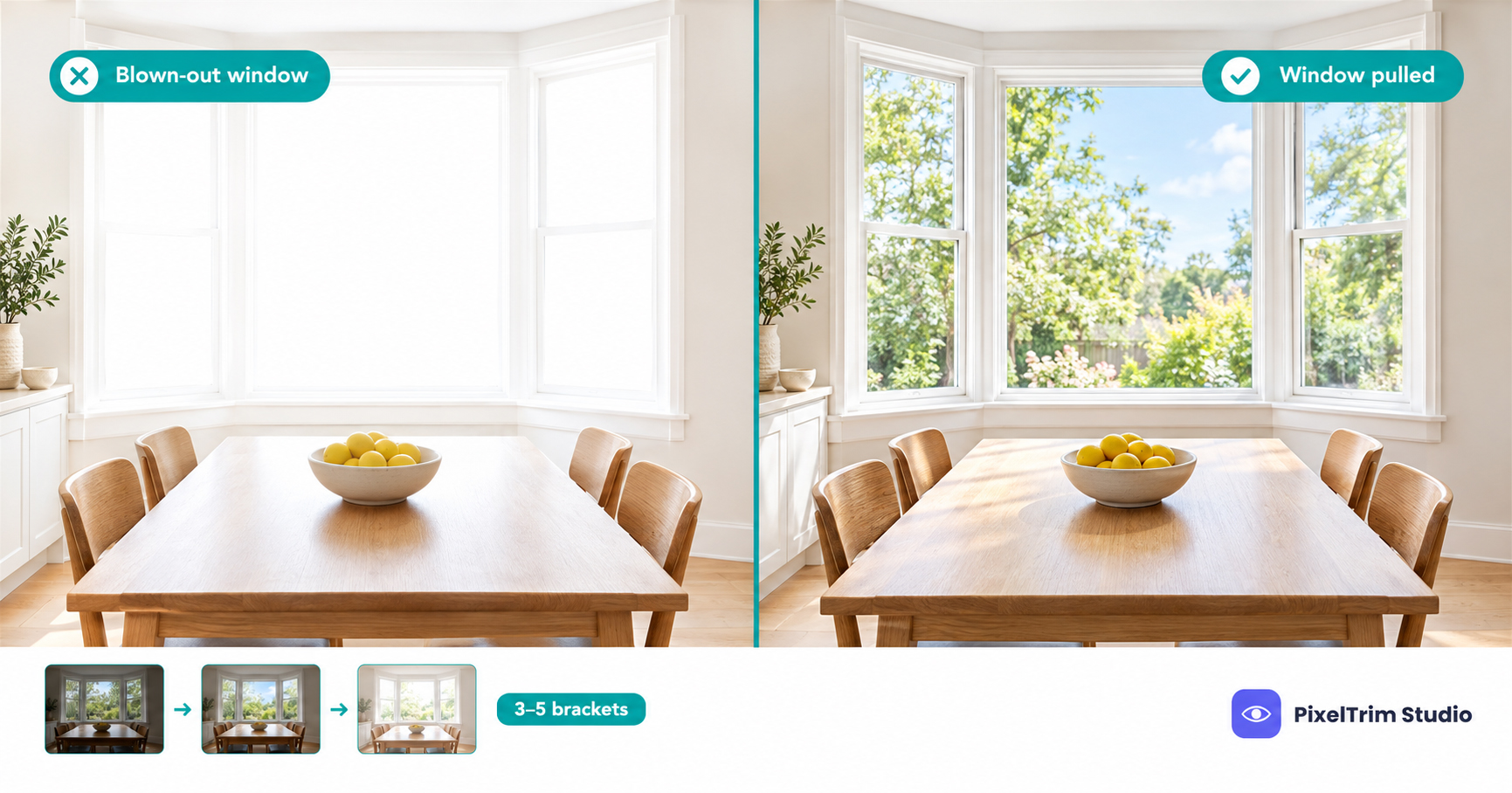
A listing photo with a white rectangle where the window should be tells buyers one thing: the camera ran out of dynamic range. A window pull is the edit that puts the real view back. This guide explains what it is, how it differs from a plain HDR blend, what a clean result looks like, and what it costs per image.
Quick Answer
- A window pull means masking the glass by hand and blending the real outdoor view from a darker exposure into the finished interior frame.
- It is different from an HDR blend, which merges whole frames and can still leave windows pale or ringed.
- At PixelTrim Studio it sits in the Enhanced package at $2.49 per image, not in the Basic HDR package at $1.49.
What a Window Pull Actually Is
An interior bracket set has two jobs split across frames. The brightest frame lights the room properly, and the darkest frame is the only one that still holds detail in the window. A window pull takes the glass area from that darker frame, masks each pane precisely, and places it into the finished image so the room stays bright and the view stays visible.
The word "pull" describes exactly that: you pull the exterior detail through the glass. Done well, nobody notices the edit. Done badly, the window looks like a printed poster taped behind the frame.
Window Pull vs HDR Blend: What Each One Fixes
| Edit | Works on | Typical result | Where it falls short |
|---|---|---|---|
| HDR blend | The whole frame, 3 to 5 brackets merged | Balanced room, even light, better window than a single shot | Bright windows can stay washed out or get a pale ring around the frame |
| Window pull | The window glass only, masked by hand | Real outdoor view visible, room brightness untouched | Needs a darker frame that still holds window detail |
| Both together | HDR blend first, window pull second | Evenly lit room and a natural view in every window | Costs more per image than a basic blend |
For what the blend itself does to a listing photo, see our guide to HDR blending, sky replacement and virtual twilight.
When Your Photos Need One
Not every window needs a pull. Order it when the view is part of the sale or when the window is the brightest thing in the frame:
- Bright day, dim interior. The bigger the gap between outdoors and indoors, the harder a standard blend struggles.
- Large windows and patio doors. A big white area pulls the eye away from the room.
- A selling view. Water, a garden, a skyline or a treeline is worth showing.
- Sun-facing rooms. Rooms facing the sun at shoot time often clip the window even in the darkest frame.
If the windows are small and your blend already shows clean detail, skip it and save the difference.
What a Good Window Pull Looks Like
Use this checklist on any delivered batch, whether it came from an editor or a software preset:
| Check | Clean result | Red flag |
|---|---|---|
| Frame edges | Crisp, no bright ring | White or grey halo around the frame |
| View brightness | Slightly darker than the room, like the eye sees it | View brighter or more saturated than anything else |
| Glass character | A faint reflection or tint stays | View looks flat, like a poster behind the glass |
| Mullions and screens | Bars stay sharp and straight | Bars look melted, doubled or cut |
| Curtains and plants in front | Edges intact, sheer fabric looks natural | Cut-out look around leaves or curtains |
| Consistency | Same look in every room of the set | One room bright, the next one dull |
The halo is the most common failure. Automated blends are especially prone to it, which is covered in our manual vs AI real estate photo editing comparison.
Keep the View Real
A window pull corrects exposure. It should never invent a view. Swapping a parking lot for a garden changes what a buyer finds on a walkthrough, and that moves the edit from correction into misrepresentation. Our MLS photo requirements guide covers the general test boards apply: editing that corrects how the camera saw the space is fine, while editing that changes what is in the space needs a disclosure or should not be done.
The safe workflow is simple. Pull the view from your own darker bracket, so what shows through the glass is what stands outside. If a window faces a wall or a weak view, an honest pull will show that, and the better conversation is with the agent, not with the editor.
What Window Pull Editing Costs
PixelTrim Studio prices real estate editing per image, in three packages:
| Package | Price per image | Window pull included? |
|---|---|---|
| Basic HDR | $1.49 | No. HDR blend, exposure and white balance, vertical and perspective correction |
| Enhanced | $2.49 | Yes. HDR blend plus sky replacement, lawn and foliage enhancement, window pull and TV screen replace, 1 revision round |
| Virtual Twilight | $4.99 | Not a window pull. Adds window and exterior light glow as part of a full day-to-dusk conversion |
Here is the math on a 25-photo listing. All 25 at Basic HDR comes to $37.25. All 25 at Enhanced comes to $62.25. The $25.00 difference buys window pulls, sky replacement, lawn enhancement and TV screen replacement across the set.
The Enhanced package also covers TV screen replacement, which matters for the same reason as windows: a black or reflective rectangle pulls the eye in a room photo. For a full listing shoot, send your typical volume to the real estate photo editing service and ask for a standing rate. For market-wide ranges across HDR blending, sky replacement and twilight, see our real estate photo editing cost guide.
How to Shoot a Listing So the Window Pull Works
- Shoot 3 to 5 brackets per angle. More frames give the editor more room to recover detail in high-contrast rooms.
- Make sure the darkest frame still shows the window. If even the darkest frame is pure white, there is no view to pull.
- Lock the camera. Use a tripod so the frames line up, because misaligned brackets create ghosting around frames and bars.
- Set the room as the listing will look. Clean the glass and open or close blinds the way you want them to read in the final photo.
- Tell the editor which views matter. A note such as "garden view, living room" saves a revision round.
- Flag single-frame shots. A single RAW can work, but a window with no detail in the file cannot be rescued.
If you shoot several listings a week and want to hand off the whole blend, our HDR image blending outsourcing guide lists what to check in a provider before you send files.
FAQ
What is a window pull in real estate photography?
A window pull is an edit that restores the outdoor view in overexposed windows. The glass is masked by hand and a darker exposure of the same scene is blended in, while the rest of the room keeps its brighter exposure.
Is a window pull the same as HDR blending?
No. HDR blending merges whole frames to balance the room, while a window pull works on the glass only. It is often a second pass on top of the blend, which is why PixelTrim Studio includes it in the Enhanced package rather than the Basic HDR package.
Can a window pull be done from a single exposure?
It depends on the file. A single RAW can hold some recoverable highlight detail, but if the window is fully white in the file there is no view left to restore. Three to five brackets per angle give the cleanest result.
Will a window pull get my listing photos flagged by the MLS?
Generally no, as long as it restores the real view. Boards care about edits that change what is actually in the space, so keep the view real and never swap in scenery from somewhere else.
How much does window pull editing cost?
At PixelTrim Studio a window pull is included in the Enhanced package at $2.49 per image, along with HDR blending, sky replacement, lawn and foliage enhancement, TV screen replacement and one revision round. The Basic HDR package at $1.49 per image does not include it.
Not sure your windows need a pull? Send 2 images for a free trial edit and judge the frame edges and the view yourself: start your free trial.
Tags
Ready to get your images edited?
Upload 2 photos for a free trial edit — returned in under 24 hours.
Start free trial →