A guest booking a vacation rental cannot walk through the door first. The photos are the visit. That makes editing a bigger decision here than on a sale listing: a good edit fixes light, color and angles so the place looks the way it feels, while a bad one sets up a one-star review for a room that did not match. This guide covers which edits help a rental listing, which ones to leave alone, and what a full gallery costs at PixelTrim Studio.
What Editing Fixes in a Vacation Rental Photo
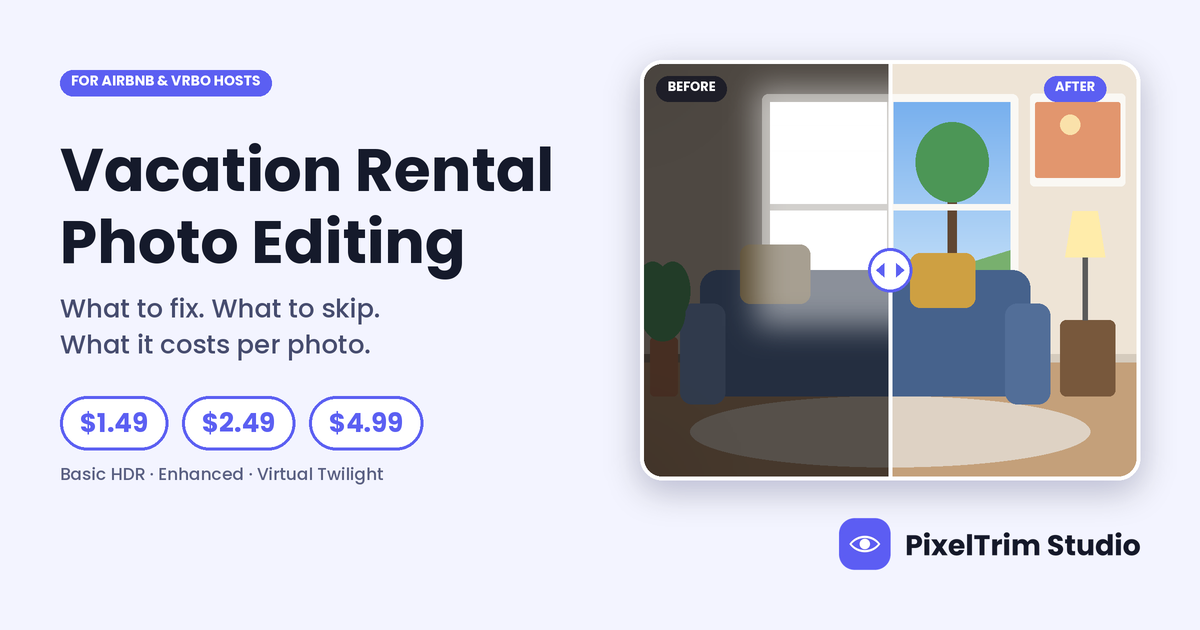
Most weak rental photos share the same handful of problems. Each one has a specific edit, and each edit sits in one of three real estate photo editing packages.
| Problem in the photo | Edit that fixes it | Package | Price per photo |
|---|---|---|---|
| Dark room, flat or uneven light | HDR blend of 3 to 5 brackets, exposure and white balance | Basic HDR | $1.49 |
| Leaning walls and doorframes | Vertical and perspective correction | Basic HDR | $1.49 |
| White rectangle where the window should be | Window pull from the darker bracket | Enhanced | $2.49 |
| Grey, washed-out sky over the deck or pool | Sky replacement matched to the light | Enhanced | $2.49 |
| Patchy lawn or tired foliage | Lawn and foliage enhancement | Enhanced | $2.49 |
| Black TV screen reflecting the room | TV screen replace | Enhanced | $2.49 |
| Flat daytime shot of the hero exterior | Day-to-dusk conversion with window glow | Virtual Twilight | $4.99 |
These are our live per-image rates, with manual editing, 24 to 48 hour turnaround and one revision round. For what each technique does to a photo, see our HDR blending, sky replacement and virtual twilight guide, and for the window fix on its own, our window pull guide.
Edit the Light, Not the Listing
Rental photos have a job a sale listing does not: they must match what a guest finds on arrival. Airbnb's Help Center says hosts may be asked to confirm photo accuracy by taking new photos of the space as it is now, and that the images it verifies should represent the key features and amenities guests expect on arrival. Treat that as the test for every edit.
| Safe edit | Risky edit | Why it matters |
|---|---|---|
| Fixing exposure, white balance and window glare | Changing the view, or adding one that is not there | The guest sees the real view from the window |
| Straightening leaning verticals | Stretching or cropping to make a room look bigger | Room size is the first thing a guest checks against the photo |
| Replacing a flat grey sky with a believable one | Adding a pool, hot tub or furniture that is not on the property | Amenities drive the booking, so they have to exist |
| Removing temporary clutter such as cords, bins or a stray hose | Removing permanent features, wear or damage, such as power lines, a neighboring building or a stain | Guests find them on arrival |
| Virtual twilight on a real exterior with real windows | Heavy filters, black and white or sepia | Vrbo lists black and white or sepia treatment as a reason a photo might be rejected |
Vrbo's Help Center also names text overlays, logo watermarks, borders and collages among the things that can get a photo rejected, so skip those finishing touches. The details are in our Vrbo photo requirements guide.
Our recommendation: keep the sky believable for the place and season, and keep the evening glow tied to windows that really have lights behind them. Fix exposure, windows, color and perspective, and leave out anything that changes what a guest will find. The same test is covered for window views in our window pull guide.
Which Photos to Edit First
You do not have to give every photo the same treatment. Platforms decide which photos guests see first, and that is where editing pays back.
- Airbnb: the Help Center says the first 5 photos are the most prominent on your listing, and the first one is the large photo in search. See our Airbnb photo requirements guide.
- Vrbo: an AI tool picks the hero image and the order, so any photo might lead. Every photo needs to be good enough to open the gallery.
A simple order of priority for a 25-photo gallery:
- The hero exterior, a good candidate for Virtual Twilight at $4.99.
- The main living space, with the window pull if the view sells.
- The kitchen and the main bedroom.
- The one feature that sells the stay, such as the pool, deck, view or hot tub.
- Everything else at Basic HDR, so the full set matches in light and color.
What a Vacation Rental Gallery Costs
Here is the math on four common cases, using the live per-image rates. These are our own illustrations, not a quote.
| Case | Math | Total |
|---|---|---|
| 25 photos, all Basic HDR | 25 x $1.49 | $37.25 |
| 25 photos, mixed: 15 Basic, 8 Enhanced, 2 Virtual Twilight | 15 x $1.49 = $22.35, 8 x $2.49 = $19.92, 2 x $4.99 = $9.98 | $52.25 |
| The same mixed gallery plus a resize and reformat pass | $52.25 + 25 x $0.19 = $4.75 | $57.00 |
| Property manager: 10 units, 25 photos each, all Basic HDR | 250 x $1.49 | $372.50 |
The resize pass uses our image conversion service, which starts at $0.19 per image. If you manage several units, send your typical volume and ask for a standing rate. For market-wide ranges across HDR, sky replacement and twilight, see our real estate photo editing cost guide.
Edit or Reshoot?
Editing fixes how the camera saw the space: light, color, perspective, sky and temporary distractions. It cannot fix the space itself. Reshoot, after fixing the room, when:
- The bed is unmade, surfaces are cluttered or the room needs cleaning.
- A room has no photo at all. Airbnb's photo tour asks for at least one photo of every room or space.
- The problem is permanent and a guest would see it on arrival.
- No frame holds window detail, so there is no view left to restore.
How to Brief an Editor for a Rental Gallery
- Shoot 3 to 5 brackets per angle on a tripod. A single RAW file can work for exterior sky edits, but interiors need the brackets.
- Name the files in the order you want guests to see them, for example 01-exterior, 02-living, 03-kitchen.
- Mark the cover photo and the one feature that sells the stay.
- List what must not change: the view, fixtures and any visible wear.
- Say which platforms the gallery is for. One 3:2 export at 3840 x 2560 px clears the Vrbo and Airbnb minimums, as covered in our Vrbo guide. Hotel-style listings can follow our Booking.com photo requirements guide.
- Start with a trial. Send 2 photos and judge the window edges, the sky and the color yourself.
Not sure which package your gallery needs? Send 2 photos from your listing and we will edit them free, returned in under 24 hours.
Comparing providers instead? Our real estate photo editing service guide covers what to check before you send a full shoot.
FAQ
How much does vacation rental photo editing cost per photo?
At PixelTrim Studio it is $1.49 per photo for Basic HDR, $2.49 for Enhanced with sky replacement and window pull, and $4.99 for Virtual Twilight. A 25-photo gallery with 15 Basic, 8 Enhanced and 2 Virtual Twilight photos comes to $52.25.
Is it okay to edit Airbnb and Vrbo listing photos?
Yes, when the edit fixes light, color and perspective and the photo still shows what a guest will find. Airbnb's Help Center says verified images should represent the key features and amenities guests expect on arrival, and Vrbo lists black and white or sepia treatment, text overlays, watermarks and collages as reasons a photo might be rejected.
Which photos should I edit first?
Start with the hero exterior, the main living space, the kitchen, the main bedroom and the feature that sells the stay. Airbnb says the first 5 photos are the most prominent, and Vrbo may choose the hero image for you, so every photo should be good enough to lead.
Can an editor remove clutter from a rental photo?
Temporary clutter such as cords, bins or a stray hose can be removed. Basic decluttering is part of the Enhanced and Virtual Twilight packages, or available as an add-on. Permanent features, wear or damage should stay, because guests find them on arrival.
How fast can a vacation rental gallery be edited?
Standard turnaround is 24 to 48 hours for most orders, and same-day delivery is available on request for smaller batches. Send 3 to 5 bracketed exposures per angle for the best interior results.
Tags
Ready to get your images edited?
Upload 2 photos for a free trial edit — returned in under 24 hours.
Start free trial →