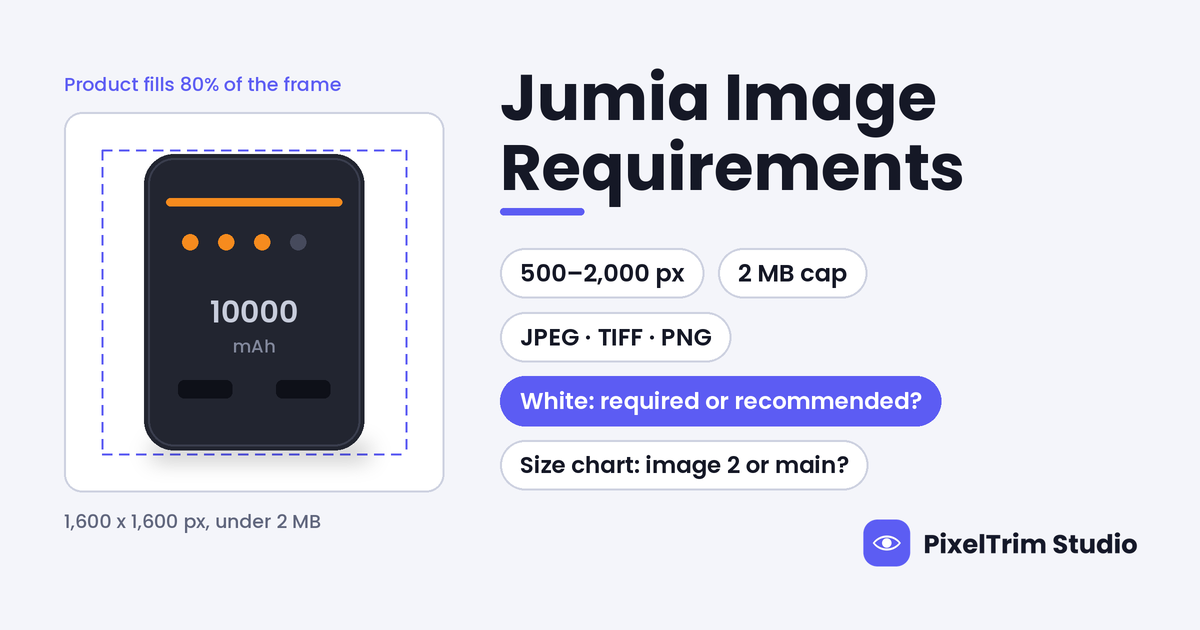
Jumia does not publish one image spec sheet. Its image rules are spread across three pages in the Jumia Global VendorHub, and they agree on the numbers but not on the details. All three give the same pixel range, 500 x 500 to 2,000 x 2,000 px, and the same 2 MB cap. Then one page says a white background is a must and another says it is only recommended, and one page says to put the size chart in the second image while another says it must be in the main image.
This guide puts the rules in one place, labels which page says what, shows what a compliant main image looks like and prices the editing jobs that usually fix a failing set. We opened all three pages in full: Product Image Guidelines, Create a Product and Product Listing Guideline. They sit in the FBJ Module section of the Global VendorHub, which reads as guidance for international sellers. We found no separate public spec for local Seller Center accounts, so confirm anything borderline on your own upload screen before a large batch.
Jumia Image Specs at a Glance
| Requirement | What the Jumia pages say |
|---|---|
| Pixel size | 500 x 500 px minimum, 2,000 x 2,000 px maximum; each side above 1,000 px is recommended |
| Maximum file size | 2 MB |
| File format | JPEG (.jpg or .jpeg), TIFF (.tif) or PNG (.png); JPEG is recommended |
| Images per product | At least 1, at most 8 (a main image plus 7 secondary images); 6 pictures plus a YouTube video recommended |
| Main image background | White (the pages disagree on how strict this is, see below) |
| Frame fill | The whole product visible, taking up at least 80% of the image space, with no cropping |
| Clothing | At least 3 real photos from different angles: front, back and close-up detail |
| Text and marks | No price, review text, logos, watermarks or promotional labels |
| Language | No Chinese characters or Chinese watermarks in images |
Three details matter before you resize anything. First, 2,000 px is a ceiling as well as a range, so a 4,000 px camera original is too large and has to be scaled down. Second, the 2 MB cap is a separate check, and a 2,000 x 2,000 px JPEG can pass the pixel test and still be over the limit, so look at file weight and not only dimensions. Third, the pages state no aspect ratio and do not say whether the 2,000 px maximum applies to each side, so keep both sides inside 500 to 2,000 px. The upload screen shows an error when the pixel size is wrong.
Where Jumia's Own Pages Disagree
| Item | Product Image Guidelines | Create a Product | Product Listing Guideline |
|---|---|---|---|
| Background | Listed under "Must be": use a white background | A white background is recommended | The main image must be a front-facing photo of the product on a white background |
| Fashion size chart | Non-mandatory; if your sizing differs from the Jumia Size Guide, upload your own chart, preferably as the second picture | Not mentioned | If your sizing differs from the Jumia Size Guide, a size conversion chart must be provided in the main image |
White Background: Must or Recommended?
Two of the three pages treat white as a requirement, and the upload walkthrough softens it to a recommendation. We would not gamble on the softer reading. Shoot and edit the main image on pure white, RGB 255, 255, 255. Jumia prints no RGB value, so that is our reading, not a Jumia number. A search-result copy of the Product Image Guidelines page showed looser wording, a plain or light-coloured background, while the live page we opened says white. Pages in this hub get edited, so an older screenshot or a seller group post may not match what QC checks today.
Size Chart: Second Image or Main Image?
The Product Image Guidelines treat a custom size chart as optional and suggest the second picture slot. The Product Listing Guideline says it must be in the main image when your sizing differs from Jumia's guide, which is the case for Chinese sizing on a European-size SKU. The same page also asks fashion sellers to include a size image showing garment length, sleeve length and leg circumference. The main-image reading sits awkwardly beside the rules for a clean main image, and we cannot tell which line QC applies. Build the chart as its own image and put it second. If your sizing differs from Jumia's guide, test one SKU with the chart on the main image as well and read the QC note before you upload a batch. That is our suggestion, not a Jumia instruction.
What a Compliant Jumia Main Image Looks Like
The main image is the first photo on the product page and the one shown in search results, so it carries most of the rules.
| Allowed on the main image | Not allowed on the main image |
|---|---|
| The whole product, front-facing, taking up at least 80% of the frame | A cropped product |
| A clean white background | A cluttered background with visible warehouse items, boxes or personal belongings |
| Only the item for sale | Free gifts, accessories, reference objects or other non-sale items that could mislead a buyer |
| A product colour that matches the SKU colour | Other colours of the same product in the main image |
| A clear, undistorted photo | Stretched, deformed or blurred images, which are named QC rejections |
| One front-facing view | A multi-angle collage |
| A real photo that shows the product as it is | Signs of second-hand use or wear, or edits that hide details that do not match the real product, such as logos |
| Good composition and lighting | Poor composition and lighting, or a product placed on a bare surface or plain countertop |
| Clean image space | Price, review text, irrelevant logos, watermarks, or promotional labels such as "Top Seller" and "Hot Sale" |
Jumia does not name cutout edges, but cluttered backgrounds and poor lighting are on the prohibited list, so a hand-drawn clipping path onto flat white is the cleanest way to clear them. One line cuts the other way. Editing to hide logos, wear or other details that do not match the real product is a named violation, so use editing to clean the frame and never to cover a flaw.
Clothing, Shoes and Other Categories
Jumia lists shot suggestions by category. They are suggestions, apart from the clothing minimum.
- Clothing: at least 3 real photos from different angles, covering front, back and close-up details. Jumia suggests a model front and back, detail close-ups such as the neckline, cuffs, hem stitching and waist label, a size chart, an ironed flat lay and a matching display. It suggests European size standards for the chart.
- Swimsuits and underwear: swimsuits must be photographed on mannequins. For swimsuits and underwear the main picture must have no models, and nothing may show offensive gestures or indecent exposure.
- Shoes: four shots, a right shoe at 45 degrees, a front view at the toe, a back view that shows the sole pattern on sports shoes, and an overhead shot of the pair with the toes forming a V. Sandals add a close-up of the anti-slip sole.
- Bags and luggage: the main view, views from several sides, an open-state close-up of the lining, and for briefcases a shot with A4 paper inside to show capacity.
- Phones and tablets: front, back, side thickness, a camera close-up, an interface close-up that shows the charger plug type, and a powered-on scene with a solid-colour screen.
- Household appliances: front, back, a close-up of the core functions, the internal structure, usage scenes and the energy efficiency label.
- Everything else: a front close-up, back, side, detail features, a function demonstration and usage scenes.
Keep reference objects out of the main image. If one appears elsewhere, such as the A4 paper above, Jumia asks you to point out the item actually being sold with an arrow or text in every image where it appears.
One Listing per Colour
The Create a Product page says variants can only differ in attributes such as size, power, capacity or age group, and must share the same set of images, so a variant may not change the product's appearance. A clothing item in three colours needs three separate products, each with its own image set, and the main image colour must match the SKU colour. Budget editing per colour, not per style.
What Happens When Images Fail
Images that miss the technical specs, such as damaged, stretched or blurred files, are rejected at SKU QC. The product cannot sync to the front end and can be taken off the shelf until it is fixed. Content breaches carry heavier measures, and the pages list removal from the shelf, a ban on applying for consignment orders, refusal to take the product into the warehouse, return of inventory and infringement fines. The pages say Jumia decides the measure by severity. For a catalogue, that makes a wrong image set expensive.
One Master Spec That Clears Every Page
- Export a square JPEG at 1,600 x 1,600 px in sRGB. That sits inside 500 to 2,000 px and above the recommended 1,000 px. The square ratio and sRGB are our suggestions, because Jumia states neither.
- Keep every file under 2 MB. Check the file weight, not just the pixels.
- Put the main image on pure white, RGB 255, 255, 255, with the whole product visible and at least 80% of the frame filled.
- Keep text, prices, logos, watermarks and badges off every image, and nothing in Chinese.
- For clothing, shoot front, back and a close-up, then add the size chart as image 2.
- Build one listing per colour, with up to 8 images and 6 as the target.
If the same files also feed other marketplaces, Jumia's 2 MB cap is the tightest number. Our Takealot image requirements guide and Noon image requirements guide both work from a 10 MB ceiling, and our Temu image requirements guide covers a 3 MB figure quoted by seller guides. Export to the smallest file weight first. Noon also takes JPEG only and checks aspect ratio, so confirm that one separately.
What Fixing a Jumia Set Costs
Most failing sets need a clean cutout on white, sometimes an invisible mannequin shot for apparel, and a recut to the right size and file weight. These are PixelTrim Studio's current per-image rates:
| Job | Service | Price per image |
|---|---|---|
| Cutout to flat white | Clipping path | $0.39 simple, $0.69 medium, $0.99 complex |
| Invisible mannequin apparel shot | Ghost mannequin | $1.49 simple, $2.49 medium, $3.49 complex |
| Recut to size, format and file weight | Image conversion | $0.19 basic (format and resize), $0.39 standard (adds color mode, DPI and profile embedding) |
As a first worked example, take one general product with the 6 images Jumia recommends. The main image gets a simple cutout ($0.39), and all 6 files get a basic conversion to size and file weight (6 x $0.19 = $1.14). That comes to about $1.53 per product, assuming the other five images are clean photos that need no cutout.
For a plain t-shirt with the 3 photos Jumia requires for clothing, take the front, back and one close-up as flat-lay shots with simple cutouts (3 x $0.39 = $1.17) and a basic conversion on all 3 files (3 x $0.19 = $0.57). That is about $1.74 per listing. If you would rather have invisible mannequin shots for the front and back, two simple ghost mannequin edits (2 x $1.49 = $2.98) plus one simple cutout for the close-up ($0.39) and the same conversion ($0.57) come to about $3.94 per listing. Jumia's pages do not mention ghost mannequin shots by name, and they require mannequins for swimsuits without saying whether the mannequin may be removed afterwards, so test one SKU first. Multiply either figure by the number of colours.
Resizing cannot create detail that was never captured. If an original is narrower than 500 px, a conversion job can scale it, but the result will look soft and a reshoot is the better fix. Turnaround is 24 to 48 hours with one free revision round.
Pre-Upload Checklist for Jumia
- JPEG (or TIFF or PNG) between 500 x 500 px and 2,000 x 2,000 px, under 2 MB
- Main image on pure white, whole product visible, at least 80% of the frame, nothing cropped
- No price, review text, logo, watermark, badge or promotional label on any image
- No Chinese characters or Chinese watermarks
- No clutter, boxes, warehouse items or personal belongings in the frame
- Only the item for sale, with no free gifts or reference objects in the main image
- Main image colour matches the SKU colour, with one listing per colour
- Clothing: at least 3 real photos (front, back, close-up) and a size chart, tested in the right slot
- Up to 8 images, with 6 as the target
- No edits that hide wear, logos or damage
Not sure your photos would pass? Send two sample images and we will edit them to these specs, free, through our free trial.
FAQ
What size should Jumia product images be?
Jumia's Global VendorHub pages ask for images between 500 x 500 px and 2,000 x 2,000 px, with each side above 1,000 px recommended, under 2 MB, in JPEG, TIFF or PNG (JPEG recommended). The pages state no aspect ratio, so a square 1,600 x 1,600 px JPEG is a safe master.
Does Jumia require a white background?
The Product Image Guidelines page lists a white background as a must, and the Product Listing Guideline asks for the main image on white, but the Create a Product page calls white only recommended. Treat pure white as required for the main image.
What is the maximum file size for Jumia images?
All three pages give 2 MB per image. A 2,000 x 2,000 px file can pass the pixel check and still be over 2 MB, so check the file weight as well as the dimensions.
How many images can I upload to a Jumia listing?
At least 1 and at most 8, made up of a main image and up to 7 secondary images. Jumia recommends 6 pictures plus a YouTube video, and clothing needs at least 3 real photos from different angles: front, back and close-up detail.
Where should I put the size chart on a Jumia fashion listing?
The pages disagree. The Product Image Guidelines recommend the second picture position when your sizing differs from the Jumia Size Guide, while the Product Listing Guideline says a size conversion chart must be provided in the main image. Test one SKU before a batch and follow the QC note.
Tags
Ready to get your images edited?
Upload 2 photos for a free trial edit — returned in under 24 hours.
Start free trial →