Search for Amazon infographic image rules and you will find confident answers: text is fine, a white background is not needed, use all the slots. Then you open Amazon's own pages and find that the rulebook is mostly about the main image. The gallery below it gets two or three sentences. This guide separates what Amazon states from what only seller guides claim, and shows where those guides disagree.
For the main image spec, see our Amazon image requirements guide. This page covers the other slots: infographic and lifestyle images.
Main Image vs Gallery Images: What Each Slot Is For
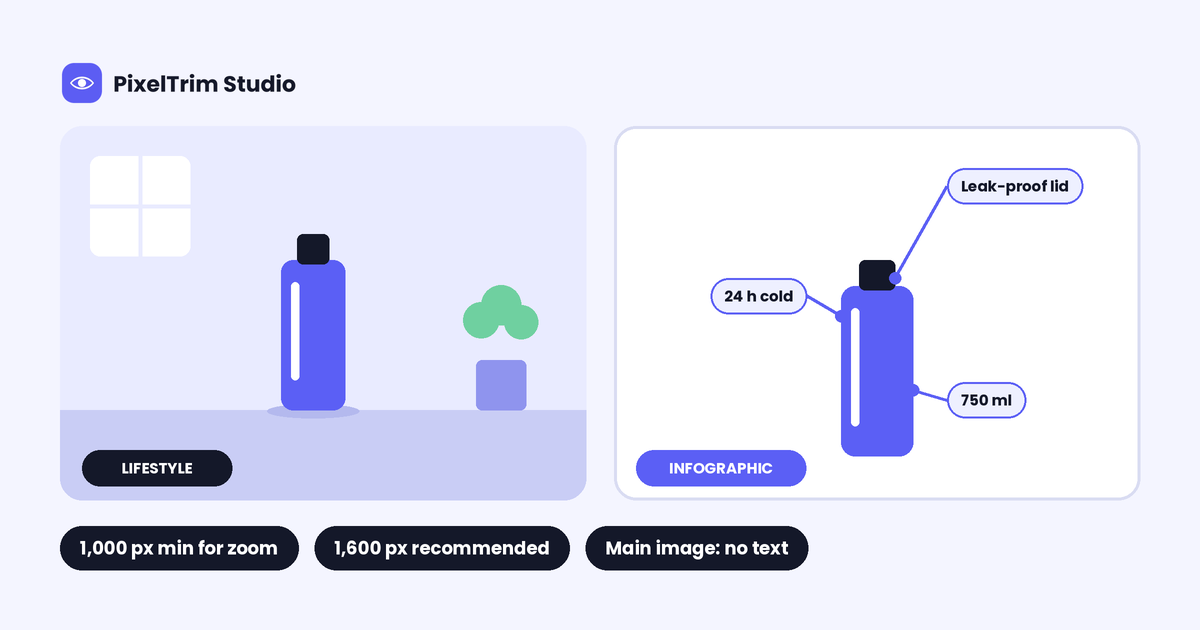
The main image is the search-result thumbnail, so it carries the strict rules: pure white background, product only, no text. Every other slot is a gallery image. Amazon's wording is that the main image should be supplemented with images showing different sides of the product, the product in use, or details the main image does not show. Infographic and lifestyle images are the two most common ways to do that.
| Image type | Job | Typical content |
|---|---|---|
| Lifestyle | Show the product in use | Real setting, scale against everyday objects, props, models |
| Infographic | Answer a buyer question fast | Dimensions, materials, quantity, compatibility, short feature callouts |
| Detail / close-up | Prove quality | Texture, stitching, ports, finish |
| Angle shots | Show every side | Back, side, top, inside |
What Amazon Itself Says
We could not open the Seller Central help page, which sits behind a login. The points below come from Amazon's wording as quoted in Seller Central forum posts, plus an Amazon staff post, so confirm them against the live help page in your account.
| Rule | What Amazon states |
|---|---|
| Purpose of gallery images | Show different sides, the product in use, or details not visible on the main image |
| Accuracy | Images must accurately represent the product and show only the product for sale |
| Zoom size | At least 1,000 px on the longest side for zoom |
| Recommended size | 1,600 px or larger on the longest side |
| Maximum size | No more than 10,000 px on the longest side |
| Quality | No blurry, pixelated or jagged-edge images |
| White background | Required for the main image |
| Lifestyle count | An Amazon staff post suggests 3 to 5 additional lifestyle images and different angles |
Notice what is missing: Amazon's wording that we could read does not list a text rule for gallery images. The text ban is stated for the main image. Amazon's A+ Content guide does advise avoiding embedded text so mobile shoppers can read it, which is a useful hint even though it covers a different block. Our A+ Content image size guide covers that block.
What Seller Guides Agree On
These points appeared across several third-party guides. They are common practice, not quotes from Amazon policy.
- Gallery images may include text overlays, props, people and lifestyle settings
- A pure white background is not needed on gallery images
- Infographics work best for dimensions, materials, quantities and a few key features
- Keep pricing, promotional claims and Amazon badges such as Best Seller off every image
- Use the gallery to answer the questions a buyer would otherwise ask in the Q&A section
Where Guides Disagree
These are the claims that change from guide to guide. When a guide and Amazon's help page differ, the help page wins.
| Question | What guides say | What to do |
|---|---|---|
| Is white required on gallery images? | Most say no. One guide says yes | Amazon states white for the main image only. Test your category |
| Is text allowed on gallery images? | Most say yes. One guide says no text or promotional material | Keep text short and factual, and avoid claims |
| How many infographics are allowed? | One guide says only one infographic or lifestyle image. No other guide we opened says this | Treat it as an outlier unless your upload window shows a limit |
| How many images show? | Seven by default on desktop in one guide. Eight desktop and six mobile in another | Put your strongest images first, since display varies |
| Best pixel size | 1,000 px, 1,600 px or 2,000 px | 1,000 px is the zoom minimum. 1,600 px is Amazon's recommendation |
| Accepted formats | Older Amazon wording lists JPEG, TIFF and GIF. Newer guides add PNG | Use JPEG unless a slot asks otherwise |
How to Build the Gallery
This order is a practice many sellers use, not an Amazon rule. Adjust it to your category.
- Slot 1: main image. Product only, pure white. See the pure white background guide for the exact check.
- Slot 2: key benefits infographic. Three to five short callouts that answer the top buyer question.
- Slot 3: lifestyle image. The product in a real setting so scale is obvious.
- Slot 4: dimensions or size infographic. Real measurements, not decoration.
- Slot 5: close-up. The detail that proves quality.
- Slot 6 and later: more lifestyle or comparison. Different use cases, not repeats.
Text on Infographic Images: Safe Habits
- Design for a phone first. If the text cannot be read at thumbnail size, cut it
- Use a headline and short labels, not paragraphs
- Show only facts you can defend: sizes, materials, counts, compatibility
- Skip pricing, discounts, review claims and Amazon badges
- Keep the product cutout clean, because text callouts make edge flaws easier to spot
Common Mistakes
- Putting an infographic in the main slot, which can get the listing suppressed. See our main image suppressed guide
- Uploading gallery images below 1,000 px, so zoom is off
- Resizing a small file up to 1,600 px, which only makes it softer
- Filling the lifestyle scene with props that are not included in the sale
- Using five lifestyle images that all show the same room
- Pasting a rough cutout onto a lifestyle background, so the edges look glued on
What the Photo Work Costs
The text and layout of an infographic is your design work. The photo side is ours: cutting the product out, placing it on a lifestyle background with matched lighting and adding a natural shadow. That is image manipulation, and these are the live rates:
| Tier | Price | Includes |
|---|---|---|
| Simple | $2.99 per image | Object removal or swap, simple background replacement, basic composite |
| Standard | $7.99 per image | Multi-element composite, lighting matched, shadow and reflection added, 1 revision round |
| Complex | From $19 per image | Full scene construction, 3+ source images, layered PSD, revision |
Worked example: five lifestyle slots at the Simple tier is 5 x $2.99 = $14.95. At the Standard tier it is 5 x $7.99 = $39.95. If your main image also needs a clean white cutout, our Amazon listing image editing service guide lists the cutout rates.
Pre-Upload Checklist
- Main image is product-only on pure white, with no text
- Every gallery image is at least 1,000 px on the longest side, ideally 1,600 px
- Each infographic answers one clear buyer question
- Text stays readable at phone size
- No pricing, promo claims or badges anywhere
- Lifestyle images show different uses, not repeats
- Edges on every cutout look clean at full zoom
Not sure your lifestyle images look natural? Send 2 sample images and we will edit them for free.
FAQ
Can I put text on Amazon gallery images?
Most seller guides say yes, and the Amazon wording we could read states the text ban for the main image only. One guide disagrees. Keep text short and factual, and check your category rules in Seller Central.
Do Amazon infographic images need a white background?
No, according to most guides. Amazon states the pure white rule for the main image. Gallery images can use colour or lifestyle backgrounds.
What size should Amazon infographic and lifestyle images be?
At least 1,000 px on the longest side so zoom works. Amazon recommends 1,600 px or larger, and no more than 10,000 px.
How many infographic images can I use?
One guide says only one infographic or lifestyle image is allowed, but no other guide or Amazon page we opened says so. Check the Images tab for your category, and use the slots you are given.
How many lifestyle images should a listing have?
An Amazon staff post suggests 3 to 5 additional lifestyle images showing different angles. Use different settings, not repeats.
Tags
Ready to get your images edited?
Upload 2 photos for a free trial edit — returned in under 24 hours.
Start free trial →