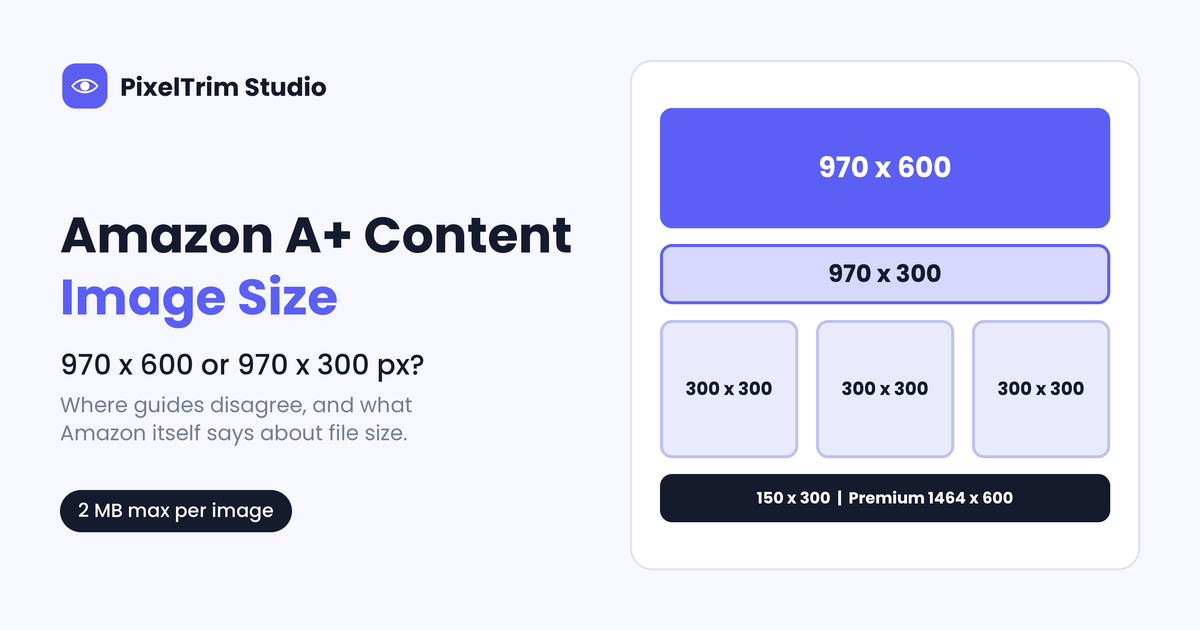
Search for the Amazon A+ Content image size and you will find two answers for the same banner: 970 x 600 px in one guide, 970 x 300 px in the next. Both numbers are real. They belong to different modules, and several guides mix the names up, so a seller can build a full set of artwork at the wrong size and only find out in the upload window.
This guide separates what Amazon itself states from what only third-party guides report, shows where those guides agree and where they do not, and gives a safe way to size every module. For the main image and the other listing slots, see our Amazon image requirements guide. This page covers only the A+ Content block below the buy box.
Why A+ Content Sizes Are Confusing
A+ Content is built from fixed modules in A+ Content Manager inside Seller Central. Each module has its own image slots at its own pixel size, so there is no single A+ image size. Basic A+ and Premium A+ also differ: Premium uses wider images and separate desktop and mobile uploads.
The complication is the source. Amazon's public Selling Partner blog guide to A+ Content states a file-size cap and some content rules, but it does not list pixel sizes per module. The per-module numbers live in Seller Central, behind a login, and in older Amazon template guides that sellers have copied into their own blog posts. We could not open those Seller Central pages, so every pixel size below is labelled as third-party.
What Amazon Itself Says
These points come from Amazon's own A+ Content design guide on its Selling Partner blog:
| Rule | What Amazon states |
|---|---|
| File size | Image sizes should be no larger than 2 MB |
| Text inside images | Avoid embedding text, so mobile shoppers can read the details on small screens |
| Resolution and motion | Avoid low-resolution or animated images |
| Resizing | Resized images can turn blurry and unreadable, so follow the module dimensions |
| Module count | Up to 5 Basic modules per ASIN, up to 7 Premium modules |
| Preview | A+ Content Manager previews desktop and mobile before you submit |
| Eligibility | Professional selling plan plus a brand enrolled in Brand Registry |
| Not allowed | Pricing, promotions, shipping details, QR codes, hyperlinks, contact details, and claims like best-selling or top-rated |
Amazon does not put pixel dimensions in that guide. For those, the next two sections compare what third-party guides report.
Where Third-Party Guides Agree
We compared more than ten seller guides. These sizes showed up consistently:
| Module | Reported size (px) |
|---|---|
| Company logo | 600 x 180 |
| Header image with text | 970 x 600 |
| Image with text overlay | 970 x 300 |
| Single image or three-image cards | 300 x 300 per image |
| Comparison chart column | 150 x 300 per product |
| Premium full-width image | 1464 x 600 desktop, 600 x 450 mobile |
Where They Disagree
These are the numbers that change from guide to guide. If your design file follows the wrong one, the upload either fails or gets scaled and softened.
| Slot | Numbers seen | What to do |
|---|---|---|
| Full-width header | 970 x 600 or 970 x 300 | Two different modules. Some guides call the 970 x 300 px one the full-width header |
| Four-image module | 220 x 220, 225 x 225 or 135 x 135 | Read the size shown in the slot |
| Single image with specs or side image | 300 x 300 or 300 x 400 | Template-dependent, check the slot |
| Premium single image | 800 x 600 or 970 x 600 | Check the slot, desktop and mobile |
| Maximum file size | 2 MB, 5 MB or up to 10 MB | Use Amazon's 2 MB |
| Minimum resolution | 72 dpi or 300 dpi | Not stated by Amazon. Export sharp files at the module size |
The only reliable rule is the last line of most of these guides too: the size shown in the A+ Content Manager upload window beats any blog post, including this one.
How to Size an A+ Image Set Safely
- Choose the modules first. Build the module stack in A+ Content Manager before you design anything, so every slot shows its own pixel size.
- Write the size down per slot. Copy the number from the upload window, not from a guide. Re-check it if you reuse a template.
- Design at the exact size. One third-party guide says Amazon may accept files at twice the listed size when the aspect ratio matches. Amazon does not state this in the guide we could open, so test one slot before you export a whole set.
- Pick the right format. Export photographic scenes as JPEG and flat graphics or logos as PNG, in RGB. Skip animated files.
- Keep every file under 2 MB. A 970 x 600 px PNG of a photo can pass 2 MB quickly, so check weight before upload.
- Keep text large and short. Amazon asks you to avoid embedded text, so use it only for a headline or short labels that stay readable on a phone.
- Preview desktop and mobile before you submit. Content goes live only after Amazon validates it.
Common A+ Upload Mistakes
- Designing a 970 x 600 px hero, then dropping it into a 970 x 300 px slot and losing the top and bottom
- Reusing one image across modules without resizing and re-cropping each copy
- Exporting a photographic PNG that passes the 2 MB cap
- Putting small body text inside the image, which is unreadable on mobile
- Adding pricing, promo or competitor claims, which A+ Content guidelines forbid
- Using a gray or off-white product photo as the base, then wondering why the module looks muddy next to the white main image
That last one is an editing problem, not an A+ problem. If the product cutout is the weak point, our guide to pure white backgrounds for Amazon photos explains the fix, and our Amazon listing image editing service guide covers the full workflow. Selling on Walmart too? Its separate enhanced-content specs are in our Walmart rich media guide.
What It Costs to Resize an A+ Image Set
If you already have the artwork and only need it resized, reformatted and renamed to each module, that is image conversion. Our image conversion service lists these live rates:
| Tier | Price | Includes |
|---|---|---|
| Basic | $0.19 per image | Format conversion, resize to spec, rename, batch delivery |
| Standard | $0.39 per image | Format plus color mode, DPI change, profile embedding, 1 verification pass |
Worked example: one A+ page with 10 image slots resized at the Basic tier is 10 x $0.19 = $1.90. At the Standard tier it is 10 x $0.39 = $3.90. For 10 ASINs with 10 slots each, that is $19.00 or $39.00. You send the module sizes from your upload window, and we match them. See what image conversion is for the format and color-mode background.
Pre-Upload Checklist
- Module list is final and each slot size is copied from the A+ Content Manager upload window
- Every file is under 2 MB, in RGB, and not animated
- No pricing, promo claims, QR codes, links or competitor mentions
- Text inside images is short and readable on a phone
- Desktop and mobile previews checked before submit
Not sure your files will fit the slots? Send 2 sample images and we will resize them to your spec for free.
FAQ
What size should Amazon A+ Content images be?
It depends on the module. Third-party guides agree on 970 x 600 px for the header image with text, 970 x 300 px for the image with text overlay, 300 x 300 px for single-image and three-image cards, 150 x 300 px for comparison chart columns and 600 x 180 px for the company logo. Amazon shows the exact pixel size next to each slot in A+ Content Manager, so use that number.
Is the A+ Content header 970 x 600 or 970 x 300 px?
Both appear, because they are different modules. The header image with text is listed at 970 x 600 px, and the image with text overlay at 970 x 300 px. Some guides call the 970 x 300 px module the full-width header, which causes the mix-up. Pick the module first, then read the size in the upload window.
What is the maximum file size for A+ Content images?
Amazon states that A+ Content image sizes should be no larger than 2 MB. A few third-party guides quote 5 MB or 10 MB, but those figures are not from Amazon, so keep every file under 2 MB.
Do Premium A+ images use different sizes?
Yes. Third-party guides list the Premium full-width image at 1464 x 600 px for desktop plus a separate 600 x 450 px mobile image. Premium needs eligibility, and Amazon allows up to seven Premium modules against five Basic modules per ASIN.
Can I upload an image larger than the module size?
One third-party guide says Amazon may accept images at twice the listed size if the aspect ratio matches and the file stays under the cap. Amazon does not state this in the guide we could open, so test it in the upload window and check the mobile preview before you submit.
Tags
Ready to get your images edited?
Upload 2 photos for a free trial edit — returned in under 24 hours.
Start free trial →

