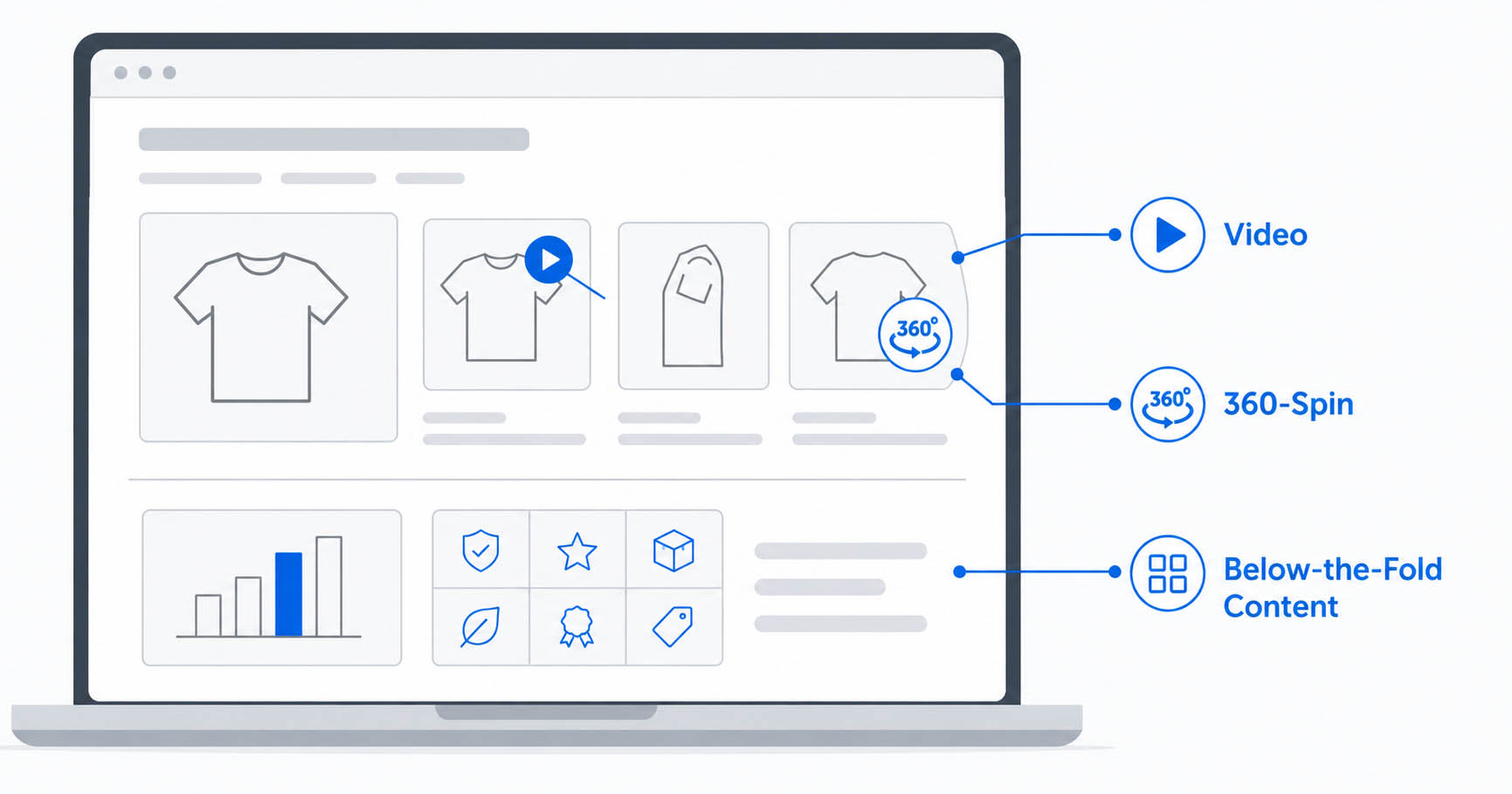
If you've only ever uploaded a white-background hero shot and three angle photos to your Walmart listing, you're using a fraction of what Walmart's product detail page actually supports. Rich Media — video, 360-spin images, and below-the-fold Enhanced Content — sits below the standard image carousel and is one of the most underused levers sellers have for lifting conversion rate, without touching price.
This guide covers what counts as Rich Media on Walmart Marketplace, the exact technical specs for each type, who's eligible, and how it's different from the basic Walmart image requirements you're probably already following.
What Counts as Walmart Rich Media
Walmart groups enhanced product content into three categories, each with different specs, eligibility rules, and upload paths:
| Type | What it is | Where it appears |
|---|---|---|
| Video | A short product demo, tutorial, or unboxing clip | Second slot in the image carousel, plus below the main image |
| 360-spin images | A sequence of stills that simulate a rotating product view | Below the main image display |
| Enhanced Content (below-the-fold) | Brand story modules, comparison charts, feature grids, downloadable spec sheets | "About the Brand" section, further down the PDP |
Video and 360-spin are self-serve — any seller in good standing can upload them through Seller Center's Media Library. Below-the-fold Enhanced Content is restricted to registered brands and has to go through an approved third-party hosting partner (Salsify, Syndigo, and similar Connected Content providers) — you can't upload it yourself the way you upload a product photo.
Video Specs
| Requirement | Spec |
|---|---|
| File format | MP4 or MOV |
| Max file size | 100MB |
| Title length | Under 200 characters |
| Hosting | Direct file upload required — YouTube or other external links are not accepted |
| Captions | A .vtt caption file is recommended for accessibility |
| Processing time | Under 60 seconds after upload; full listing publish can take 24–72 hours |
A good demo video doesn't need to be a full production. A 15–30 second clip that shows scale, texture, or the one feature customers ask about most in reviews usually earns its slot. Walmart supports more video real estate per listing than Amazon, which caps most categories at a single video — that gap alone is worth using if you're already cross-listing both.
360-Spin Image Specs
| Requirement | Spec |
|---|---|
| File format | JPG or PNG |
| Minimum size | 1500 × 1500px |
| Max file size | Under 5MB per frame |
| Frame count | Up to 24 stills, shot at even rotation intervals |
| Background | Consistent, seamless — any shift between frames breaks the spin illusion |
360-spin only works if every frame is lit and cropped identically. This is the part sellers underestimate: a spin set shot handheld, or edited frame-by-frame with inconsistent white-balance, produces a visible "jump" between frames instead of a smooth rotation — which does more harm to trust than not having a spin at all.
Below-the-Fold Enhanced Content
This is the tier most sellers don't know exists. It lives in the "About the Brand" section further down the product page and can include:
- Comparison charts — your product vs. competing SKUs on key specs
- Feature grids — icon-plus-text modules breaking down key benefits
- Lifestyle image blocks — the product in context, paired with short copy
- Downloadable PDFs — assembly manuals, sizing charts, warranty info, spec sheets
Eligibility is the catch: this tier is only available to registered brands, and content has to be submitted through an approved third-party solution provider rather than Seller Center directly. If you're not brand-registered on Walmart yet, video and 360-spin are still fully available to you — Enhanced Content is the one piece that's gated.
Why Rich Media Is Worth the Setup Time
Image completeness and quality feed into Walmart's Content Quality Score, which is a visible component of the broader Listing Quality Score — unlike Amazon's more opaque suppression system, you can actually see where your listing stands. Rich Media specifically tends to move two things: time-on-page and conversion rate, both of which correlate with better placement over time even though Rich Media itself isn't scored in the standard listing-quality metric the way primary images are.
The trade-off is publish time — Rich Media uploads take 24–72 hours to go live, versus near-instant for standard images, so it's worth queuing before a launch or promotion rather than the day of.
Rich Media vs. Your Primary Image Requirements
It's easy to conflate the two, but they're governed by different rules. Your primary product image still has to meet the strict specs covered in our Walmart Marketplace image requirements guide — pure white background, 1:1 square ratio, 2200×2200px recommended. Rich Media sits entirely separate from that: 360-spin and video don't need a white background at all, and below-the-fold modules are built more like a mini landing page than a product photo. Getting the primary image compliant is step one; Rich Media is what you add once that's locked in.
The same logic applies if you're prepping the same shoot for Amazon — Amazon's equivalent is A+ Content, gated behind Brand Registry the same way Walmart gates Enhanced Content behind brand registration, so the planning overlap is real even though the technical specs differ.
Getting Your Assets Rich-Media Ready
Most of the editing work for Rich Media isn't retouching in the traditional sense — it's preparing consistent, comparable frames. A 24-frame 360-spin set needs identical cropping and color-matching across every frame, which is exactly the kind of detail-heavy work that manual editing outperforms automated tools on — an AI batch tool applied frame-by-frame tends to introduce the small inconsistencies that make a spin set look choppy. Comparison charts and feature-grid modules for Enhanced Content usually start with a clean clipping path cutout of the product so it can be dropped onto a branded layout without a background seam showing.
If you're budgeting for a full Rich Media rollout across a catalog, treat it the same way you'd treat any other bulk editing project — see our product photo editing pricing guide for how per-image costs typically scale, and avoid the shortcuts covered in common product photography mistakes — several of them (inconsistent lighting between shots, handheld camera shake) are exactly what breaks a 360-spin set.
Need your 360-spin frames or comparison-chart product cutouts prepped for Walmart Rich Media? Get a free sample edit from PixelTrim Studio and see consistent, launch-ready assets on your own product photos.
Frequently Asked Questions
What is Walmart Rich Media?
Walmart Rich Media is enhanced, interactive product content — video, 360-spin images, and below-the-fold Enhanced Content — that goes beyond the standard white-background image carousel on a product detail page.
Is Walmart Rich Media the same as the primary image requirements?
No. Primary images must meet strict specs (white background, 1:1 square ratio, 2200×2200px recommended). Rich Media — video and 360-spin — follows separate specs and doesn't require a white background.
What are the video specs for Walmart listings?
Videos must be MP4 or MOV format, under 100MB, with a title under 200 characters. Direct file upload is required — external links like YouTube aren't accepted.
What are the 360-spin image requirements?
360-spin images must be JPG or PNG, at least 1500×1500px, under 5MB each, with up to 24 frames shot at consistent lighting and cropping for a smooth rotation effect.
Can any seller add below-the-fold Enhanced Content?
No. Below-the-fold Enhanced Content — comparison charts, feature grids, downloadable PDFs — is restricted to registered brands and must be submitted through an approved third-party hosting provider, not uploaded directly in Seller Center.
How long does Rich Media take to go live?
Rich Media uploads typically take 24–72 hours to publish, longer than the near-instant processing for standard product images.
Tags
Ready to get your images edited?
Upload 2 photos for a free trial edit — returned in under 24 hours.
Start free trial →

