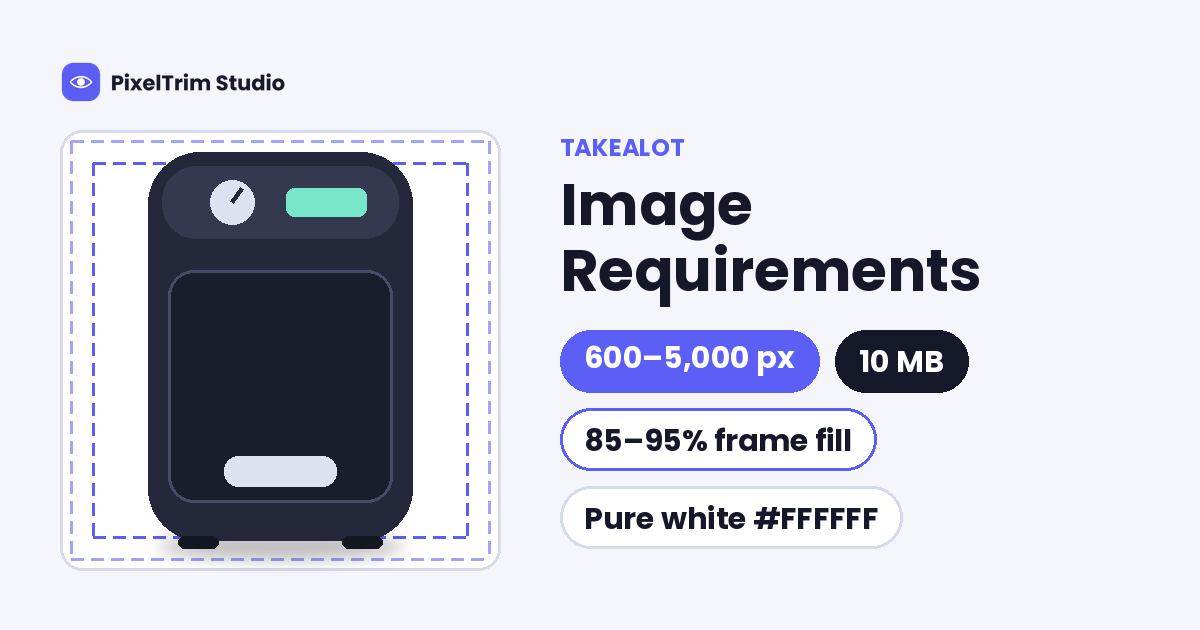
Takealot has no stand-alone image spec sheet. Its image rules sit inside one long document, the Catalogue Product Information Rules and Requirements, and they are split between a technical table, a quick-start checklist and a long list of category exceptions. The headline numbers are simple: JPEG or PNG, 600 to 5,000 px on every side, 10 MB maximum, and a pure white main image that fills 85 to 95% of the frame. What trips sellers is the detail around those numbers. One third-party guide gives a 2 MB cap, the footwear image count appears twice with two different answers, and one or two failing images are enough to reject the whole product.
This guide puts the rules in one place, flags where the sources disagree, shows what a compliant main image looks like and prices the editing jobs that usually fix a failing set. The figures follow the Takealot Help Centre document labelled Version 1.47, which we read in full. Takealot sets the minimum image count per category in a separate Global Category Tree that we did not open, so confirm anything borderline on your Seller Portal upload screen before a large batch.
Takealot Image Specs at a Glance
| Requirement | Takealot guideline |
|---|---|
| File type | JPEG (.jpeg or .jpg) or PNG; PNG may not have a transparent background |
| Image size | No shorter than 600 px and no longer than 5,000 px on any side |
| Aspect ratio | Square, or 4:3, 3:2, 16:9, 5:3 or 5:4 is highly recommended (a recommendation, not described as a rejection rule) |
| Maximum file size | 10 MB |
| Resolution | 72 DPI or higher (stated in the quick-start checklist) |
| Colour mode | sRGB |
| Frame fill | The product fills 85 to 95% of the frame length or width |
| Main image background | Solid white, RGB 255, 255, 255 (#ffffff); fashion has a light grey exception |
| Images per product | At least 5 recommended; the required minimum depends on the category |
Three details matter before you resize anything. First, PNG is accepted, but only as a flat image, so a transparent cutout has to be placed on a solid background before upload. Noon is stricter on this point and takes JPEG only, as we explain in our Noon image requirements guide. Second, the size limits apply to every side, so a 1,200 x 500 px crop fails the 600 px minimum even though its long edge is fine. Third, the 72 DPI figure is a metadata value, not a pixel count, and it will not rescue a small file.
Where the Sources Disagree
| Item | Official Takealot document | Third-party guide we found |
|---|---|---|
| Maximum file size | 10 MB | 2 MB |
| Minimum resolution | 72 DPI | 72 DPI |
| Main image background | White, RGB 255, 255, 255 | White |
The only conflict on file size comes from a Deep-Image.ai blog post, which is a vendor article rather than a Takealot page. We treat the official 10 MB figure as the ceiling. The safe move is to export under 2 MB when the picture allows it, because most plain white-background product shots compress well below that at high JPEG quality, although dense textures such as knitwear or lace may not. That is our suggestion, not a Takealot number.
Footwear: 5 Images or 3?
Takealot's own document gives two answers. The Shoes row says at least 3 images are needed for any footwear, front-facing plus a side, angled or rear view. The Clothing, Accessories and Footwear row says at least 5 images. The version history shows why: version 1.38 set 3 images for footwear, and version 1.43 raised clothing, accessories and footwear to 5. Both lines are still in the text. If you sell shoes, build 5 images, because that passes under either reading.
What a Compliant Takealot Main Image Looks Like
The primary image is the first photo a shopper sees, so Takealot is strictest here. Its rules are written around a single, unused product on a clean white background.
| Allowed on the primary image | Not allowed on the primary image |
|---|---|
| The single unused product, or the full bundle, shown clearly | A lifestyle image (these belong in secondary images, with a few category exceptions) |
| A solid white background, RGB 255, 255, 255 | Any border around the image |
| Light, believable shadows and reflections | Badly edited shadows or reflections |
| A real photograph that is in focus, with smooth edges | CAD drawings, thumbnails or illustrations |
| Packaging, when it is clear what the customer will receive (added in version 1.46) | Watermarks, "% off" text or other promotional material |
| A product that fills 85 to 95% of the frame | Images you do not own or have the right to use, such as stock photos |
Edge quality is where studio shots usually fail. Takealot names poorly edited edges as a not-allowed example, so a ragged or haloed cutout can be rejected even when the background is technically white. A hand-drawn clipping path gives a clean edge on a hard-surfaced product. For shadows, Takealot allows only light, natural ones, so a faint soft shadow under the product is the reliable choice, and a hard or pasted-on shadow is a named failure.
The 85 to 95% Frame Fill Rule
Takealot says 85 to 95% of the frame length or width needs to be filled by the product. We read that as the longest side of the product spanning 85 to 95% of the canvas. On a 2,000 x 2,000 px canvas that is about 1,700 to 1,900 px, and on a 1,200 x 1,200 px canvas it is about 1,020 to 1,140 px. Books are stricter, with front cover art expected to fill 95% of the frame. This is our reading of the rule, so check one test file on the upload screen before you export a full catalogue.
Fashion: Light Grey, Ghost Mannequin and the Five-Image Rule
- Background: off-white to light grey is allowed in all fashion categories when the image is high quality (72 DPI or more). The grey may not fall below RGB 189, 189, 189 (#bdbdbd). Takealot says this is subject to review and that pure white remains preferred.
- Primary image style: clothing may be shot on a ghost mannequin, on a model or lying flat. Takealot marks ghost mannequins as preferred, and it does not allow visible mannequins or multi-angle shots as the primary image.
- Cropping: the image must be cropped to feature only the product for sale. If you sell a jacket, crop to show mostly the torso.
- Underwear, lingerie and swimwear: graphics, blur, dots and animation used to cover exposure are no longer accepted. Takealot recommends ghost mannequins, body tape or body suits instead.
- Socks: at least 2 images, with a front-facing primary shot laid flat.
An invisible mannequin shot is a ghost mannequin edit: the garment is shot on a mannequin and the mannequin is removed. If the same catalogue also goes to Zalando, plan for a second export, because Zalando wants portrait JPEGs at 1:1.44 and rounds the ratio when it checks, as we explain in our Zalando image requirements guide.
Minimum Images by Category
| Category | Minimum images | Primary image rule |
|---|---|---|
| Clothing, accessories and footwear | At least 5 | Front-facing; secondary images may be side, angled or rear-facing |
| Shoes (see the note above) | At least 3 on the Shoes row | Shoe only, any angle; pairs may be accepted |
| Socks | At least 2 | Front-facing, laid flat |
| Wallets, purses and watches | At least 2 | Front-facing, the item being sold only |
| Bags | At least 2 | Front-facing, the item being sold only |
| Large appliances | At least 2 | Front-facing |
| Jewellery | 1 primary image required | Only the jewellery item being sold |
| Wigs and weaves | At least 1 | Wigs on a model; no mannequin images as the primary |
Takealot says it highly recommends at least 5 high-quality images per product, showing different angles, sizes and textures, and it points to the Global Category Tree for the exact minimum in every other category. Some categories also need a specific secondary image. Medicine and related products need a photo of the actual packaging showing active ingredients, fitness and nutrition products need a nutritional information image, and food needs a clear 360-degree image showing both sides of the product.
Primary Image Exceptions That Catch Sellers Out
- Homeware: a high-quality lifestyle image is allowed as the primary for duvets, duvet covers, sheets, throws, curtains, shower curtains, shower glass doors, rugs, wall clocks, scatter cushions, tablecloths and storage-type products. Cut-off images are secondary only.
- Toys: a box that shows its contents is enough, packaged or unpackaged.
- Paint, cosmetics and nail polish: one colour swatch per primary image, and the swatch may not be larger than the product.
- Beauty and sporting goods: multiple angles are allowed on the primary image.
- Drinkware: the primary image may include liquid.
- Stickers, wall art and decals: a dark background is not allowed on the primary image, though it can work as a secondary image.
- Watch straps: only the strap may appear in the primary image; the strap with a watch face is a secondary image.
Secondary images can show different angles, the product in use and size charts for clothing. They cannot be the primary image repeated in another colour, and logos or badges are not allowed as a secondary image.
How Takealot Rejects Images
This is the part that costs time. If one or two images in a catalogue submission fail, the entire product in that submission is rejected, and you have to fix the images and upload again. Takealot checks images in two stages. A recently uploaded image goes through an initial system validation, and a "View 1 Error" banner appears if it fails, with a message naming the problem. After you submit, the catalogue goes through a further quality and system review, and you download a results file with a Rejection tab and a Failed Review column that names the failing image.
Version 1.42 updated the image requirements to match the system validation process. In practice, a wrong size or file type fails instantly, while subtler problems such as rough edges, bad shadows or an off-white background reach a reviewer. Takealot also publishes a Catalogue Rejection Look-Up Sheet that lists the remedial action for each rejection code.
For video, Takealot accepts a YouTube link only, with a maximum length of three minutes and no watermarks, logos or promotional text. The quick-start checklist gives 640 x 360 as the video size.
What Fixing a Takealot Set Costs
Most failing sets need a clean cutout on white, a light shadow so the product does not float, a ghost mannequin edit for apparel and a recut to the right size and colour mode. These are PixelTrim Studio's current per-image rates:
| Job | Service | Price per image |
|---|---|---|
| Cutout to flat white | Clipping path | $0.39 simple, $0.69 medium, $0.99 complex |
| Light shadow on the main image | Image shadow | $0.49 drop shadow, $0.89 natural shadow |
| Invisible mannequin apparel shot | Ghost mannequin | $1.49 simple, $2.49 medium, $3.49 complex |
| Recut to size, format and sRGB | Image conversion | $0.19 basic (format and resize), $0.39 standard (adds color mode, DPI and profile embedding) |
Our shadow service also offers a reflection shadow at $1.29 per image. Takealot allows light reflections, but a natural or drop shadow is the safer choice on a main image.
As a first worked example, take one general product with the 5 images Takealot recommends. The main image gets a medium cutout and a natural shadow ($0.69 + $0.89 = $1.58), and all 5 files are recut to spec at the basic conversion rate (5 x $0.19 = $0.95). That comes to about $2.53 per product, assuming the other four images are clean photos that need no cutout.
For a plain t-shirt with the 5 images clothing requires, take a front and a back shot as simple ghost mannequin edits (2 x $1.49 = $2.98), three flat or detail shots with simple cutouts (3 x $0.39 = $1.17), and a basic conversion on all 5 files (5 x $0.19 = $0.95). That is about $5.10 per SKU. Hoodies, jackets and dresses sit in higher ghost mannequin tiers, and intricate shapes such as jewellery and footwear sit in the complex cutout tier.
Resizing cannot create detail that was never captured. If an original is narrower than 600 px, a conversion job can scale it, but the result will look soft and a reshoot is the better fix. Turnaround is 24 to 48 hours with one free revision round.
Pre-Upload Checklist for Takealot
- JPEG or PNG in sRGB, under 10 MB (under 2 MB if you want to be safe)
- No shorter than 600 px and no longer than 5,000 px on any side, at 72 DPI or more
- PNG files flattened, with no transparent background
- Product filling 85 to 95% of the frame, centred, and not cropped
- Primary image on solid white (RGB 255, 255, 255), or light grey no darker than RGB 189 for fashion
- No border, watermark, logo badge or promotional text on any image
- Only light, natural shadows and reflections, with smooth, clean edges
- No visible mannequin and no multi-angle shot in a clothing primary image
- At least 5 images for clothing, accessories and footwear, at least 2 for bags, watches and large appliances
- Every image owned by you or cleared for use
Not sure your photos would pass? Send two sample images and we will edit them to Takealot's spec, free, through our clipping path service page.
FAQ
What size should Takealot product images be?
Takealot asks for JPEG or PNG files that are no shorter than 600 px and no longer than 5,000 px on any side, in sRGB, under 10 MB and at 72 DPI or higher. It highly recommends a square image or a ratio of 4:3, 3:2, 16:9, 5:3 or 5:4, and the product should fill 85 to 95% of the frame. PNG files may not have a transparent background.
Does Takealot require a white background?
Yes for the primary image, which must have a solid white background of RGB 255, 255, 255 (#ffffff). Fashion categories are the exception: off-white to light grey is allowed as long as the grey does not fall below RGB 189, 189, 189, although Takealot says pure white is still preferred and fashion backgrounds are subject to review.
How many images does Takealot require per product?
It depends on the category. Takealot highly recommends at least 5 images for every product. Clothing, accessories and footwear need at least 5, socks, wallets, purses, watches, bags and large appliances need at least 2, and the exact minimum for each category is set in Takealot's Global Category Tree.
What is the maximum file size for Takealot images?
The official Takealot catalogue document gives 10 MB as the maximum file size. At least one third-party guide states 2 MB instead. Treat 10 MB as the official ceiling, and export under 2 MB where quality allows so a file passes under both readings.
Does Takealot allow ghost mannequin images?
Yes. For clothing, the primary image may be shot on a ghost mannequin, on a model or lying flat, and Takealot marks ghost mannequins as preferred. Visible mannequins and multi-angle shots are not allowed as primary images, and the image should be cropped to show only the product for sale.
Tags
Ready to get your images edited?
Upload 2 photos for a free trial edit — returned in under 24 hours.
Start free trial →