A solitaire ring and a pavé bracelet are both "jewelry," but they are not the same editing job. The difference is the stones. Every facet works like a tiny mirror that picks up dust, studio lights and the room around it, so a stone-set piece can need far more hands-on work than a plain band. This guide covers diamond and gemstone photo retouching stone by stone: what gets fixed, what a good editor leaves alone, and what each tier costs at PixelTrim Studio.
Why Stones Are Harder to Retouch Than Metal
Polished metal reflects broad shapes. A faceted stone breaks light into many small reflections, so a flaw shows up as a dark facet, a gray patch or a speck sitting on the flat top of the stone. Buyers zoom in on stones to judge them, which means a flaw you would never notice at thumbnail size is often the first thing they see.
For the general jewelry problems such as dust, scratches and metal color, see our guide to jewelry product photo editing. This post stays on the stones.
What Gets Fixed on the Stone
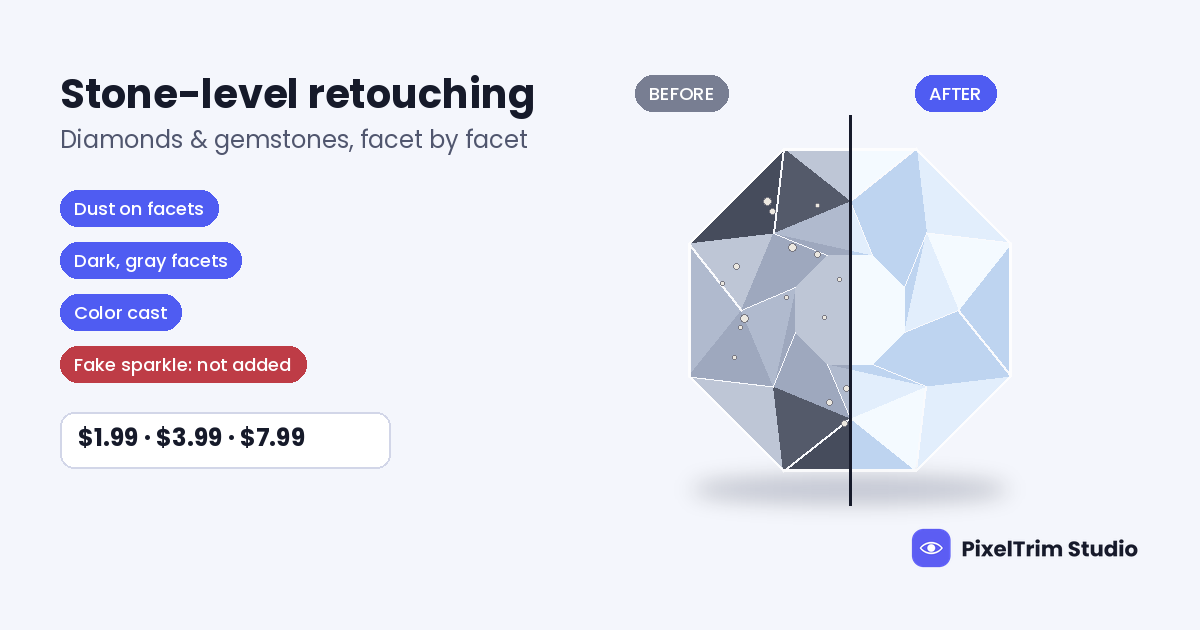
- Dust and lint on facets. On a clear stone, a speck can read as an inclusion in the photo. Each one is removed by hand at high zoom.
- Dark or gray facets. Facets that reflect the dark camera or room can look dead instead of bright. The editor restores the highlight pattern the stone would show in real light, without painting on fake glitter.
- Color cast. Clear stones can photograph yellow or blue, and colored stones shift hue with light temperature. The color is corrected to match the real stone.
- Blown highlights. Over-bright spots flatten a facet into a white patch, so the tone is recovered.
- Stone-to-stone consistency. In pavé, halo and cluster pieces, small stones should read as a matching set, not one bright, one dull and one tinted.
- Prong and setting cleanup. Stray lint around prongs and rough edges next to the stones are cleaned up.
Diamonds vs Colored Gemstones vs Cluster Pieces
Clear diamonds and white stones
The stone has no color of its own to protect, so the main jobs are dust, dark facets and a neutral color cast. Because the stone is clear, even a small speck is obvious, which is why this work is done facet by facet.
Colored gemstones
Sapphires, emeralds, rubies and similar stones live or die on hue accuracy. Our service corrects gold, silver, rose gold and gemstone tones to a true representation of the piece. The risk is going too far: a stone pushed past its real saturation looks great in the listing and disappoints at the door.
Pavé, halo and cluster pieces
Time scales with stone count. A piece with dozens of small stones means checking reflections, sparkle and dust on each one, which is why the number of stones is one of the biggest drivers in our jewelry retouching cost guide.
What a Good Editor Leaves Alone
- The stone's real character. A stone with visible inclusions should still look like that stone. Retouching removes dust and lighting artifacts, not the features that make the piece what it is.
- Color beyond the real thing. Saturation is corrected to the actual stone, not boosted to look more expensive.
- Sparkle that is not there. Fake glints and star glows read as edited to a buyer paying a premium. Automated filters tend to do this, as covered in manual vs AI jewelry retouching.
The reason is simple: an over-cleaned stone looks better than the one that arrives, and that gap turns into returns and disputes.
What Stone Retouching Costs per Image
| Tier | Price per image | What is included |
|---|---|---|
| Basic | $1.99 | Dust and lint removal, basic background cleanup, color correction, JPG or PNG delivery |
| Standard | $3.99 | Full surface polish, sparkle enhancement, gemstone color boost, 1 revision round |
| Premium | $7.99 | High-end metal retouching, micro-scratch removal, setting and prong cleanup, layered PSD plus revision |
Pricing follows the complexity of the piece and the depth of retouching needed. Here is one way to budget a 20-piece capsule: 8 simple solitaires at Basic is $15.92, 8 pavé or colored-stone pieces at Standard is $31.92, and 4 cluster or halo pieces at Premium is $31.96, for a total of $79.80. That is an illustration only. The tier each image needs depends on the image itself, so send samples for a real answer.
Prices are per image on the jewelry retouch service page.
How to Brief an Editor for Stone Work
- Name the stones. Say whether the piece has diamonds, colored gemstones or a mix, so each gets the right treatment.
- Send a color reference for color-critical pieces. A reference of the real stone lets the editor match the hue instead of guessing.
- Flag what must stay. If a stone is natural and its character is part of the piece, say so.
- Start with a sharp, well-lit file. Retouching cannot fully rescue a blurry or badly lit photo, and we flag those images before editing. Diffused light and a locked setup help, as covered in our jewelry photography tips.
- Test before a full batch. Send 2 images for a free trial edit and judge the stones at full zoom.
Choosing a Provider for Stone-Set Jewelry
Stone work is where generalist editors struggle most. If you are still comparing options, our jewelry retouching service guide covers what to check before you commit. Ready to see the result on your own pieces? Send 2 images for a free trial edit, returned in under 24 hours.
Frequently Asked Questions
What does diamond and gemstone photo retouching include?
It covers dust and lint removal on facets, restoring dark or gray facets, correcting color cast, recovering blown highlights, keeping small stones consistent in pavé and cluster pieces, and cleaning up prongs and settings.
How much does gemstone photo retouching cost per image?
At PixelTrim Studio the tiers are $1.99 per image for Basic, $3.99 for Standard and $7.99 for Premium. Which tier a piece needs depends on the stones, the setting and how much detail work the image requires.
Will retouching change the real color or clarity of the stone?
It should not. Good retouching corrects the photo so the stone looks like the real piece, removing dust and lighting artifacts without erasing the stone's real characteristics or pushing color beyond what the buyer will receive.
Why do my diamonds look dull or gray in photos?
Usually some facets are reflecting a dark camera, card or room instead of a bright light source. Retouching can restore those highlights, and better diffused lighting at the shoot reduces how much needs fixing.
How long does gemstone retouching take?
Most orders are delivered in 24–48 hours, and same-day delivery can be requested for smaller batches.
Tags
Ready to get your images edited?
Upload 2 photos for a free trial edit — returned in under 24 hours.
Start free trial →