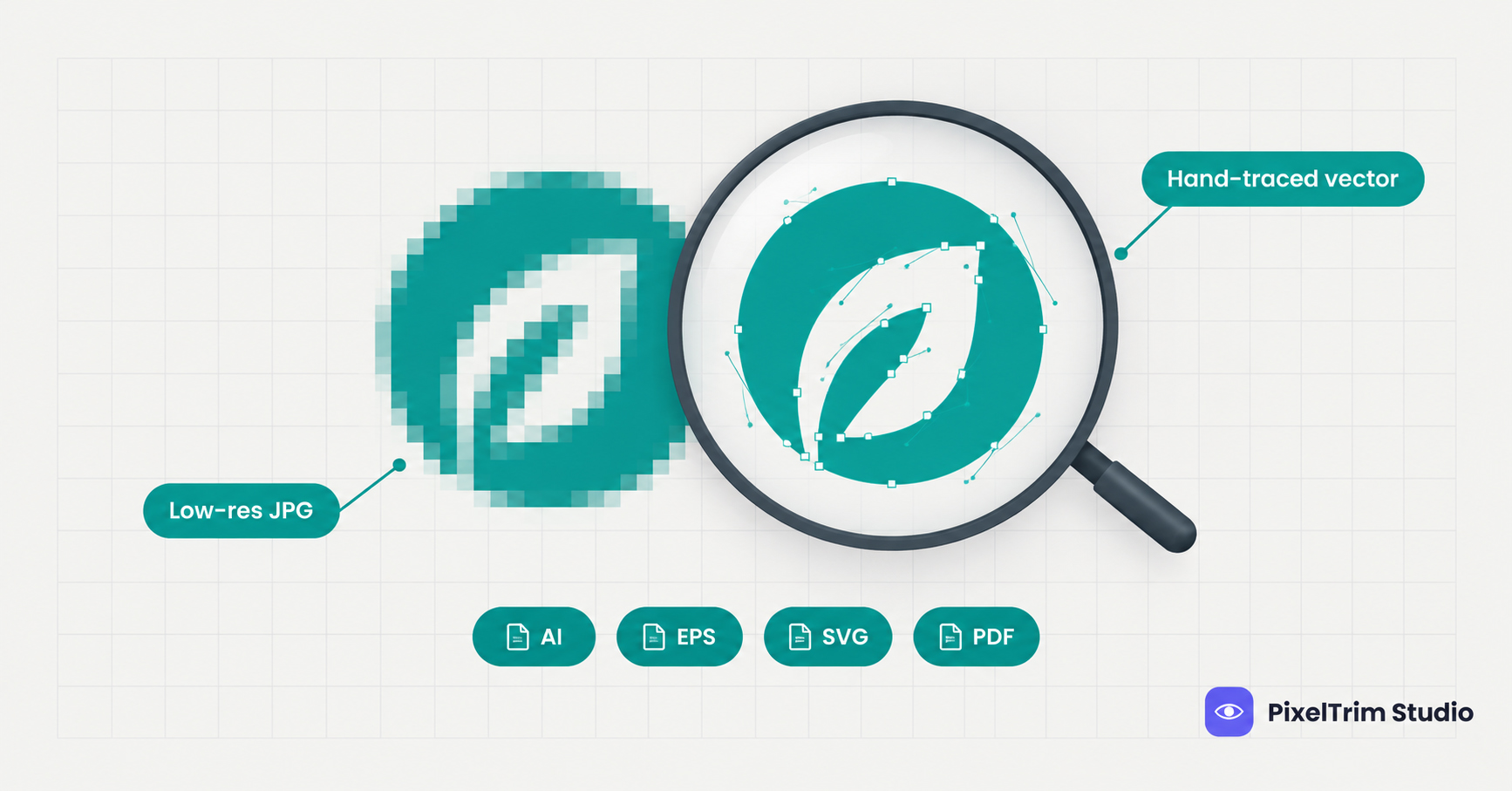
Your printer asks for a vector file, and all you have is a 300 pixel JPG you saved from your own website. You stretch it and the edges turn into blurry steps. This is one of the most common logo problems, and it usually has a cheaper fix than people expect.
Before you pay anyone, run these 5 checks. They cover where the original file may be hiding, what a rebuild can and cannot repair, and how to judge the finished file. For the full service background, see our vector tracing guide.
Why a Small Logo Cannot Simply Be Enlarged
A JPG or PNG is a grid of colored pixels. When you enlarge it, software stretches that grid and smooths the gaps with a guess. The result looks softer or blockier, but it never gains real detail. A vector file works differently: it stores the logo as paths and curves, so it can be scaled from a favicon to a billboard without losing sharpness.
That is why converting a low-resolution logo is not a resize. It is a rebuild: an editor redraws each shape on top of your file, node by node. Free auto-trace tools try to do this automatically, but they guess at corners and colors, which is covered in our comparison of manual tracing vs AI vectorization.
Check 1: Hunt for the Original File First
The cheapest vector is the one that already exists. Before ordering a rebuild, look in these places:
- The designer or agency that made the logo. Designers normally keep the AI, EPS or SVG source and can email it in minutes.
- Vendors who used the logo before, such as a sign shop, embroidery digitizer, uniform supplier or printer. They often hold a production-ready copy.
- Old brand guidelines or a launch folder from when the business started.
- Your website developer. Many sites load the header logo as an SVG, which is a vector.
- Print-ready PDFs such as a brochure, letterhead or business card proof. A PDF can keep the logo as a vector, so try the zoom test in Check 2.
- Design accounts such as Canva, Figma or Illustrator cloud files that may still hold the original artwork.
If one of these turns up an AI, EPS or SVG file, you may not need a rebuild at all.
Check 2: Confirm You Really Have a Pixel-Based File
File extensions give a quick answer, though a few cases can fool you:
| File type | Usually | Watch out for |
|---|---|---|
| JPG, PNG, GIF, WebP | Pixel-based | A PNG with a transparent background is still pixels, not a vector |
| AI, EPS | Vector | An EPS can hold an embedded bitmap, so zoom in to confirm |
| SVG | Vector | An SVG can wrap a JPG inside it, which keeps the pixel problem |
| Either | A scanned or exported PDF may be a flat picture of the logo |
The most reliable test is the 400 percent zoom test. Open the file and zoom in on a curved letter. Crisp edges that stay smooth mean vector. Visible blocky steps or fuzzy edges mean pixels, and the file needs a rebuild.
Check 3: Gather the Best Source You Can Find
A rebuild is only as good as the clues it starts from. Send the largest, least compressed version you have, plus anything that shows how the logo is supposed to look:
| What to send | Why it helps |
|---|---|
| The original upload or email attachment, not a screenshot | Screenshots add compression and lose fine detail that is hard to recover |
| Two or three versions of the logo | A website copy, a social avatar and a scan can each show different parts of the design |
| A photo of a sign, shirt or packaging that carries the logo | Gives a second reference when small text or thin lines are unclear |
| Pantone codes or hex values | Without them, colors are sampled from a compressed file and can drift |
| The font name, if you know it | Speeds up text recreation and avoids lookalike letters |
| The exact wording of any small tagline | Tiny text is the first thing to become unreadable in a low-resolution file |
Check 4: Know What a Rebuild Can and Cannot Fix
Hand-tracing can rescue a lot, but it cannot invent information that is missing from the file. Here is how common problems break down:
| Problem in your file | Can a rebuild fix it? | What helps |
|---|---|---|
| Jagged, stair-stepped edges | Yes. Edges are redrawn as smooth curves | Nothing extra |
| Soft or blurry outlines | Yes, if the shapes are still readable | A second version of the logo |
| Speckles around edges from JPG compression | Yes. They are ignored, not copied | Nothing extra |
| Washed out or shifted colors | Yes, when you provide the real color values | Pantone or hex codes |
| Unreadable small text | Partly. Letters are recreated, not recovered | Exact wording and font name |
| Thin lines or details that are gone | Only by judgment. The editor has to decide what was there | A reference photo and a proof check |
| Gradients, shading or photo effects | Yes, at a higher complexity tier | The largest source you have |
If your file is extremely small, such as a tiny favicon, parts of the design may be impossible to read. In that case the editor rebuilds from the best available evidence, so ask for a proof overlay and confirm the shapes before final delivery.
Check 5: Match the Tier and File Format to the Job
Vector tracing is priced by artwork complexity, not by file size. Current rates from the vector tracing service page:
| Tier | Price | Best for |
|---|---|---|
| Simple | $4.99 per logo | 1 to 2 colors, basic shapes and text, 1 revision round |
| Medium | $9.99 per logo | 3 to 6 colors, gradients, fine detail, font recreation, 2 revision rounds |
| Complex | $19.99 per artwork | Full-color illustrations, photo-to-vector, embroidery-ready separation |
Simple logos are usually delivered within 24 hours, and complex artwork takes 48 to 72 hours. For a closer look at what separates a careful provider from a cheap one, read our guide to the vector tracing service and how to choose a provider.
Ask for the formats that match your use:
- AI or EPS for print production, signage and design software
- SVG for websites and apps
- PDF for vendors who do not have design software
Once you own the vector, you can export it as PNG or JPG at any size. If you need many sizes, color modes or DPI settings for different printers and platforms, that is format work rather than tracing. Our image conversion explainer covers the basics, and the image conversion service handles it in batches.
How to Check the Finished Vector File
- Zoom to 400 percent on curves and corners. Edges should stay crisp.
- Overlay your original at reduced opacity. The new shapes should sit on the old ones.
- Check every color against your Pantone or hex values.
- Read all the text and compare it to your wording.
- Open each format in a different program, not only the one that made it.
- Use your revision round before approving, not after the printer starts.
Common Mistakes With Low-Resolution Logos
- Ordering before searching for an original AI, EPS or SVG file
- Sending a screenshot instead of the best original
- Sending a printer an auto-traced file without checking corners and colors
- Assuming a transparent PNG is a vector
- Skipping the proof when the source is very small
A free auto-trace tool is fine for an internal mockup. For anything going to print, embroidery or signage, a hand-traced file is the safer choice.
Get Your Logo Rebuilt
Have a blurry or pixelated logo that needs to become a clean vector? PixelTrim Studio hand-traces every logo, matches your brand colors, and delivers AI, EPS, SVG and PDF files. Try 2 images free with no software or account needed on your end.
See vector tracing pricing and start a free trial →
FAQ
Can a low-resolution logo be turned into a vector file?
Yes. A vector file is rebuilt by redrawing the logo as paths, so the editor does not need a high-resolution source. The clearer the shapes are in your file, the less guessing is involved, and you should approve a proof before the final files are delivered.
Why can't I just enlarge my logo to make it print-ready?
Enlarging a pixel-based file only stretches the pixels it already has. Edges get softer or blockier, and no new detail appears. A vector rebuild redraws the shapes, so the artwork stays sharp at any size.
How much does it cost to vectorize a logo?
Pricing follows complexity. Simple 1 to 2 color logos start at $4.99, medium logos with 3 to 6 colors, gradients and fine detail are $9.99, and full-color artwork or photo-to-vector work is $19.99.
Which file formats should I ask for?
AI or EPS for print production and design software, SVG for websites, and PDF for sharing with vendors who do not have design software. A complete delivery usually includes all four.
How can I tell if my logo is already a vector file?
Check the file type first: AI, EPS and most SVG files are vectors, while JPG, PNG, GIF and WebP are pixel-based. If you are unsure, zoom in to 400 percent. Crisp edges mean vector, and visible blocky steps mean pixels.
Tags
Ready to get your images edited?
Upload 2 photos for a free trial edit — returned in under 24 hours.
Start free trial →