Scroll through any apparel brand's Amazon or Shopify listing and you'll notice something: the clothing looks worn — filled out, natural shape, proper drape — but there's no model in the photo and no mannequin visible anywhere. That's ghost mannequin editing, also called invisible mannequin or hollow-man editing, and it's become the industry standard for apparel product photography.
This guide covers what ghost mannequin editing actually is, how it works, when your brand needs it, and how it's different from related techniques like neck join and clipping path.
What Is Ghost Mannequin Editing?
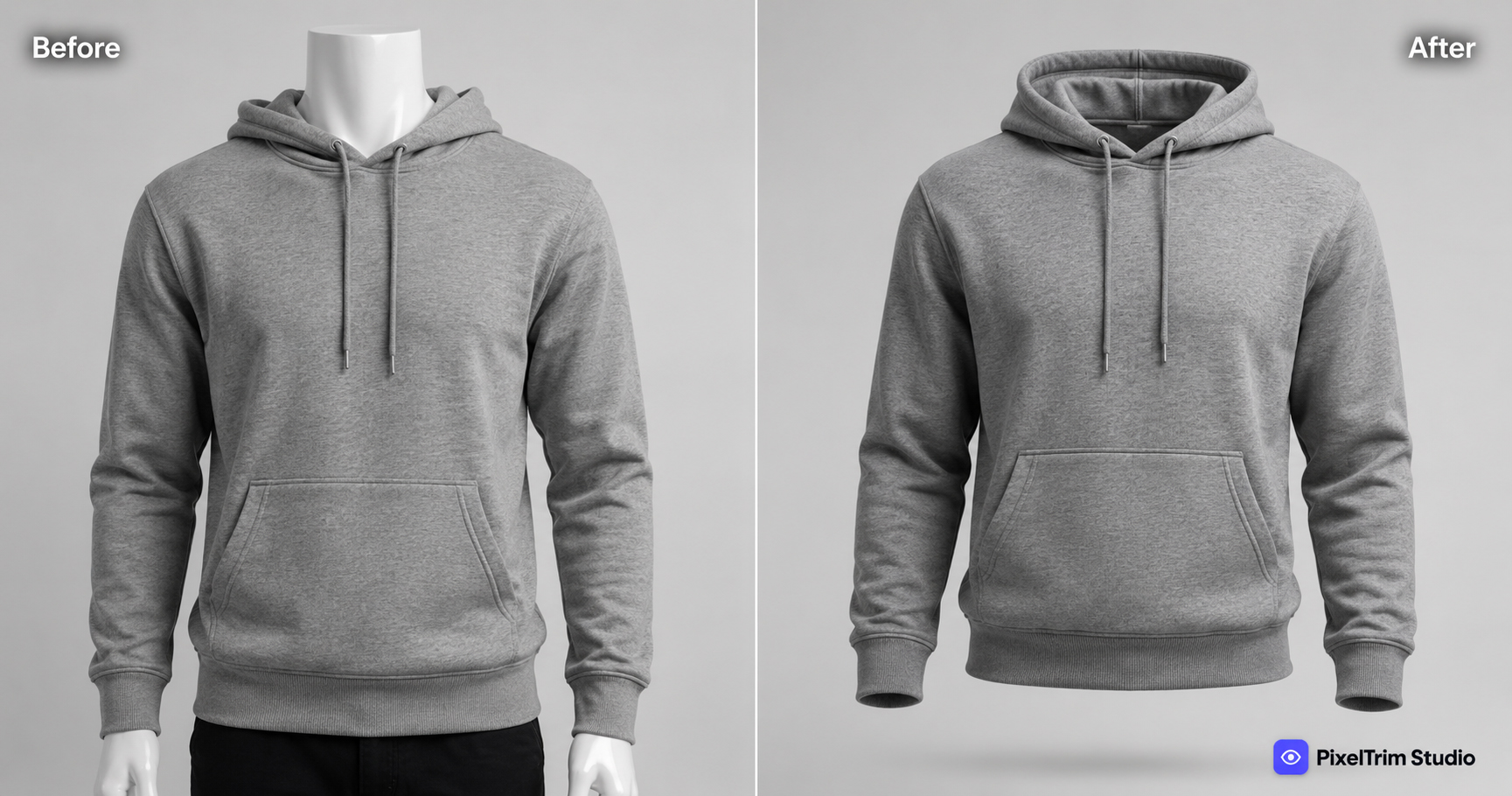
Ghost mannequin editing is a photo editing technique that combines multiple shots of a garment — usually shot on a real mannequin, plus a separate interior/neckline shot — into a single image where the mannequin has been completely removed. The result is a garment that looks three-dimensional and naturally worn, with proper volume, drape, and a realistic collar, but with no person and no mannequin in the frame.
It's called "ghost" or "invisible" mannequin because the mannequin was physically there during the shoot — it's just digitally erased afterward, leaving the garment looking like it's filled out by an invisible body.
How Ghost Mannequin Editing Works
The process starts at the photo shoot, not in editing:
- Shot 1 — Front (and back) on the mannequin. The garment is photographed fully dressed on a real mannequin, consistent lighting and angle.
- Shot 2 — Interior/neckline. A separate shot captures the inside of the collar, usually with the garment partially removed from the mannequin, so the editor has real detail to work with — not a guess.
- Editing — mannequin removal + blending. A trained editor removes every trace of the mannequin from the main shot, then blends in the interior shot at the neckline so it reads as one continuous, hollow garment.
That neckline blending step has its own name — neck join — and it's the single hardest part of the whole edit to get right. We cover the difference in detail in Ghost Mannequin vs Neck Join, and exactly what to shoot in our shooting guide for ghost mannequin and neck join.
Why Brands Use Ghost Mannequin Instead of a Model or Flat Lay
Three common ways to photograph apparel — a model, a flat lay, or ghost mannequin — solve different problems:
| Method | Shows shape/fit? | Consistent across catalog? | Cost |
|---|---|---|---|
| Model shoot | Yes, best | Depends on model availability | Highest |
| Flat lay | No — looks flat | Easy, cheap | Lowest |
| Ghost mannequin | Yes — natural 3D shape | Very consistent | Moderate |
Ghost mannequin sits in the middle: it gives shoppers a realistic sense of fit and shape — something a flat lay can't do — without the cost, scheduling, and consistency challenges of booking a model for every single item.
Who Needs Ghost Mannequin Editing
- Clothing brands shooting t-shirts, hoodies, jackets, and dresses for online listings
- Amazon and Shopify apparel sellers who need a consistent, professional look across the whole catalog
- Wholesale and B2B apparel businesses building large product catalogs
- Print-on-demand brands that need a polished worn-look mockup without hiring models
For accessories, flat bags, or simple items with no real 3D shape, a standard clipping path edit on a flat-lay photo is usually faster and cheaper, and looks just as clean on a listing page.
What Does Ghost Mannequin Editing Cost?
Pricing depends mainly on how many joins the garment needs and how complex the fabric is:
- Simple — single neck join, t-shirts and basic tops
- Medium — multiple joins (neck + sleeves), hoodies and jackets
- Complex — full hollow-man on dresses and gowns, detailed fabric drape
For the exact factors that move the price up or down — fabric type, batch size, turnaround — see our full Ghost Mannequin Photo Editing Cost breakdown. For how this compares to other editing services, check the Product Photo Editing Pricing Guide.
Manual vs AI Ghost Mannequin Editing
AI "instant ghost mannequin" tools have gotten faster, but the neck join — the part that makes or breaks the effect — is still where they struggle most, especially on layered or textured garments. We break this down in full in Manual Ghost Mannequin Editing vs AI Tools.
Getting Started
Need ghost mannequin editing for your apparel catalog? PixelTrim Studio does 100% manual ghost mannequin and neck join editing — try 2 images free, no commitment.
See our Ghost Mannequin service →
FAQ
What is ghost mannequin photo editing?
Ghost mannequin (invisible mannequin) editing combines a garment shot on a real mannequin with a separate interior/neckline shot, then removes all traces of the mannequin so the garment looks naturally worn with proper 3D shape and no visible support.
Is ghost mannequin the same as neck join?
No. Ghost mannequin is the full technique — shooting and compositing the whole garment. Neck join is the specific step inside that process where the interior collar shot is blended with the outer shot. Neck join can also be ordered on its own for touch-ups.
Do I need a model or a real mannequin to get this effect?
You need a real mannequin for the shoot — the "invisible" part happens entirely in editing, not at the photo shoot. No live model is required.
How much does ghost mannequin editing cost?
Pricing depends on the number of joins and fabric complexity — a simple single-join t-shirt costs less than a multi-layer jacket or a full hollow-man dress edit. See our full cost guide for exact ranges.
Can AI tools do ghost mannequin editing instead of a human editor?
AI tools can handle very simple, single-layer garments reasonably well, but they consistently struggle with the neck join and with layered or textured fabrics — the exact areas that matter most for a listing-ready image.
Tags
Ready to get your images edited?
Upload 2 photos for a free trial edit — returned in under 24 hours.
Start free trial →