If you shoot weddings, headshots, or studio portrait sessions, you already know raw camera files rarely leave the camera ready to deliver. Skin looks patchy under studio strobes, under-eye shadows show up harsher than in real life, and a full gallery of 300+ images needs to look consistent, not edited one-off. That's what a portrait retouching service is built for.
This guide breaks down what portrait retouching actually includes, how it's priced for full-gallery delivery, manual vs AI editing, and what to check before you hand off a client's wedding or session gallery to an outside editor.
What a Portrait Retouching Service Actually Includes
Portrait retouching is a specific, more delicate skill than general photo editing — it's focused on the person in the frame, not the background or product around them. A proper portrait retouching service typically includes:
- Skin tone evening — correcting redness, blotchiness, and uneven color caused by studio lighting or mixed light sources
- Blemish and temporary mark removal — pimples, scratches, stray makeup smudges, sunburn patches
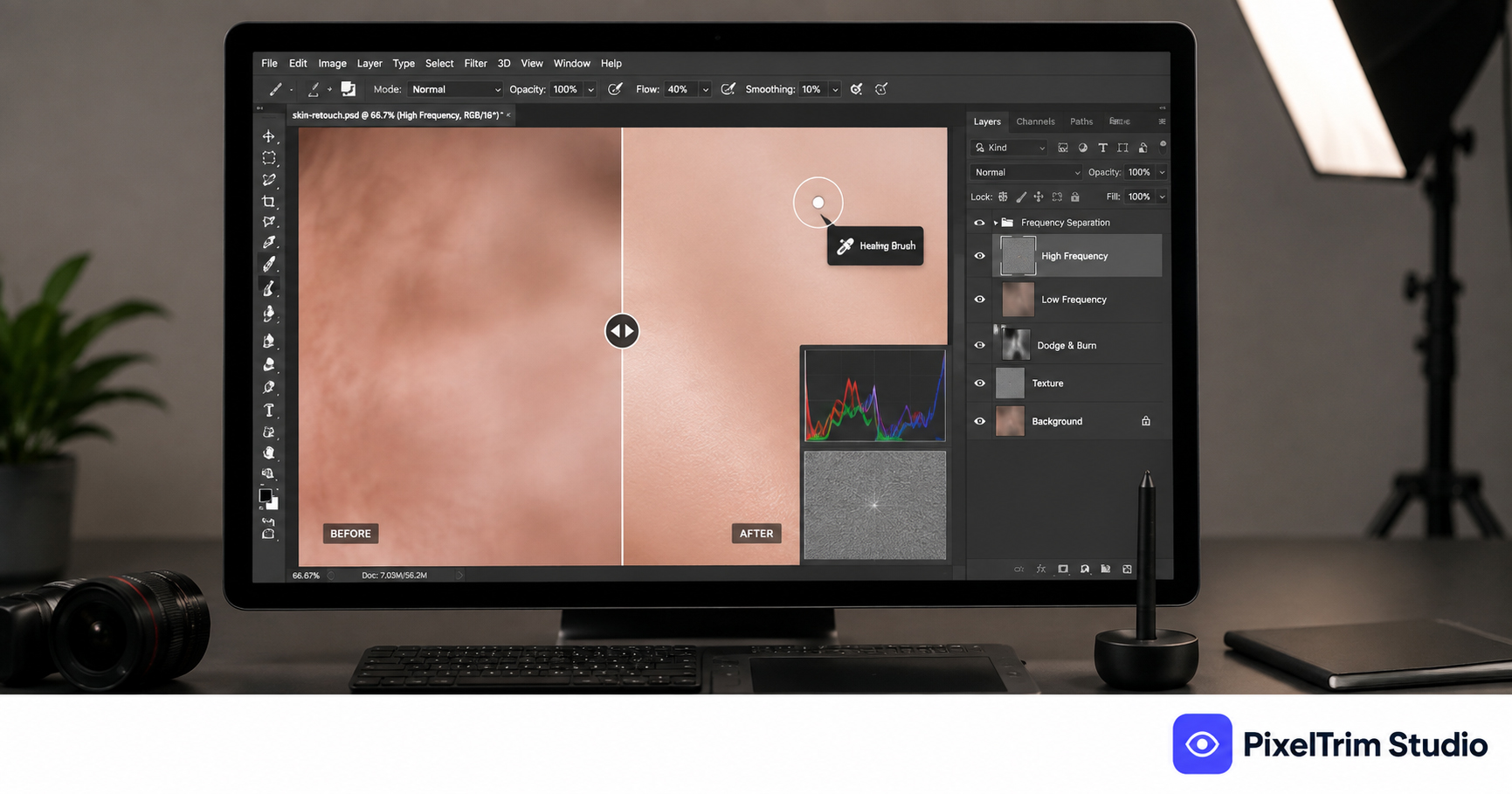
- Texture-preserving smoothing (frequency separation) — reducing shine and pore visibility while keeping real skin texture, not a plastic finish
- Under-eye and shadow softening — correcting harsh shadows from on-camera flash or overhead studio lights
- Stray hair and flyaway cleanup — around the hairline, especially common in outdoor wedding shots
- Eye and teeth brightening — subtle, natural enhancement, not an artificial whitening effect
- Batch color and exposure matching — so an entire gallery looks consistent from image 1 to image 300
What it does not usually include: reshaping facial features, body proportions, or heavy digital makeup application. A reliable provider will flag this distinction upfront, since it changes both the ethics and the price of the edit. For the broader definition of where retouching fits against other editing types, see our image retouching guide.
Portrait Retouching vs Skin Retouching for Sellers
These two get confused because the techniques overlap — both use frequency separation, both fix skin tone. The difference is the workflow. Our skin retouching service guide covers the eCommerce seller angle — a single model shot bundled with a product listing, one or two images at a time. Portrait retouching for photographers is a full-gallery workflow — 200, 500, sometimes 1,000+ images from one wedding or session that all need to look like they came from the same consistent edit, not 500 individually-tweaked photos.
Who Actually Needs This
Portrait retouching services get used most by:
- Wedding photographers delivering full-day galleries under tight turnaround deadlines
- Headshot and corporate photographers needing a consistent, professional look across a whole team or event
- Portrait studios with regular family or senior-photo session output
- Newborn and family photographers needing gentle, natural skin correction
- Independent photographers who shoot fast but don't have editing hours in a busy season
Manual vs AI Portrait Retouching
AI retouching apps are fast, but skin is exactly where they still struggle — auto-smoothing tends to blur texture unevenly across a face, and it often "fixes" things that were never a problem (freckles, natural skin texture, a small mole) while missing an actual blemish that needed attention. It also has no concept of "this client's skin tone should look like this" across a 500-image gallery — consistency drifts image to image.
Manual, layer-based retouching (frequency separation) keeps real skin texture intact, only corrects what actually needs it, and can be matched consistently across an entire gallery by one editor working from the same reference. For a wider comparison of where AI genuinely helps and where it still falls short across different editing types, see our Manual vs AI Photo Editing guide.
What Portrait Retouching Costs
Pricing is almost always per image, and scales with how much correction is needed per photo:
| Tier | Typical Price | What's Included |
|---|---|---|
| Basic | $0.79 / image | Exposure and white balance fix, blemish/spot removal, color correction |
| Standard | $1.99 / image | Full skin retouching, under-eye/shadow softening, frequency separation |
| Advanced | $3.99 / image | High-end beauty retouching, dodge and burn contouring, layered PSD delivery |
Most galleries mix tiers — a handful of hero/cover shots get Advanced treatment while the rest of the gallery gets Standard. For how portrait retouching pricing compares against other editing services, see our full product photo editing pricing guide.
How to Choose a Portrait Retouching Provider
- Ask for a portrait-specific before/after sample — not a product cutout sample. Skin and facial retouching is a different skill entirely.
- Confirm it's manual work, not an automated AI filter pass — ask directly if frequency separation is used.
- Check gallery turnaround time — a 500-image wedding gallery takes longer than a 10-image headshot session; get a real timeline, not a generic promise.
- Ask how consistency is handled across a large batch — one editor per gallery, or a shared style guide, keeps the whole set looking uniform.
- Clarify revision policy — skin tone and softness level are subjective to a client; at least one free revision round matters.
FAQ
What does a portrait retouching service include?
Skin tone evening, blemish and temporary mark removal, texture-preserving smoothing, under-eye and shadow softening, stray hair cleanup, and batch color/exposure matching across a full gallery. It does not typically include reshaping facial features or body proportions.
How is portrait retouching different from skin retouching for sellers?
The techniques overlap, but the workflow differs. Skin retouching for sellers usually covers one or two model shots bundled with a product listing. Portrait retouching is a full-gallery workflow — sometimes hundreds or over a thousand images from one shoot — that all need to look consistently edited.
How much does portrait retouching cost per image?
It typically ranges from under $1 for basic exposure and blemish fixes up to $4 or more per image for advanced beauty retouching with layered PSD delivery, depending on the depth of correction needed.
Can AI tools handle portrait retouching for a full wedding gallery?
AI tools can apply a fast smoothing pass, but they often blur skin texture unevenly and can't maintain the same look consistently across hundreds of images from one editor's judgment. Manual, layer-based retouching stays more reliable for both quality and gallery-wide consistency.
How do I choose a reliable portrait retouching provider?
Ask for a portrait-specific before/after sample, confirm the work is manual rather than an AI filter, check realistic turnaround for your gallery size, ask how they keep a large batch consistent, and clarify the revision policy before you commit.
Need a full gallery retouched without losing natural skin texture? See our Image Retouching service — 100% manual editing, 24–48h turnaround, 1 free revision included. Or get a free quote for your next gallery.
Tags
Ready to get your images edited?
Upload 2 photos for a free trial edit — returned in under 24 hours.
Start free trial →