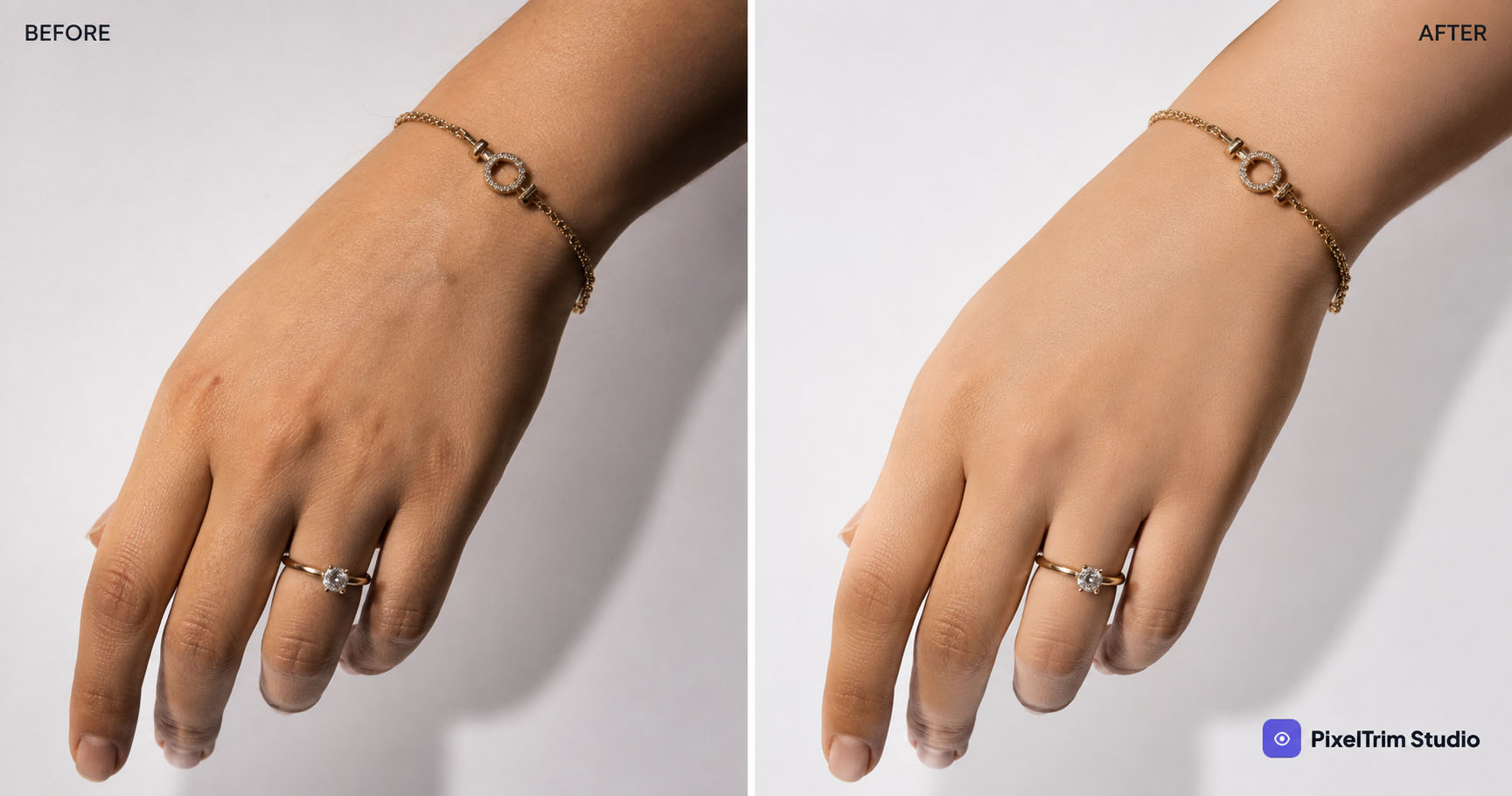
If your product photos include a model, mannequin close-up, or a skin-adjacent shot (hands holding jewelry, feet in shoes, arms in sleeves), raw camera files almost never look clean enough to publish. That's what a skin retouching service is for — cleaning up skin tone, texture, and small blemishes without making the shot look fake or over-processed.
This guide covers what's actually included in skin retouching, how it's priced, manual vs AI editing, and what to check before hiring a provider.
What a Skin Retouching Service Actually Includes
"Skin retouching" covers a specific set of fixes, not a full beauty makeover. A proper e-commerce or portrait skin retouching service typically includes:
- Blemish and spot removal — pimples, scars, dust or lint on skin, temporary marks
- Skin tone evening — fixing patchy redness, uneven lighting, or color casts from studio lights
- Texture smoothing (frequency separation) — reducing harsh pores or shine while keeping natural skin texture, not "plastic" skin
- Stray hair and flyaway cleanup — around the face, neck, and hairline
- Under-eye and shadow correction — softening dark circles or harsh shadows from lighting setup
- Wrinkle and fabric-crease reduction — where skin meets clothing edges, common in apparel and jewelry-on-model shots
What it does not usually include: reshaping body proportions, changing facial features, or heavy digital makeup. A good provider will flag if a request crosses from "cleanup" into "reshaping," since that changes both the price and the ethics of the edit.
Who Actually Needs This
Skin retouching gets requested most by:
- Apparel and fashion sellers shooting on live models instead of ghost mannequin or flat lay
- Jewelry sellers shooting rings, bracelets, or earrings on hands, wrists, and ears
- Footwear brands shooting shoes on feet
- Portrait and headshot photographers delivering client galleries
If you're running an apparel store on Shopify with on-model photography, this usually sits alongside your regular cutout and color work — see our Shopify product photo editing guide for how the two fit together in one workflow.
Manual vs AI Skin Retouching
AI retouching tools are fast, but skin is one of the areas where they still struggle — auto-smoothing tends to blur texture unevenly, and AI often "fixes" things that weren't broken (like natural moles or freckles) while missing an actual blemish. Manual, layer-based retouching (frequency separation) keeps real skin texture intact and only touches what actually needs fixing.
For a broader breakdown of where AI holds up and where it doesn't across different editing types, see Manual vs AI Photo Editing.
What It Costs
Skin retouching is usually priced per image, and the price depends on how much correction is needed:
| Retouching level | What's included | Typical use case |
|---|---|---|
| Light cleanup | Minor blemish removal, basic tone evening | Clean studio shots, minimal correction needed |
| Standard retouch | Full blemish removal, texture smoothing, stray hair cleanup | Most apparel/model product shots |
| Heavy retouch | Standard retouch + shadow/wrinkle correction, multiple problem areas | Poor lighting conditions, close-up detail shots |
Skin retouching often gets bundled with other per-image services (background cutout, color correction, shadow work) rather than billed alone. If you're comparing this against your full editing budget, our Product Photo Editing Pricing Guide breaks down per-image costs across service types.
Shoot-Stage Mistakes That Make Retouching Harder (and Costlier)
A lot of what skin retouchers spend time fixing traces back to the shoot itself — harsh direct lighting that blows out skin tone, dust on the lens, or inconsistent color temperature between shots. Cleaning these up in editing takes longer, which usually means a higher per-image price. See 5 Product Photography Mistakes That Make Editing Harder for the shoot-side fixes that keep your retouching bill down.
How to Choose a Skin Retouching Provider
- Ask for a before/after sample on skin specifically — not just product cutouts. Skin retouching is a different skill.
- Confirm it's manual, not just an AI filter pass — ask directly if frequency separation or layer-based editing is used.
- Check turnaround time — heavy retouching takes longer than a simple clipping path; rushed skin work tends to look over-smoothed.
- Ask about revisions — skin tone is subjective; a provider offering at least one free revision round is safer.
- Clarify what counts as "light" vs "heavy" retouching upfront so pricing doesn't surprise you later.
FAQ
What does a skin retouching service include?
Blemish and spot removal, skin tone evening, texture smoothing, stray hair cleanup, and shadow or wrinkle correction around skin areas. It does not typically include reshaping body proportions or facial features.
Is skin retouching different from general photo retouching?
Yes. General retouching can include background cleanup, color correction, and object removal. Skin retouching is a specific, more delicate skill focused only on skin texture and tone, usually done with frequency separation to avoid an artificial look.
How much does skin retouching cost per image?
Cost depends on how much correction is needed — light cleanup costs less than heavy retouching with multiple problem areas. It's often bundled with other per-image editing services rather than priced alone.
Can skin retouching be done with AI tools?
AI tools can do basic smoothing quickly, but they often blur natural texture unevenly and miss the exact blemishes that need fixing. Manual, layer-based retouching keeps skin looking natural while correcting only what actually needs it.
How do I choose a reliable skin retouching provider?
Ask for a skin-specific before/after sample, confirm the work is manual rather than an AI filter, check turnaround time, and clarify revision policy and what counts as light vs heavy retouching before you commit.
Need skin retouching done manually, without the plastic look? See our Image Retouching service — 100% manual, 24–48h turnaround, 1 free revision included.
Tags
Ready to get your images edited?
Upload 2 photos for a free trial edit — returned in under 24 hours.
Start free trial →

