Two listings, same product, same white background — one photo looks like it's floating, the other looks real. The difference is almost always the shadow. Sellers spend hours getting the clipping path and background perfect, then skip the one detail that tells a buyer's brain "this object actually sits on a surface."
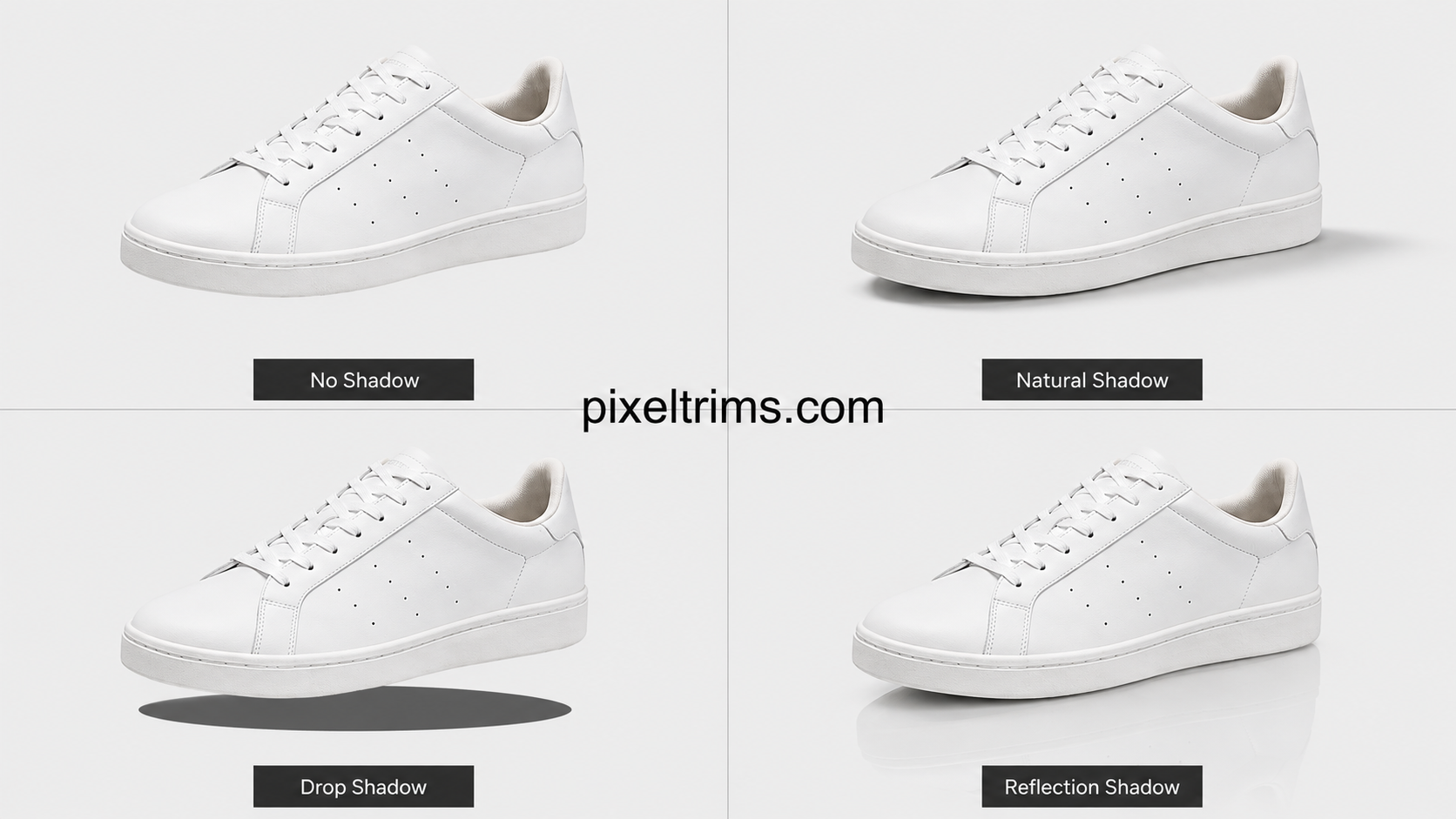
There isn't just one "shadow" style. Marketplaces and photographers generally use three distinct types, and picking the wrong one for the wrong platform is a common, avoidable mistake.
The 3 shadow types, explained
1. Natural (organic) shadow
This is the shadow the product actually cast during the shoot — soft, slightly irregular, following the real direction of the light. Editors clean it up (remove harsh spots, even out the tone) but keep its organic shape. It's the most common choice for lifestyle and marketplace listings because it looks the most believable.
2. Drop shadow
A drop shadow is built by the editor, not captured in-camera — a soft, uniform, slightly blurred dark shape placed directly under the product. It's faster to produce than cleaning up a natural shadow and looks more "graphic" and consistent, which is why it's popular for catalog and grid-view listings where every image needs to look uniform at a glance.
3. Reflection shadow
Instead of a shadow, this adds a soft mirrored fade of the product underneath it — like the product is sitting on a glossy surface. It reads as more premium and is used a lot for electronics, jewelry, and footwear listings where the brand wants a high-end, showroom feel.
Do marketplaces allow shadows?
This is where sellers get tripped up, because the rule is different per platform:
- Amazon main image: pure white background, no visible shadow allowed on the primary image (see our Amazon image requirements guide). Shadows are only allowed on secondary/lifestyle images.
- eBay, Etsy, Shopify: shadows are generally fine on both main and secondary images — a natural or drop shadow is common and often improves click-through.
- Website / brand product pages: full flexibility — this is where reflection shadows show up most, since there's no strict marketplace compliance rule to follow.
If you're specifically aiming for the strict pure-white, no-shadow look Amazon requires, our pure white background guide covers that setup in detail.
Which shadow actually helps conversions?
There's no single "best" answer — it depends on where the photo lives:
- For a marketplace grid (search results, category pages), a light drop shadow tends to perform better — it keeps every thumbnail visually consistent, which matters when your image sits next to 40 competitors.
- For a single product page where the buyer is already interested, a natural shadow builds more trust — it looks less "stock photo," more like a real object they're about to receive.
- For premium/aspirational categories (watches, sneakers, jewelry, electronics), a reflection shadow signals quality and is worth the extra editing step.
Common shadow mistakes that hurt listings
Most of these come down to consistency, not the shadow itself — the same issues we cover in our product photography mistakes guide show up here too:
- Mismatched shadow direction across a product set — one image has the shadow on the left, another on the right.
- Shadow too dark or too hard-edged, which reads as a cheap Photoshop cutout instead of a real object.
- No shadow at all on a busy background, which makes the product look pasted rather than clipped.
- Using a drop shadow on Amazon's main image, which technically violates the pure white background rule.
Manual editing vs AI shadow tools
AI background/shadow tools are fast, but they typically default to one generic drop shadow regardless of the product's actual lighting, shape, or material — which is fine for a quick listing but noticeably flat for jewelry, glass, or reflective products. We cover this trade-off in more depth in our manual vs AI photo editing comparison. Manual shadow work costs a little more per image but matches the shadow to the product's real lighting and material instead of applying a template.
Getting started
If you're not sure which shadow style fits your listings, our image shadow editing service covers all three types — natural, drop, and reflection — matched manually to your product and platform, with a free 2-image trial so you can compare before committing.
Not sure which shadow fits your product? Try 2 images free — we'll match the shadow style to your platform and product type, returned in under 24 hours.
Get your free shadow edit trial →FAQ
What's the difference between a drop shadow and a natural shadow?
A natural shadow is cleaned up from the real shadow cast during the shoot, so it keeps an organic, slightly irregular shape. A drop shadow is built entirely by the editor — a uniform, soft-edged shape placed under the product for a consistent, catalog-style look.
Does Amazon allow shadows on product photos?
Not on the main image — Amazon requires a pure white background with no visible shadow. Shadows are allowed on secondary and lifestyle images, where a subtle natural shadow is common.
Which shadow type sells better, natural or reflection?
Natural shadows generally build more trust on single product pages, while reflection shadows work better for premium categories like jewelry and electronics where a showroom look matters more than realism.
Can I add a shadow myself instead of using a service?
Yes, with Photoshop's layer and blur tools, but matching the shadow's softness, direction, and opacity to the product's real lighting takes practice. Most sellers find it faster and more consistent to have a batch of product photos shadow-edited professionally, especially past a handful of images.
How much does professional shadow editing cost?
It's typically priced as an add-on alongside clipping path or background removal rather than as a standalone service — see our product photo editing pricing guide for a full per-image breakdown.
Tags
Ready to get your images edited?
Upload 2 photos for a free trial edit — returned in under 24 hours.
Start free trial →