Wayfair rejects incomplete listings before a single customer ever sees them — and the most common reason is images that don't clear the resolution floor or don't cover enough angles. Unlike Amazon or eBay, Wayfair isn't a seller marketplace in the usual sense: you're onboarding as a B2B supplier through Partner Home, and your product data — images included — has to be complete before the listing goes live at all. There's no "publish now, fix later."
This guide covers the exact image spec Wayfair publishes for suppliers, the shot types it recommends per product, and how the onboarding checklist ties images to the rest of your catalog data.
Wayfair Supplier Image Specifications
| Requirement | Spec |
|---|---|
| Minimum resolution | 1,000 × 1,000 px |
| Recommended resolution | 2,000 × 2,000 px or higher |
| Minimum images per product | 3+ (Wayfair's own copy also says "at least two to start") |
| Where images live | Uploaded per SKU through Partner Home, alongside product specifications |
| Excluded categories | Perishables, certain electronics, medical devices — check assortment fit before shooting |
The floor is 1,000×1,000px, but Wayfair is explicit that 2,000×2,000px images "highlight every detail" — worth defaulting to if your source photography supports it, since furniture buyers zoom in to check upholstery weave, wood grain, and joinery before spending real money on a piece.
The 5 Shot Types Wayfair Recommends
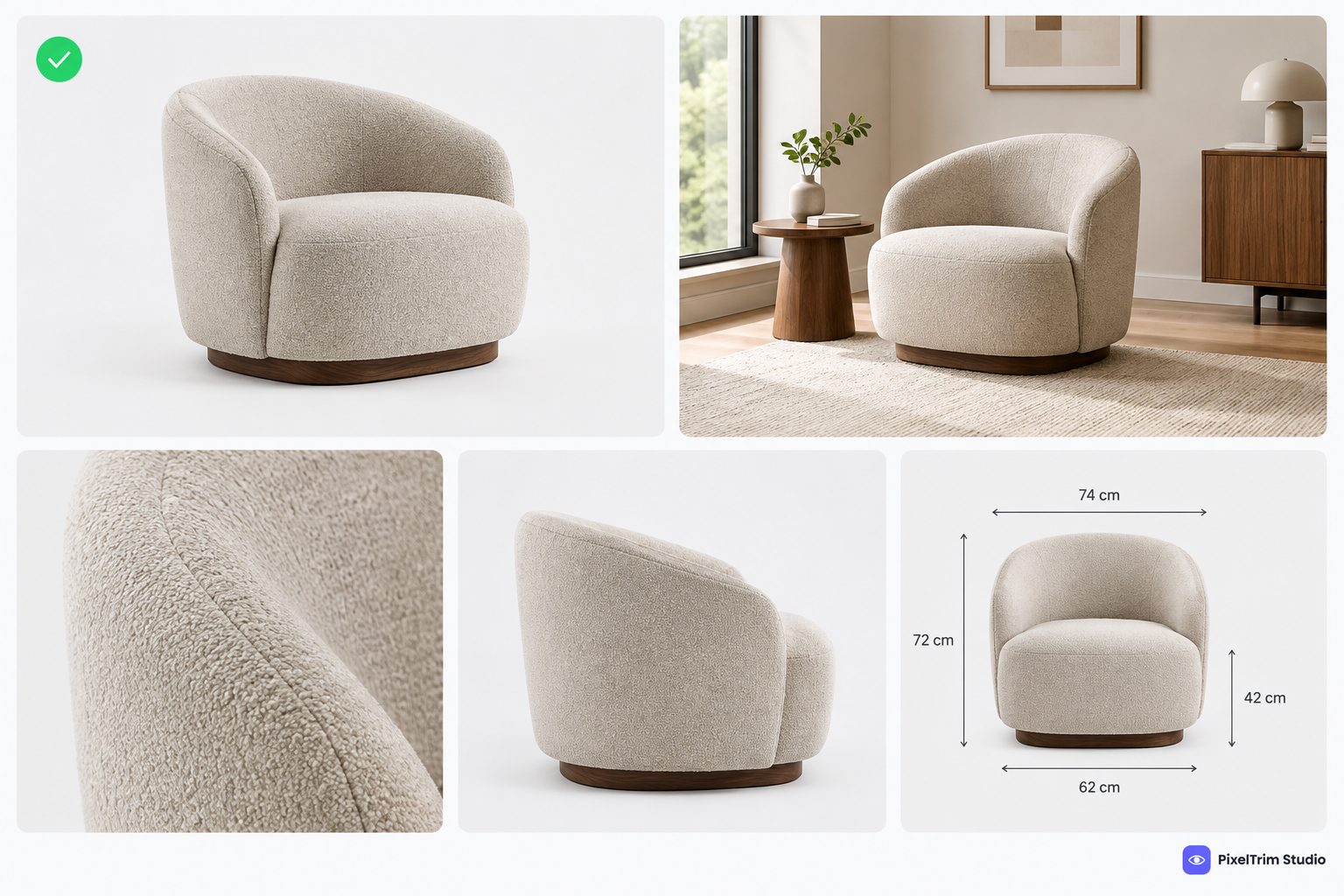
Wayfair's own supplier guidance groups product imagery into five types, and a listing with only one of them reads as thin compared to a fully-shot competitor:
- Single-Product Silhouette (Silo) — the product isolated, no background clutter. Your primary/hero-style shot.
- Zoomed-In Environmental — a close, in-context detail shot (fabric texture, hardware, joinery).
- Zoomed-Out Environmental — the product staged in a room setting, showing scale and style.
- Functional — the product doing what it does: a recliner reclined, a drawer open, a sofa bed unfolded.
- Dimensional — an image or overlay communicating size, often with measurements marked directly on the shot.
You don't need all five on every SKU, but Wayfair's guidance is clear that mixing silo and environmental shots — plus at least one functional or dimensional image where it applies — is what "brings the product to life" for an online furniture buyer who can't sit on it first.
Images Are Only Half the Onboarding Requirement
Wayfair's quick-view onboarding checklist ties image compliance directly to catalog readiness. Alongside 3+ images at 1,000×1,000px minimum, each product needs:
- Product name, model/manufacturer part number, and supplier part number
- Materials, product options, dimensions, and weight
- Carton dimensions and care instructions
- Wholesale cost and, where applicable, product warnings
An image batch that's technically spec-compliant but arrives without matching product data still stalls onboarding — Wayfair reviews the full SKU record together, not the photo in isolation.
Wayfair vs. Amazon, eBay, and Google Shopping
Sellers who already list furniture on other marketplaces are usually over-prepared on resolution and under-prepared on shot variety — Wayfair asks for fewer pixels than Amazon's recommended size, but more image types per listing than any of the platforms below:
| Platform | Minimum | Recommended | Shot-type guidance |
|---|---|---|---|
| Wayfair | 1,000 × 1,000 px | 2,000 × 2,000 px | 5 types: silo, environmental (in/out), functional, dimensional |
| Amazon | 1,000 px longest side | 2,000 px+ | Main image product-only; lifestyle/detail shots in secondary slots |
| eBay | 500 × 500 px | 1,600 × 1,600 px | No shot-type requirement |
| Google Shopping | 500 × 500 px | 1,500 × 1,500 px+ | No shot-type requirement |
See our Amazon image requirements guide and Google Shopping image requirements guide if you're cross-listing the same furniture catalog across platforms — the resolution floor is rarely the blocker once you've cleared Wayfair's, but the shot-type mix usually needs to be built specifically for Wayfair rather than reused wholesale.
Getting Furniture Photos Onboarding-Ready
Furniture photography has two editing needs that come up more than on smaller products: a clean isolated cutout for the silo shot, and a grounded shadow so the piece doesn't look like it's floating once it's cut out. A clipping path handles the isolation — pen-tool work holds up on straight furniture edges and upholstery seams in a way automated background removal often doesn't — and matching a natural or drop shadow underneath finishes the silo shot so it reads as a real product sitting on a real surface, not a cutout floating on white. Our shadow creation service guide covers which shadow type fits a silo vs. a staged room shot.
For sellers onboarding a full furniture line at once — dozens of SKUs, each needing 3-5 shot types — batch pricing matters more than per-image rates quoted for a single photo. Our product photo editing pricing guide breaks down how per-image costs scale once you're ordering in volume rather than one SKU at a time.
Need your furniture catalog edited and shot-type complete for Wayfair onboarding? Get a free sample edit from PixelTrim Studio and see the difference before committing to a full batch.
Frequently Asked Questions
What is the minimum image resolution for Wayfair supplier listings?
1,000 × 1,000 pixels is the minimum Wayfair requires for a product to be featured, though Wayfair's own guidance recommends 2,000 × 2,000 pixels to highlight product detail.
How many images does Wayfair require per product?
Wayfair's onboarding checklist asks for 3+ clear images per product. Wayfair's supplier imagery guidance separately notes at least two images to start, with more recommended to help a listing stand out.
What are the 5 types of product images Wayfair recommends?
Single-product silhouette (silo), zoomed-in environmental, zoomed-out environmental, functional, and dimensional. A mix of silo and environmental shots is Wayfair's stated recommendation, not just a single product-only image.
Do I need product specifications along with images to onboard on Wayfair?
Yes. Wayfair's onboarding checklist requires images and full product specifications together — name, model/manufacturer part number, materials, dimensions, weight, carton dimensions, care, and wholesale cost.
Can I reuse my Amazon or eBay furniture photos for Wayfair?
The hero/silo shot often transfers if it already meets 1,000×1,000px, but Amazon and eBay listings typically don't include the zoomed-environmental, functional, and dimensional shot types Wayfair specifically asks suppliers to provide.
Tags
Ready to get your images edited?
Upload 2 photos for a free trial edit — returned in under 24 hours.
Start free trial →