Furniture is one of the hardest product categories to edit well — large, irregular shapes, multiple materials (wood, metal, upholstery) in one shot, and buyers who zoom in on grain and stitching before they'll spend real money on a piece they can't sit on first. "Furniture photo editing service" searches keep climbing as more sellers list on Wayfair, Amazon, and Shopify at once, but most editing providers still price and describe the work like it's a plain product on a white background.
This guide breaks down what a proper furniture photo editing service should include, what it actually costs, and what to check before you commit a full catalog to a provider.
What's Included in a Furniture Photo Editing Service
Furniture editing isn't a single step — a complete service covers:
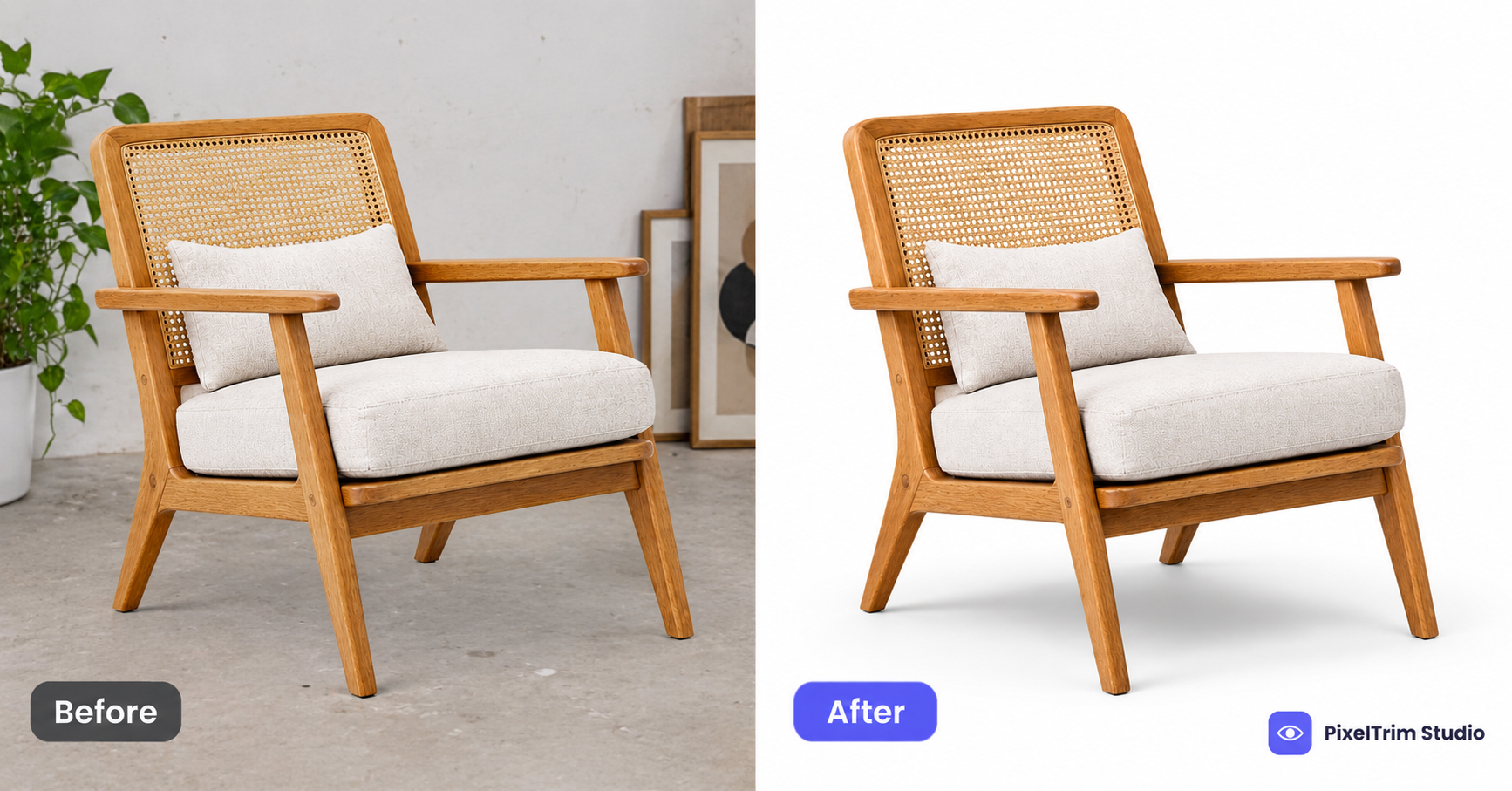
- Clean cutout / clipping path — the piece isolated from its background with a hand-drawn pen-tool path, holding up on straight edges, cushion seams, and open framework (a chair back, a shelf unit) where automated background removers tend to leave ragged edges or fill in gaps that should stay transparent.
- Grounded shadow — a natural or drop shadow added under the cut-out piece so it reads as sitting on a real surface instead of floating on white. Skipping this is the most common reason a furniture cutout looks obviously edited.
- Wood tone / fabric color correction — matching the piece's actual finish and upholstery color across every angle in a set, since lighting shifts between shots can make the same sofa look like two different colors.
- Batch consistency — the same background, shadow angle, and crop ratio applied across an entire SKU set, not just the hero shot.
- Marketplace-ready delivery — output sized and formatted to your platform's spec, since furniture is commonly cross-listed across Wayfair, Amazon, and Shopify with different image requirements for each. Our Wayfair supplier image requirements guide covers the shot types and resolution floor Wayfair specifically checks for onboarding.
A quote that only mentions "background removal" is usually missing the shadow and color-matching steps that make a furniture cutout look finished rather than pasted.
Furniture Photo Editing Pricing (2026 Rates)
Furniture editing is typically billed as clipping path plus shadow, priced by complexity rather than a flat per-image rate. Here's what PixelTrim Studio currently charges for each piece:
| Service | Tier | Price | Best For |
|---|---|---|---|
| Clipping path | Complex | $0.99/image | Furniture, intricate shapes or open framework (chair legs, shelving) |
| Clipping path | Medium | $0.69/image | Multi-part pieces without fine cutouts |
| Shadow creation | Natural | $0.89/image | Shape-matched shadow for a realistic silo shot |
| Shadow creation | Drop | $0.49/image | Fast, consistent catalog/grid shadow |
Standard turnaround is 24–48 hours regardless of batch size, with 1 free revision round included. Clipping path and shadow are usually ordered together and quoted at a combined rate rather than priced separately — ask for the bundle price before comparing quotes. For how furniture editing compares against other product categories, see our full product photo editing pricing guide and clipping path pricing guide.
What to Look For When Choosing a Provider
Price alone doesn't tell you whether a provider can actually handle a furniture catalog. Check for:
- A free sample edit on your own furniture photos, not a stock demo. Wood grain, upholstery texture, and open framework behave differently from a solid-shape product, and a sample tells you fast whether a provider can handle it.
- Manual editing, not AI-only. Automated cutout tools commonly struggle with chair legs, wicker, and other open or reflective shapes — see our manual vs AI photo editing comparison for where AI tools fall short on complex edges.
- Consistency across a full set, not just one hero shot. Ask to see a multi-angle sample of the same piece — mismatched shadow direction or color drift between angles is a common quality gap.
- Bulk workflow experience. A full furniture line can mean hundreds of SKUs at 3–5 angles each; our bulk product photo editing guide covers what to expect when ordering at that volume.
- Platform-spec awareness. A provider who doesn't ask which marketplace you're delivering to may hand back the wrong resolution or shot type for Wayfair, Amazon, or Shopify.
Common Red Flags
- A flat per-image rate that doesn't change between a simple side table and an open-frame chair
- No shadow step included or mentioned by default
- No sample or trial offer before a full batch commitment
- No question about which marketplace the images are going to
Get Started
Need your furniture catalog cut out, shadowed, and marketplace-ready? PixelTrim Studio's clipping path service and shadow creation service are 100% manual, priced by complexity, with a free 2-image trial before you commit to a batch. If you're onboarding a full line at once, contact PixelTrim Studio for a straightforward quote based on your actual pieces.
FAQ
What does a furniture photo editing service typically include?
A clean pen-tool cutout, a grounded natural or drop shadow, wood tone and fabric color matching across a set, and output delivered to your marketplace's exact image spec.
How much does furniture photo editing cost?
Furniture usually falls in the complex clipping path tier due to open framework and irregular shapes, typically around $0.99/image for the cutout plus $0.49–$0.89/image for shadow, often bundled at a combined rate.
Why does furniture cost more to edit than a simple product?
Open framework (chair legs, shelving), mixed materials in one shot, and large surface areas that show color and lighting inconsistency all take more manual editing time than a solid-shape product on a plain background.
Do I need shadow creation on every furniture image?
For any cutout on a white or colored background, yes — without it the piece looks like it's floating. Shadow is usually less critical on lifestyle/staged room shots where the piece already sits in a real environment.
Can I use the same edited images across Wayfair, Amazon, and Shopify?
The core cutout and color correction transfer, but resolution and shot-type requirements differ per platform — Wayfair specifically asks for a mix of silo and environmental shots that Amazon and Shopify listings don't typically require.
Tags
Ready to get your images edited?
Upload 2 photos for a free trial edit — returned in under 24 hours.
Start free trial →