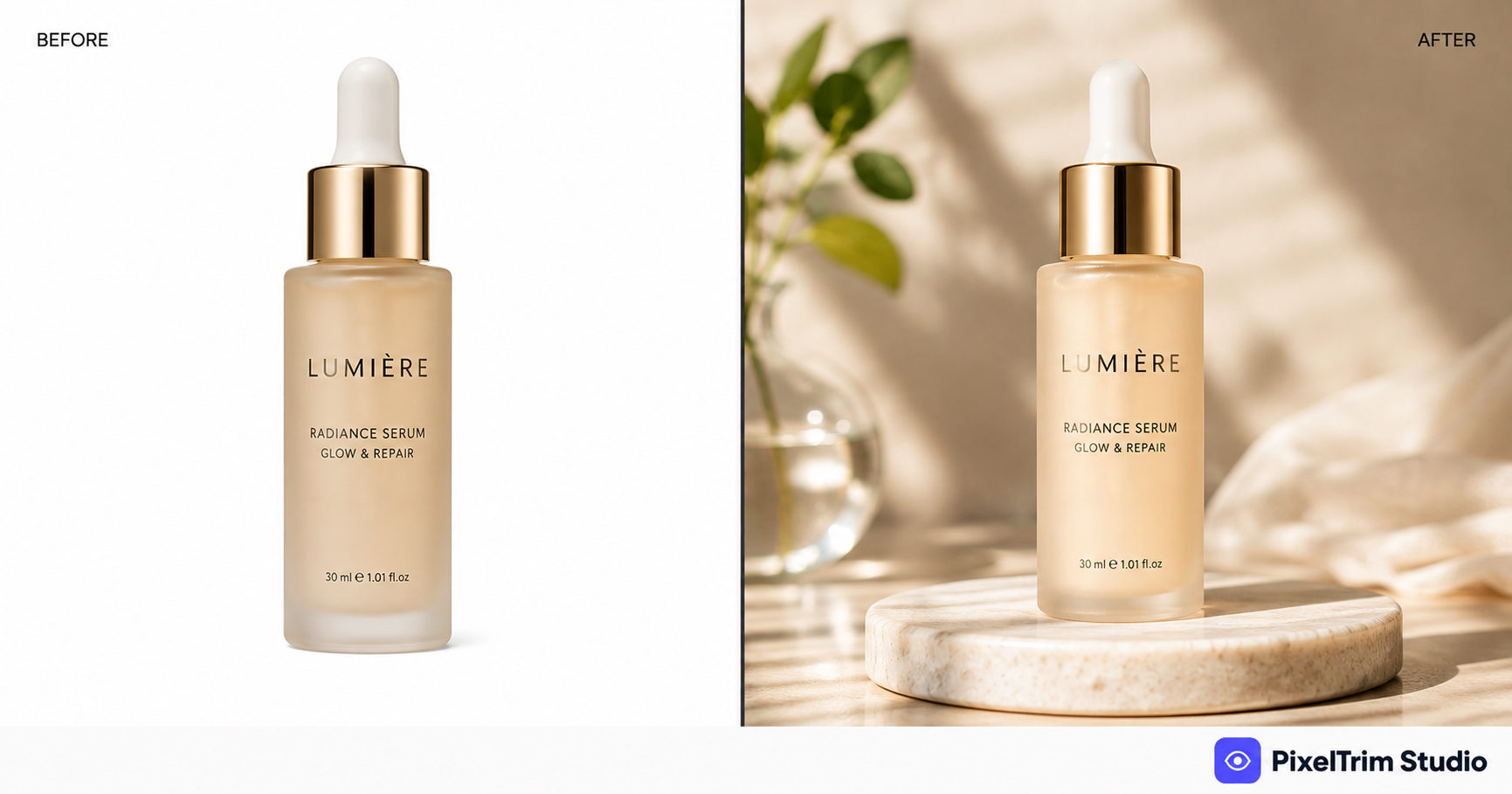
If a photo just needs a plain background removed, that's a clipping path job. But when you need a product placed into a new scene, an object erased from a shot, or a raw photo turned into a polished lifestyle image — that's image manipulation, a broader category of manual Photoshop work most sellers don't realize is a distinct service.
This guide covers what's actually included, how it differs from clipping path and masking, what it costs, and what to check before hiring a provider.
What Is Image Manipulation?
Image manipulation is manual editing that changes or combines elements within a photo — not just cutting a subject out, but building a new scene around it. That can mean compositing multiple source images into one, swapping a background for a lifestyle or studio setting, removing unwanted objects, or constructing a product mockup from flat artwork.
Where clipping path and masking are about isolating a subject, image manipulation is about reassembling the final image — matched lighting, matched shadows, and a result that looks like it was shot that way originally.
What's Included in an Image Manipulation Service
- Background replacement — subject cut and placed on a lifestyle, studio, or custom background with matched lighting
- Object removal — distractions, props, mannequins, watermarks, or logos cleaned out of the frame
- Composite work — multiple source photos merged into one seamless image (model composites, duplicated objects, rebuilt scenes)
- Mockup creation — flat artwork placed onto 3D product mockups or real product shots
- Creative advertising composites — campaign-ready images built from separate assets
Image Manipulation vs Clipping Path vs Image Masking
| Service | What it solves | Typical output |
|---|---|---|
| Clipping Path | Hard-edge background removal | Clean cutout, solid background |
| Image Masking | Hair, fur, fine/semi-transparent edges | Natural soft-edge cutout |
| Image Manipulation | Scene building, compositing, object removal | New, reassembled final image |
In practice, manipulation projects often start with a masking or clipping-path step first, then build outward from there — it's the "everything after the cutout" service.
Common Use Cases
- Amazon/Walmart lifestyle images from a plain product cutout — one of the most requested jobs, since marketplace A+ content and enhanced listings need in-scene product shots, not just white-background hero images
- Removing props, stands, or mannequins left in a shot
- Model composite shots built from multiple source photos
- Product packaging mockups from flat design files
- Brand campaign composites combining product + background + text-safe space
Manual vs AI for Image Manipulation
AI tools can generate a background or remove a small object, but composite work depends on matching light direction, color temperature, and shadow physics between elements shot at different times — something automated tools still get visibly wrong. This is the same reason manual editing consistently outperforms AI on anything beyond a flat cutout: a trained editor can rebuild a shadow or match a light source by eye, an algorithm is guessing.
What Does Image Manipulation Cost?
| Tier | Price | Includes |
|---|---|---|
| Simple | $2.99/image | Object removal or swap, simple background replacement, basic composite |
| Standard | $7.99/image | Multi-element composite, matched lighting, shadow & reflection added |
| Complex | From $19/image | Full scene construction, 3+ source images, layered PSD delivery |
Complexity swings the price more here than in almost any other editing category — a single object swap and a five-layer ad composite are both "image manipulation" but nowhere near the same job. For a full breakdown across editing types, see our Product Photo Editing Pricing Guide.
How to Choose a Provider
- Ask for a sample edit on your own product photo, not a generic portfolio piece — composite quality varies a lot between editors
- Confirm the work is manual, not an AI background generator with light retouching on top
- Check they deliver layered PSD files for complex jobs, in case you need future edits
- Get a clear turnaround time and revision policy before sending a full batch
Need a product composited into a lifestyle scene, or an object cleanly removed from a shot? PixelTrim Studio does 100% manual image manipulation — try 2 images free, no commitment.
See our Image Manipulation service →FAQ
What is image manipulation in photo editing?
Image manipulation is manual Photoshop work that changes or combines elements within a photo — background replacement, object removal, compositing multiple images, or building product mockups — rather than just isolating a subject from its background.
How is image manipulation different from clipping path or masking?
Clipping path and masking isolate a subject from its background. Image manipulation goes further, rebuilding the scene around that subject — new background, matched lighting, composited elements, or an entirely reconstructed image.
Can image manipulation create Amazon lifestyle images from product photos?
Yes — placing a cutout product onto a lifestyle background with correct scaling, lighting, and shadow is one of the most common image manipulation requests, often used for Amazon A+ content and enhanced marketplace listings.
How much does image manipulation cost?
Simple jobs like an object swap or basic background replacement start around $2.99 per image. Multi-element composites with matched lighting run about $7.99, and complex scene builds with 3+ source images start from $19 per image.
Is manual image manipulation better than AI tools?
For anything beyond a flat cutout, yes. Composite work depends on matching light direction, color temperature, and shadow physics between separately shot elements — a trained editor does this by eye, while AI tools still visibly struggle with it.
Tags
Ready to get your images edited?
Upload 2 photos for a free trial edit — returned in under 24 hours.
Start free trial →

