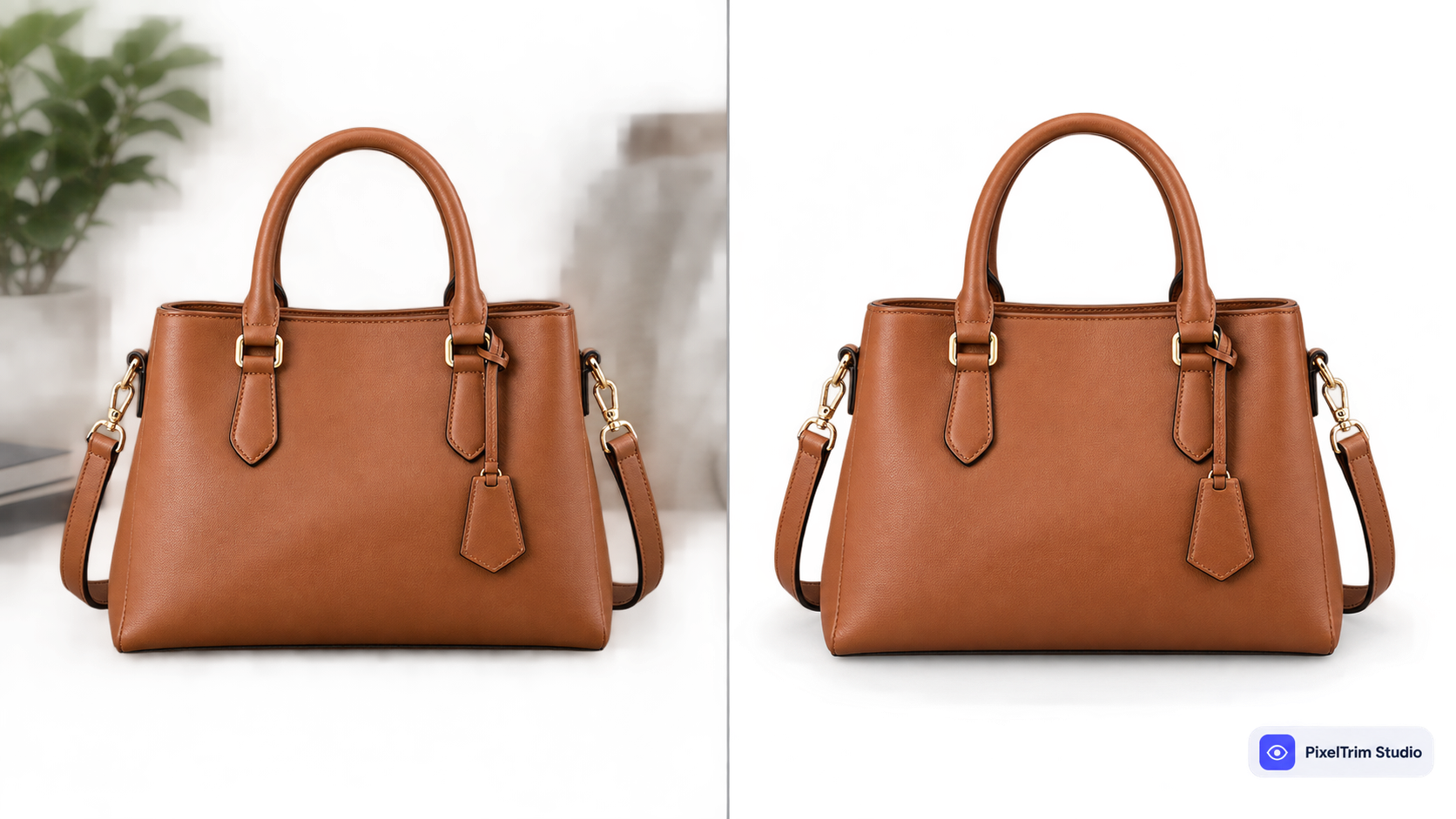
If you sell on Amazon, Shopify, or Etsy, you've probably needed a clipping path service at some point — even if you didn't call it that. Any time a product photo needs a clean, sharp edge cut away from its background, that's clipping path work. The question most sellers actually struggle with isn't what it is, it's what a fair quote looks like and how to pick a provider who won't hand back rough edges on a rush order.
This guide covers what's actually included in a clipping path service, real per-image pricing, manual vs AI, and what to check before you commit to a provider.
What a Clipping Path Service Actually Includes
A proper clipping path service isn't just "background removal" — it's a manual, pen-tool-based process that scales with how complex your product shape is. Most providers structure it around three tiers:
- Simple path — solid shapes with no holes: boxes, bottles, phone cases
- Medium path — products with a few holes or curves: shoes, bags with straps, handles
- Complex path — fine detail, multiple embedded paths, or transparency: jewelry, apparel with intricate trim, furniture with gaps
Beyond the cutout itself, a full-service provider usually also includes color correction, background replacement (pure white, transparent PNG, or a custom color), and file delivery in whatever format your marketplace needs. See our full breakdown of clipping path types if you're not sure which tier your products fall into, or start with What Is Clipping Path? for the fundamentals.
Who Actually Needs This
Clipping path services get used most by:
- Amazon, Shopify, and Etsy sellers who need a pure white background for main listing images
- Catalog photographers processing large, consistent SKU batches
- Fashion brands cutting out apparel for lookbook layouts
- Product studios that need the same shot reused across multiple backgrounds or campaigns
If your catalog has products with fur, hair, or mesh fabric instead of solid edges, clipping path may not be the right technique on its own — see Clipping Path vs Image Masking to check which one your photos actually need.
Manual vs AI Clipping Path
AI background removers are fast and often free, but they still struggle with the details that matter most for listing-ready photos — fine edges, reflective surfaces, and transparent or busy backgrounds where the product color is close to the background color. Manual, pen-tool clipping path stays accurate on exactly the cases where AI tends to leave halos or clipped detail.
For a full side-by-side comparison, see Manual Clipping Path vs AI Background Removal.
What Clipping Path Actually Costs
Pricing is per image and scales with complexity. Here's what real per-image pricing looks like:
| Tier | Typical Price | What's Included |
|---|---|---|
| Simple | $0.39 / image | 1–3 path shapes, plain product, solid edges, white or transparent background |
| Medium | $0.69 / image | Multi-part product, handles/straps/holes, color correction included |
| Complex | $0.99 / image | Intricate shapes or holes (jewelry, footwear, furniture), layered PSD on request |
Most providers offer volume discounts once you're ordering in batches of 50-100+ images. For a deeper breakdown of what drives the price up or down — turnaround time, file requirements, in-house vs freelancer vs agency — see our full Clipping Path Pricing Guide. If your catalog has products needing more than one path per image, check Multi Clipping Path Service for how that affects pricing.
How to Choose a Clipping Path Provider
- Ask for a free trial or sample edit — a confident provider will happily edit 1-2 of your actual images before you commit to a batch
- Confirm it's manual, not an AI filter pass — ask directly whether pen-tool paths are used, especially for complex products
- Check the complexity tiers in writing — a vague flat rate across different product types is a common source of billing surprises later
- Ask about revisions — at least one free revision round protects you if the first cut needs a tweak
- Confirm turnaround time — 24-48 hours is standard; rushed complex work tends to show rough edges
- Check bulk-order capacity — if you're processing hundreds of SKUs, confirm the team can actually handle your volume without quality slipping
FAQ
What does a clipping path service include?
A manual, pen-tool cutout of your product from its background, tiered by complexity (simple, medium, complex), plus color correction and delivery in your required format. It does not typically include retouching skin or surface detail — that's a separate retouching service.
How much does clipping path cost per image?
Real pricing runs from around $0.39/image for simple shapes up to $0.99/image for complex products like jewelry or footwear, with volume discounts common at higher batch sizes.
Is clipping path better than AI background removal?
For products with fine detail, reflective surfaces, or transparency, manual clipping path generally produces cleaner, more consistent results than automated tools, which is why most professional sellers still rely on it for listing-ready images.
How do I choose a reliable clipping path provider?
Ask for a free trial or sample edit, confirm the work is manual rather than AI, get complexity-tier pricing in writing, and clarify the revision policy and turnaround time before committing to a full batch.
Do I need clipping path or image masking?
If your product has solid, well-defined edges, you need clipping path. If it has hair, fur, mesh, or soft transparent edges, you need masking instead — many catalogs actually need both, applied to different products.
Need clean, professional clipping path editing for your product catalog? See our Clipping Path service — 100% manual, 24–48h turnaround, 1 free revision included. Or get a free quote for your next batch.
Tags
Ready to get your images edited?
Upload 2 photos for a free trial edit — returned in under 24 hours.
Start free trial →

