If you sell fashion, accessories, or anything with hair, fur, mesh, or fine transparent edges, you've probably tried an AI background remover on at least one product photo. They're fast, often free, and the marketing promises a clean cutout in seconds. But hair and fine-edge detail is exactly where these tools tend to fall apart — so does AI masking actually hold up, or are you still going to need a human editor before that image goes live?
We've covered the technique itself in What Is Image Masking? and how it differs from clipping path in Clipping Path vs Image Masking — this guide focuses on manual editing versus AI tools specifically for masking work.
What Is Image Masking (Quick Recap)
Image masking works at the pixel level instead of drawing a hard vector line. It's built for subjects where the edge isn't clean or solid — hair, fur, semi-transparent fabric, mesh, glass, smoke, and fine jewelry chains — capturing gradual transitions in opacity that a clipping path simply can't trace.
What Are AI Masking Tools?
AI masking (and AI background removal) tools use machine learning models trained to detect edges and subject boundaries automatically, generating a mask in seconds without a human tracing a single pixel by hand. For a subject with a simple silhouette and high contrast against the background, the result can look surprisingly usable straight out of the tool.
Where AI Masking Tools Fall Short
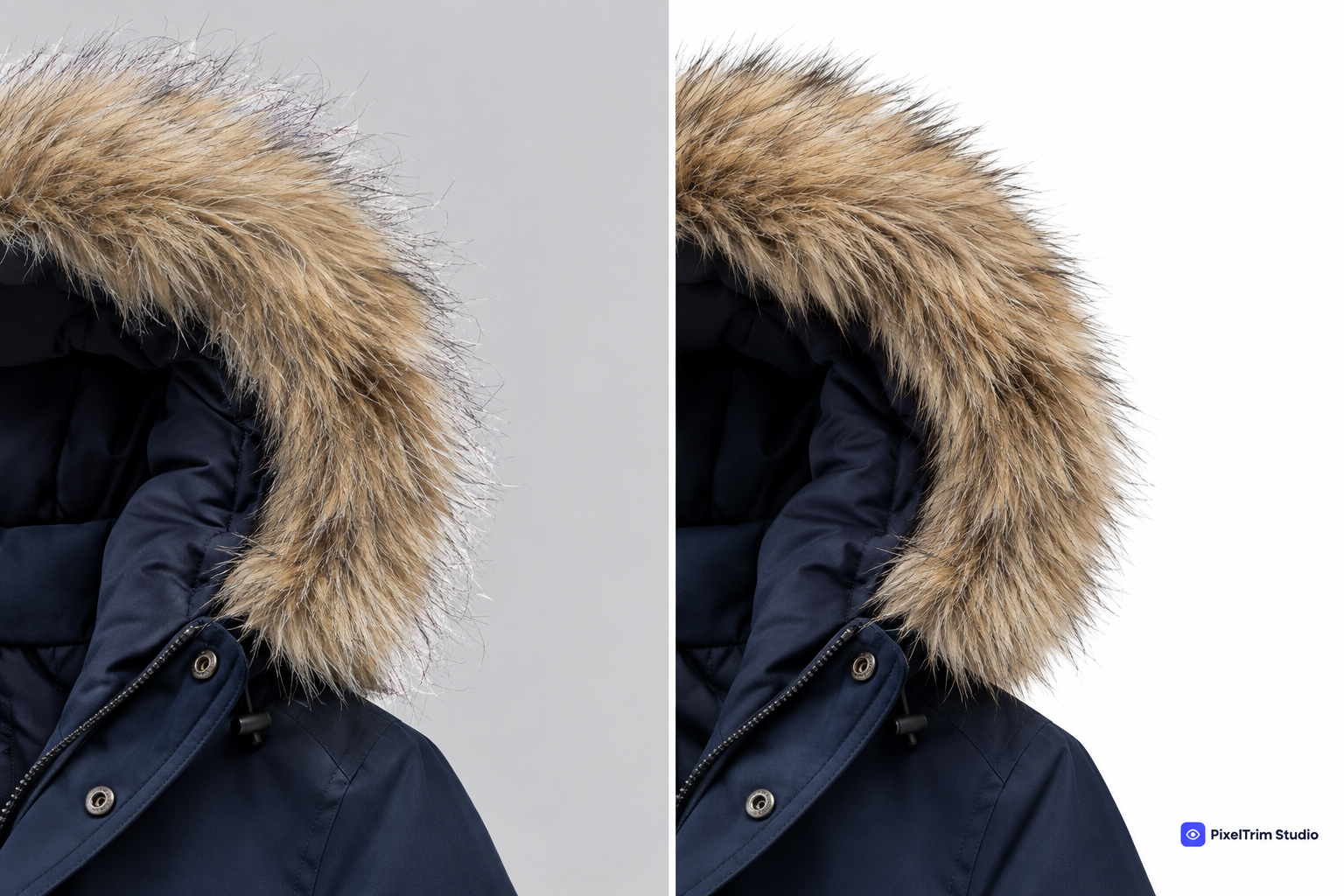
- Fine flyaway hair and fur — this is the single hardest case for AI masking. Individual strands often get merged into a blurred edge, chopped off entirely, or left with visible haloing where the old background still shows through.
- Semi-transparent fabric and mesh — veils, tulle, sheer sleeves, and lace need the mask to preserve partial opacity. AI tools frequently treat these edges as fully opaque or fully transparent, losing the natural see-through effect.
- Fine jewelry chains and metalwork — thin chain links and intricate prongs are easy for an automated model to lose or fuse together, especially against a busy or reflective background.
- Color contamination at the edge — background color often "bleeds" into the last few pixels of hair or fabric. Manual editors correct this by hand; most AI tools leave it untouched.
- Consistency across a catalog — one image masks cleanly, the next from the same shoot has a chewed-up edge or a stray halo, which is hard to catch at scale without a person reviewing every file.
Where AI Masking Tools Actually Work Fine
For simple product shapes with minimal fine detail — a solid handbag, a mug, a shoe with a clean outline — AI masking can be a reasonable shortcut, and in those cases a straightforward clipping path may be all you need anyway. For internal previews, quick social content, or early-stage mockups where pixel-perfect edges don't matter yet, AI tools can save real time.
Why Manual Masking Still Wins for Listings
Marketplace and storefront photos live or die on how natural the edge looks up close. Manual masking delivers:
- Strand-by-strand accuracy on hair, fur, and flyaways instead of a smoothed-over approximation
- True partial-opacity handling on sheer fabric, veils, and mesh
- Clean, halo-free edges even against busy or low-contrast backgrounds
- Consistent quality across an entire catalog, checked image by image rather than batch-processed blind
Cost and Speed: The Honest Trade-off
AI masking tools are near-instant and cheap — many are free for basic use. Manual masking costs more and takes longer because a trained editor is tracing fine detail by hand rather than letting a model guess. At PixelTrim Studio, manual image masking currently runs $0.59 for simple edges, $1.29 for medium complexity, and $2.49 for complex hair, fur, or fine mesh work, with a 24–48 hour turnaround and one free revision included — see current rates on our image masking service page. For how that compares across other editing services, see our product photo editing pricing guide.
Which Should You Choose?
A simple rule of thumb: zoom into the edge of your subject. If it's hair, fur, mesh, or any fine, irregular detail that's going live on a listing a shopper will study closely, go manual — the strand-level accuracy is too easy to get wrong with AI alone. If it's a quick internal draft or a simple solid-shape product, AI is fine, and a clipping path might even be the better fit. Many sellers use both: AI for fast previews, manual masking for the final, publish-ready image — the same pattern we see play out in ghost mannequin editing and vector tracing too.
Not sure what your catalog needs? See our image masking service or read the broader manual vs AI photo editing comparison for other techniques.
Frequently Asked Questions
Can AI masking tools handle fine hair and fur on their own?
Usually not reliably. Individual strands are the hardest case for automated models, and results often show blurred edges, chopped-off flyaways, or a visible halo where the old background still shows through.
Is AI masking good enough for Amazon, Etsy, or Shopify listings?
For subjects with fine detail — hair, fur, mesh, sheer fabric — usually not on its own. These platforms reward clean, professional listings, and edge artifacts are easy for shoppers to notice on zoom.
What kind of images benefit most from manual masking?
Fashion and beauty product shots with hair or fur, veils and sheer fabric, fine jewelry chains, and anything photographed against a busy or low-contrast background benefit most — exactly where AI tools tend to struggle.
Can manual and AI masking be combined?
Yes. Many sellers use AI tools for quick internal previews or early mockups, then move to manual masking for the final, listing-ready images.
How much does manual image masking cost?
At PixelTrim Studio, manual image masking starts at $0.59 for simple edges, $1.29 for medium complexity, and $2.49 for complex hair, fur, or fine mesh work, with 24–48 hour turnaround and one free revision.
Want to see the difference on your own product photos? Get a free sample edit from our team and compare it yourself.
Tags
Ready to get your images edited?
Upload 2 photos for a free trial edit — returned in under 24 hours.
Start free trial →